New Cumulative Updates for NAV 2015, 2013R2 and 2013

Today, Microsoft has released new cumulative updates for Microsoft Dynamics:

  • NAV 2015 (CU 12 – Build 42951)
  • NAV 2013 R2 (CU 24 – Build 42950)
  • NAV 2013 (CU 31 – Build 42948)

All of them include all application and platform hotfixes and regulatory features that have been released for these NAV versions.

With these cumulative updates, Microsoft Dynamics NAV 2015, 2013R2 and 2013 are fully compatible with Windows 10 and Office 2016.

You can download CU 12 for NAV 2015 here. CU 24 for NAV 2013 R2 can be downloaded here and CU 31 for NAV 2013 from here.

NAV2013 & NAV2013R2 Cumulative Updates Have Been Released

About an hour ago, Microsoft has published new Cumulative Updates for Microsoft Dynamics NAV 2013 and NAV 2013 R2. These are Cumulative Update 23 for NAV 2013 R2 and Cumulative Update 30 for NAV 2013. You can find both of Application and Platform Hotfixes, and Local Application Hotfixes as well.

You can find them as Build 42610 for NAV 2013 R2 and as Build 42591 for NAV 2013.

NAV and Windows 10 again

Month ago, I’ve wrote about using of Microsoft Dynamics NAV on Windows 10. I tested NAV ‘Corfu’ CTPs on Windows 10 prerelease versions. By my opinion future release NAV 2016 will works excellent on Windows 10. Today, Microsoft officially publish the same information, NAV 2016 is compatible with Windows 10. In the same article, we can see that older NAV versions have some problems on Windows 10, but by my opinion not big. You can find more about it in my older post, but Microsoft says it will be corrected in cumulative updates in October, but only for NAV 2015, NAV 2013 R2 and NAV 2013.

New Cumulative Updates for NAV 2015 and NAV 2013R2

CU 10 for Microsoft Dynamics NAV 2015 and CU 22 for Microsoft Dynamics NAV 2013 R2 have been released today, few hours ago. They include the most of application area and very useful platform hotfixes and regulatory features that have been for Microsoft Dynamics NAV 2015 and NAV 2013 R2.

You can download Cumulative Update 10 for Microsoft Dynamics NAV 2015 from here. This CU is named as Build 42222. Also, you can download Cumulative Update 22 for Microsoft Dynamics NAV 2013 R2 from here. This CU is named as Build 42221.

Which NAV versions can run on Windows 10

Today is the big day for Windows 10. As of today, Windows 10 is officially released and available for download. This is about Windows, but where is Microsoft Dynamics NAV here?

Last few months I have tested NAV 2016 (in the beginning it was NAV ‘Corfu’) on Windows 10. Everything works perfect and you will see it very soon (in few following months) if you are not part of TAP or ACE program.

But, I didn’t test older NAV versions but it is very interesting and very important topic. But, my fellow blogger and NAV MVP Erik Hougaard has already tested it and wrote awesome blog post. You will see that the oldest NAV version available on Windows 10 is NAV 5.0, similar as Windows 8 and 7. But, I’m advising you to read complete post and you will for surely enjoy it. Thank you Erik, really good analysis.

New Cumulative Updates for NAV2013R2 (CU21) and NAV2013 (CU28)

Two days after publishing of the newest Cumulative Update for Microsoft Dynamics NAV 2015, Microsoft has published new Cumulative Updates for two older versions NAV 2013 and NAV 2013 R2, as well. There are:

CUs

You can download them from previous links. These CUs are named as Build 41768 (NAV 2013 R2) and Build 41767 (NAV 2013). You can see that these CUs have both Platform and Application hotfixes. The most of Application hotfixes are for NAV 2013 R2 and only three of them for NAV 2013.

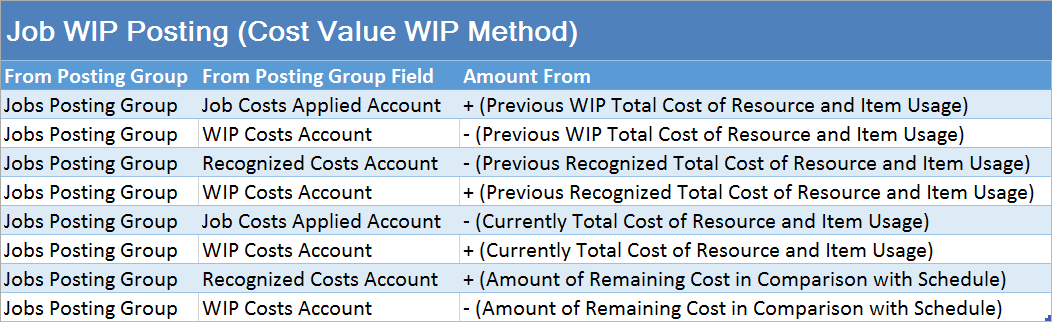
Posting Groups #25 – Job WIP Posting (3 – Cost Value)

In one of my previous posts, I have already described how you can post Job WIP entries if you use Cost Value as recognized cost in WIP posting method. But, it was only part of posting when you calculate Job WIP for the first time. But if you have already posted Job WIP entries and want to post WIP, again after new usage posting (as Contract).

In this situation, system first need to post correction of previous Job WIP entries and that post new entries. You can see how there G/L entries look like on following table:

Job WIP Posting 3a

When we speak about “Remaining Cost in Comparison with Schedule”, we already think about relation between Contract usage posting and values as Schedule.

Posting Groups #24 – Job WIP Posting (2)

If you have the same example as in previous post, but with using different methods of WIP posting (e.g. Completed Contract, Cost of Sales or Contract-Invoiced Cost), you will get the some different results. To repeat, my example was only posted usage of resources and items, without invoicing. System calculates WIP for all Resource and Item usage, based on Unit Cost and consumed Quantity. Result of this posting is following:

Job WIP Posting 2

How to Upgrade NAV

Today, Microsoft has published new article about best practices and tips and tricks in upgrading process when you want to upgrade your solution to NAV2013R2 or NAV2015. After this first part about this topic, Microsoft already publish a second part with the same topic.The main reason why to read this article is because, the Classic Client is no longer supported by Microsoft. Now, it is the right time to make upgrade of your old NAV version.

Anyway, you can find awesome articles about this upgrade process here on MSDN Blog and part 2, as well. I recommend these articles.

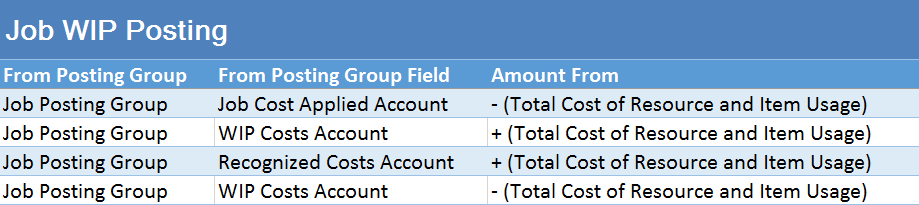
Posting Groups #23 – Job WIP Posting (1)

As the most of projects are jobs performing usually several months (or several years), WIP calculation is very important part of Job Management. From NAV 2013, we have new functionality for WIP calculation in Jobs – the WIP cockpit. I already described how this feature works in my older post and now, I want to show you results of WIP posting in G/L Entry.

When you want to post WIP to G/L, system will use only Jobs Posting Groups for determining what account need to use. Considering, there are not only one method of WIP posting, it means system doesn’t post results on the same way every time.

In this first example, I have used following WIP posting methods as recognized costs: Cost Value and Usage (Total Cost). Results for these two methods are the same.

System calculates WIP for all Resource and Item usage, based on Unit Cost and consumed Quantity. Result of this posting is following:

Job WIP Posting 1