Every March and every September for the last few years, my routine has been the same. Microsoft publishes the release plan, I download the PDF, I filter Release Planner down to Sales, Customer Service, Customer Insights, and Power Platform, and I build the “What’s New” deck that I present to partners each month. That routine ended on 25 August 2026, when Microsoft announced there would be no 2026 release wave 2 plan — not delayed, not renamed, just none.
This post is what I found when I sat down to rebuild my workflow, including the parts that broke and the parts I actually like better.
What Microsoft announced
The short version, from the official announcement by Richard Riley (GM, Agents and Low Code):
- The twice-yearly release wave model is retired. Starting September 2026, new Dynamics 365, Power Platform, and Dataverse capabilities are published continuously, as soon as Microsoft commits to them, rather than being held for an April or October announcement.
- Everything moves to the AI at Work roadmap (the site formerly known as the Microsoft 365 roadmap) at aka.ms/AIatWorkroadmap. Dynamics 365, Power Platform, Dataverse, Microsoft 365, and Copilot roadmap items now live in one place.
- Each item has a lifecycle: In Development → Rolling Out → Launched. The item stays on the roadmap and gets updated as it progresses, instead of disappearing after publication like release plan entries did.
- Release plans on Microsoft Learn stop being published from September 2026. The old ones stay online for historical reference.
- Release Planner retires by 15 November 2026.
- Only roadmap content with a public preview or GA date of 1 June 2026 or later migrates to the new roadmap. Anything older stays in the archived release plans.
- Saved views in “My Release Plans” do not carry over. The AI at Work roadmap has no personalised saved views at all.
The two things that are explicitly not changing: product release schedules stay as they are, and Message Center remains the place for tenant-specific change notifications.
What broke for me
I’ll be honest about the friction, because most coverage of this change reads like a press release.
- My saved filters are gone. I had a curated view in Release Planner covering exactly the apps I present on. That’s dead by mid-November, and there is no equivalent. The workaround is a bookmarked URL with the filters baked in, plus an RSS subscription to that filtered view. It works, but it’s a step backwards for anyone who maintained several views.
- No more “the plan” as a document. Partners loved being able to say “it’s in the wave 2 plan” and point at a PDF. That artefact no longer exists. The replacement is a CSV export of a filtered roadmap view, which is fine for planning spreadsheets but not something you hand to a customer.
- The historical split is awkward. For the next few months, I’m working from two sources: archived release plans for anything that shipped before June 2026, and the AI at Work roadmap for anything after. If a partner asks “when did feature X go GA”, I need to know which side of the line it falls on.
- Bookmarks and internal docs. Every “see release plan” link in our internal partner documentation now needs updating. Small job, but it has to be done before November.
What I actually like
Continuous disclosure is better for support. Under the wave model, a feature that Microsoft committed to in May might not be publicly disclosed until the September plan. Partners would open tickets about behaviour that was already planned to change, and I couldn’t tell them. Now I can point to a roadmap item the moment it’s committed.
The lifecycle status is useful. Release plans told you a target date and then went silent. The new roadmap tells you whether something is still in development, actively rolling out, or launched — and updates that status. For a support role, that’s the question I’m actually asked most: “Is it live in my region yet?”
Feature IDs are searchable and shareable. Every item has an ID, and you can link directly to it. That’s exactly what I want to put in a ticket response.
The part nobody is talking about: querying the roadmap from your own tools
This is the piece I think is the most interesting and the least covered. Microsoft has published a Release Communications MCP Server that exposes the AI at Work roadmap (and Azure Updates) to any MCP-compatible AI client. No authentication, no licence, free to use.
The endpoint is:
https://www.microsoft.com/releasecommunications/mcp
Standard configuration for most clients:
{ "servers": { "MRC-MCP-Server": { "type": "http", "url": "https://www.microsoft.com/releasecommunications/mcp" } }}
It exposes four tools: get_recent_roadmaps, get_roadmap_by_id, get_recent_azure_updates and get_azure_update_by_id. The roadmap tools support OData-style filtering by product, platform, release ring, cloud instance, status, and dates, plus text search on titles. Data refreshes daily.
Documented clients include VS Code, Visual Studio, GitHub Copilot CLI, Claude Desktop, Claude Code, Cursor, and Codex. It’s also a plain remote MCP server, so it can be added as a tool in a Copilot Studio agent.
Why this matters for my monthly webinar: instead of manually scrolling a filtered web page, I can ask, “list all Dynamics 365 Sales and Customer Insights roadmap items updated in the last 30 days with status Rolling Out” and get the raw material for the deck. That’s my old Release Planner filter, except it answers questions.
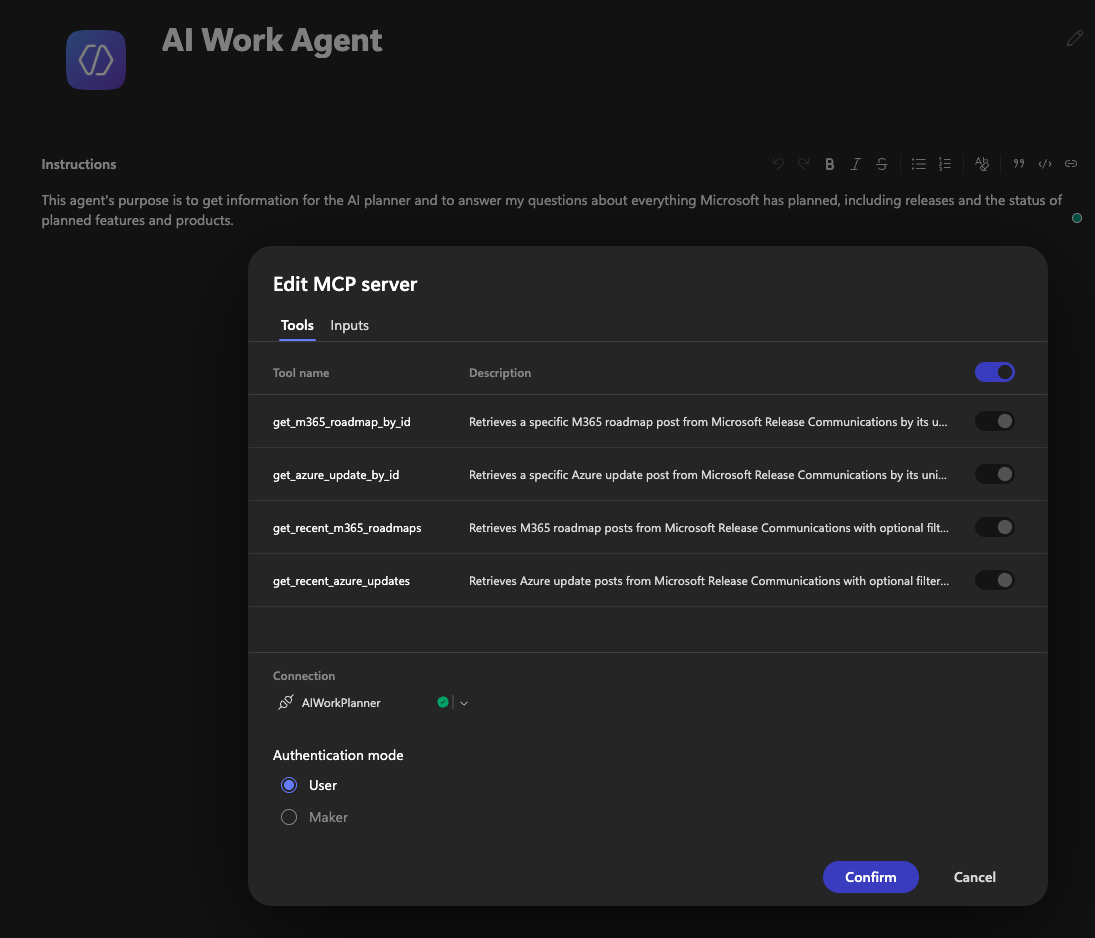
One practical note from the docs: AI clients sometimes don’t invoke the MCP tools unless you’re explicit. Mention “AI at Work roadmap” in the prompt, and don’t mix Azure and Microsoft 365 questions in the same request.
My new workflow
Here’s what I’ve set up to replace the wave routine:
- One filtered roadmap URL for the products I cover, bookmarked, with the RSS feed for that view added to my reader.
- A monthly review on the first working day of each month — pulling the last 30 days of changes, which becomes the webinar content. Microsoft itself recommends a monthly or quarterly rhythm to replace the wave cadence; monthly matches what I already do.
- The MCP server connected to my AI client for ad-hoc partner questions and for generating the first draft of the update list.
- Message Center still checked for tenant-specific rollout notices — the roadmap tells you what’s coming. Message Center tells you when it hits your environment.
- Archived release plan links kept for anything pre-June 2026.


