Posting Groups Feedback

I have to share with you one feedback about my Posting Groups series. I have got this mail yesterday from one guy I really appreciate:

“I really appreciate your blog posts about the posting setups. I even took printout of them and posted in our Dynamics Team room wall (Hope you ok with it). It will be really good reading material for our new team members.”

I am really happy if my posts help to someone in his daily work :).

IMG_2495

Posting Groups #14 – Payment Discounts

One of features in Microsoft Dynamics NAV is using of payment discount. You can configure conditions of using this functionality on General Ledger Setup. With this configuration, I mean on Appln. Rounding Precision and Payment Tolerance and types of Payment Accounts from Customer Posting Groups. More about this configuration, you can find using Help for these fields.

We can use payment tolerances and discounts in few different situations. You can see how it generally works on following flowchart:

##1

In my first example, I have configured only payment tolerance without discounts. When we post payment some less from original amount on invoice (e.g. 2.395 instead 2.400), we will get following G/L entries:

##2

If our payment is greater than Invoice Amount reduced by discount, we will get following entries. System will post full payment as original invoice amount plus tolerance and discount, as well:

##3

If payment is less than Invoice Amount reduced by discount, we will get following entries. System will post full payment as original invoice amount, discount and tolerance:

##4

Posting Groups #13 – Finance Charge and Reminders

When we have overdue sales invoices, we usually can use Reminders and/or Finance Charge Memos. Both of these documents increases debits of our customers. We don’t post these documents, but we issue them. But, these issued documents also can make G/L entries.

On the first flowchart, you can see how system uses posting groups on Finance Charge Memos.

FWC_FinChargeMemo

Results of this issued document in G/L entries are as following:

FinChargeMemo

Now, on the second flowchart, you can see how system uses posting groups on Reminder. It uses very similar as on Finance Charge Memos, but fees on Finance Charge Memos lines are based only on Terms, while fees on Reminders can be based on Terms and Levels.

FWC_Reminders

Results of Issued Reminders in G/L entries are as following:

Reminders

Posting Groups #12 – Payment Posting

When we post payments, we usually have payments for customers and from vendors. In the same time, we should have bank account posting as balance accounts. Bank account is not necessary, but it is the best practice.

When we post payments from bank statement, we will get the same G/L entries, regardless we have payment in local currency or in some other. These are entries as following:

1PaymStat

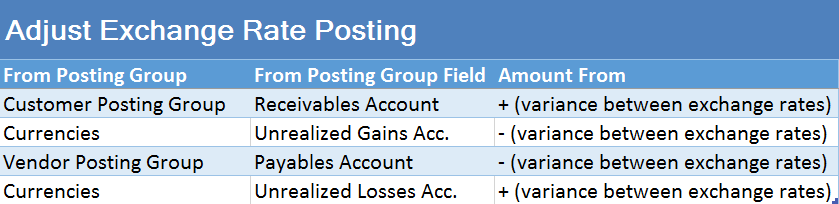
If we use non-local currency in payment process, after running Adjust Exchange Rate batch job, we will get the following G/L entries:

2PaymAdjustER

In previous example, you could see result if used currency exchange rate was increased. But, if exchange rate was decreased, the posting results in G/L entries would be as following:

3PaymAdjustER

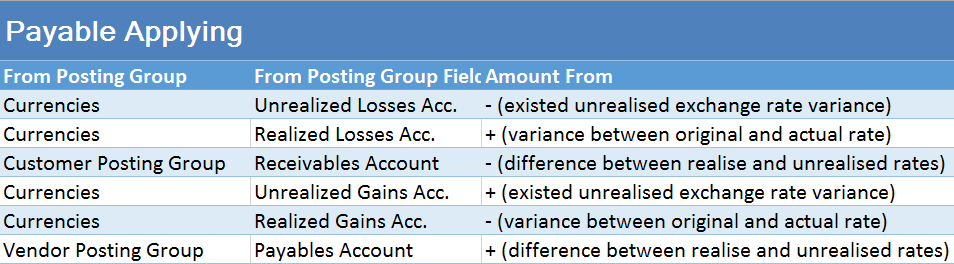
All previous results were unrealized exchange rates gains or losses, but when we apply these payments, we will get realized exchange rates as on following table:

4PaymApply

All postings, based on difference currency code, use posting groups and accounts as on following flow chart:

AdjFlowChart

Posting Groups #11 – Prepayments Posting

Before I start with this post, I want to emphasize once again, in all my examples I use W1 database. I know that prepayments can be quite differently from country to country, but I have used only W1 examples here.

Now, when this is clear, we can continue with examples. First, I will describe purchase prepayment invoice. When we choose to create Prepayment Invoice from Purchase order, system will post document with G/L Account in line (from General Posting Setup) and with following G/L entries:

PPPI

The similar situation is when we create and post sales prepayment invoice. Then, we will get these G/L entries:

PSPI

If we want to post Prepayment Credit Memo, in both cases, we will get the same entries, but with opposite signs.

Posting Groups #10 – Item Returns Posting (Sale & Purchase)

In my earl posts about posting groups, I have showed purchase and sales processes. But both of these processes have its opposite processes.

If our customer wants to return items to us, we can use the Sales Return Order for this. When we finish posting, we will get Return Receipt and Sales Credit Memo as result.

On other side, if we want to return items to our vendor, we can use the Purchase Return Order for this. As result of posting, we will get Return Shipment and Purchase Credit Memo.

I will not prepare flow chart about using posting groups, because we can use the same schemas as we already have in Item Sale Posting and Item Purchase Posting posts.

First, I will describe sales return process. When we post Return Receipt, we will get only these G/L Entries:

##1

But, when we finish posting and post Sales Credit Memo, we will get more G/L Entries:
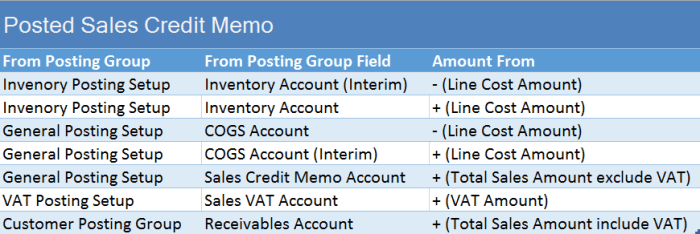
##2

The similar situation is in purchase return process. When we post Return Shipment, we will get again only these G/L Entries:

##3

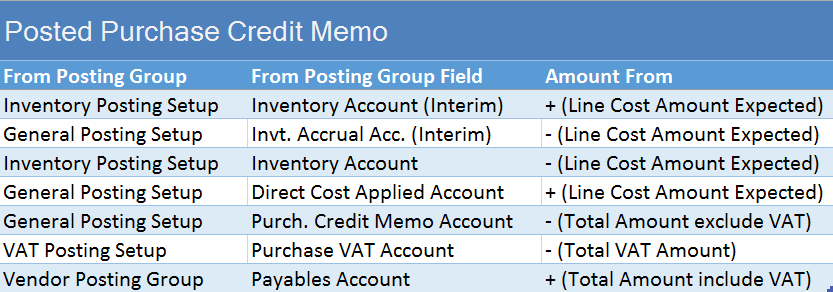
But, when we post Purchase Credit Memo for this item, we will get more G/L Entries:
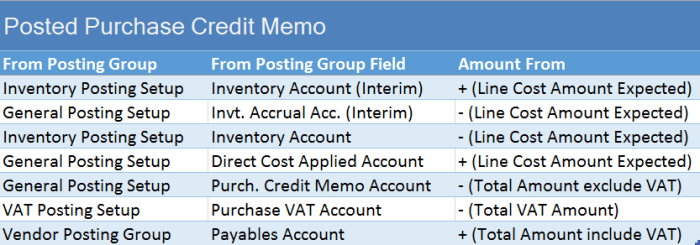
##4

And, on the end when we run Adjust Cost – Item Entries batch job, we will get the following G/L Entries (variance between expected and actual cost):

##5

Posting Groups #9 –Item Sale Posting with Payment Method

I have already showed item sale process posting here in Posting Group #2 post. But, we can have some specific variants of this posting. One of them is when we use Payment Method.

If you choose Payment Method code on sales document header, and this Payment Method has configured Bal. Account Type and Bal. Account No., NAV will automatically create the balancing journal line. This functionality is great when we are being paid in full at the time of sale, but we can use this feature in some other specific process.

You can see how system works with Payment Method on following flow-chart:

SalesPMC

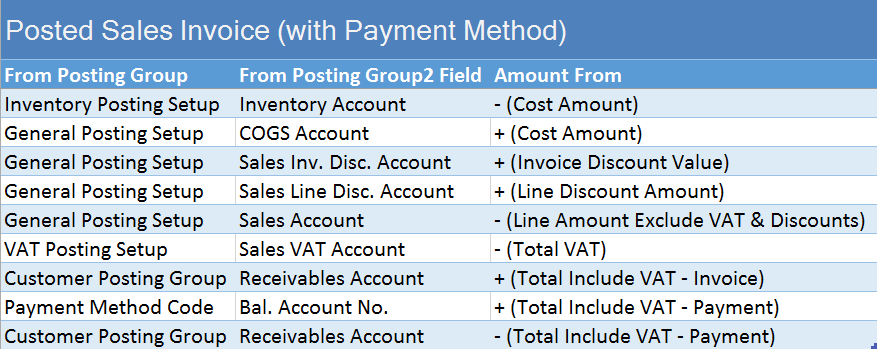
When we finish with this Sales Order posting, we can find following G/L entries navigated to Posted Sales Invoice. You can see standard G/L entries about invoice and the last two of them, connected with Payment:

SI_PyM_GLe

Posting Groups #8 – Revaluation Posting

In my last post, I have touched Revaluation process, but only for Standard cost changing. We can use Revaluation for other cases, as well.

If we change cost only for items on stock, it will be the same situation as on previous example. But, if we want to change cost for already sold or consumed stock, it will be with some differences. First, when we change the cost, we will get the same entries, as I already show in previous post. But, when we run Adjust Cost – Item Entries batch job, we will get the new G/L entries.

I made three scenarios:

In the first scenario, I have raw material with FIFO cost type. I consume this raw material on production order to produce finish goods, configured as also FIFO cost type. In this case, result of posting in G/L entry will be as following:

RevPOfifo

In the second scenario, everything was the same, but only finish goods was configured as Standard cost type. In this case, result of posting in G/L entry will be a bit different, as following example:

RevPOstd

And, in the third scenario, I change the cost on already sold items. In this scenario, G/L entries will be as following:

RevSO

Posting Groups #7 – Change Standard Cost

If you use Standard cost type for your Items and you want to change it, you need to use Standard Cost Worksheet. When you run Implement Standard Cost Changes command, all changes will be moved to Revaluation Journal.

When you post Revaluation Journal, you will get following G/L entries, if you have cost increasing:

std_rev_1

If you have cost decreasing, you will get the same Accounts, but the different values, as following:

std_rev_2

Posting Groups #6 – Manufacturing Posting (Std. Cost Type)

In my previous post, I describe all G/L posting results when we do with production, but using FIFO costing method. It this new example, I will describe results of posting when we have finish goods with Costing Method configured as Standard.

In this case, we use the same flow chart for posting groups, as I have described in my previous post.

In this example, when we post consumption and output, we will get following entries in G/L Ledger. In this case, we will get entries from cost of Item consumption and cost of Work Centers using, and value for output Item based on Standard Cost:

C&OJPstd

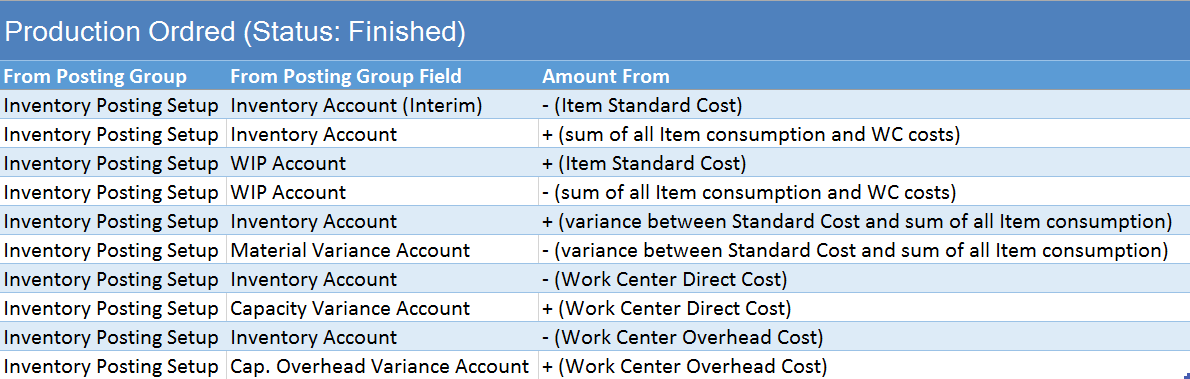
When we change status of Production Order to Finished, we will get additional G/L Entries. These are correction of standard cost on output Item and variance from standard to actual cost. You can find these entries in next table:

POsFstd