It was a good year. See you on the end of 2017…
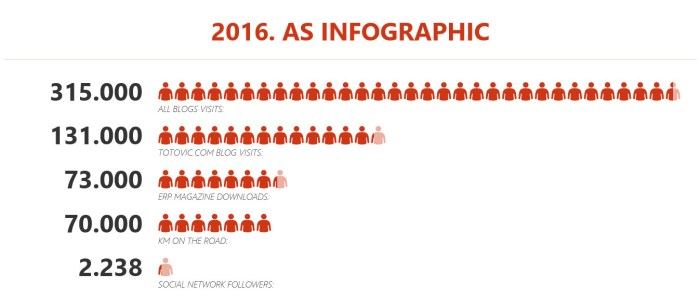
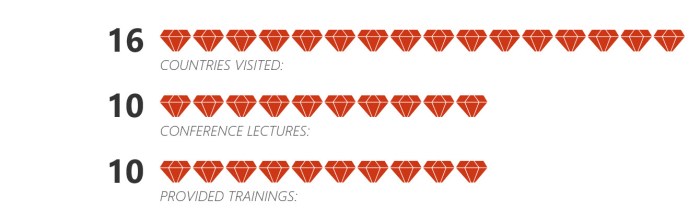
It was a good year. See you on the end of 2017…
I hope you’ve already heard for Microsoft Flow. If you want to use this amazing small tool, you need to go on https://flow.microsoft.com. With this tool, you can connect a lot of different type of software. For example, you can connect Share Point, Outlook, Excel, Facebook, Twitter, OneDrive, Dynamics solutions, Google Calendar of File Drive, Yammer, PowerBI…
In this post, I want to show you how you can create a small Flow for connection between Dynamics 365 for Financials and Facebook. I used Financials only because it was easier for my demo, but you can do it the same with your NAV 2017 for example. Before you start with Flow, you need to publish Web Service you want to use in Flow.
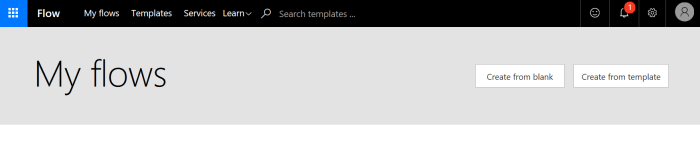
To start, first click on My Flows and then on Create from blank (for this demo). If you want to use some of templates, you will choose Create from template.
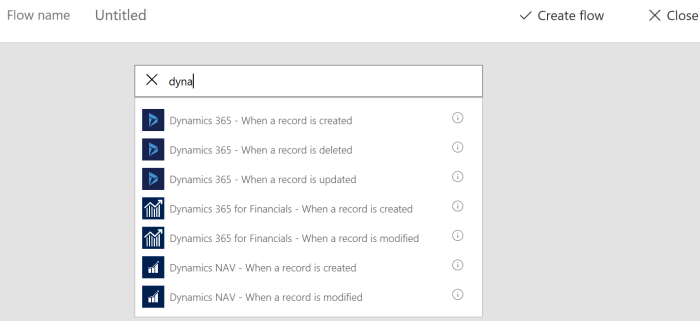
Then you need to find some of Dynamics triggers. You can see on the following picture what you currently can use. If you want to create flow for NAV or Financials, you can use When a record is created or When a record is modified. In this example, I used When a record is created. And then you need to choose one of your connections to your solution or to create new one (be careful with username and password – Web Service Access Key).
After you finish it, you can choose some of your tables (based on published Web Services). I have chosen Customers, because I want example where Facebook will announce welcome, every time when I create new customer.
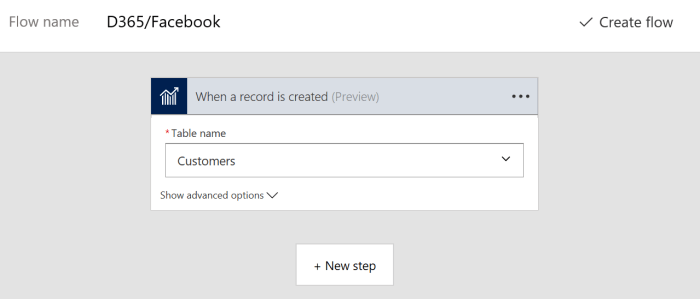
Then, I’ll click on the Next step to create step in Facebook. You need to find Facebook and to choose one of actions. I’ll choose Post to my timeline. And of course, you need to sign in to Facebook with some of accounts.

The type a message you want to post on your timeline and for this purpose you can use some of the fields in Customers table (from a right side).
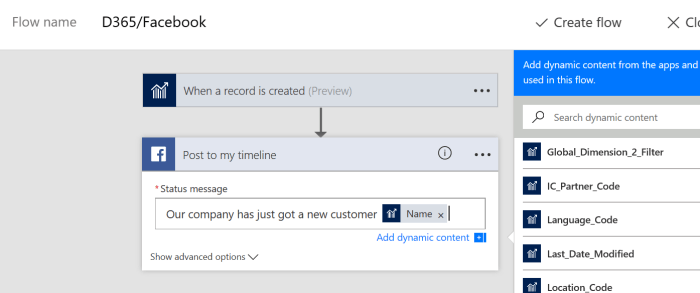
After that if you already didn’t give Flow name for your Flow, just give some name and click on Create flow; click on Done and everything is finished.
Now, you can open your Financials or NAV and create a new customer. When you finish it, you will see that Facebook announce this on your timeline:

As you can see, this was very easy and you can do it on much easier way using already prepared templates. You can find a lot of templates for CRM (Dynamics 365 for Sales) or AX (Dynamics 365 for Operations). But you can also find few of them (currently 3) for Financials and NAV (I expect more and more soon):
We finally got first view on new modern DEV environment for NAV. This is still not finished product, but we can see something already announced on Directions NA and Directions EMEA this year. We expect final version of this tool for developing extensions somewhere about Christmas.

Now the first project is public published ans all of you can download it from https://github.com/Microsoft/AL. This is just simple “Hello World”, but good enough for the first sight. Unfortunately, I didn’t download it earlier and I can just start to play with it. Just download it and be updated.
Two weeks after Directions EMEA is finished, we finally got the newest release of NAV. Now we have NAV 2017 and we expect Dynamics 365 BE during the next year (I think on non-US market). We sow the AND story about NAV and Dynamics 365, but I still think NAV partners are on the very important crossroads. I don’t expect they need to choose what business they will need to continue, because I strongly believe we can continue with both of these products, but I’m sure partners have to change their approach to this business. And this is not connected with NAV or Dyn365; new approach must be used for both of them. They have to find the best possible way to transfer their business to cloud, they have to change the way of developing (extensions, events…) and so on.

Because of that, I strongly recommend to all Dynamics partners to read the good story on MSDynamicsWorld about how Microsoft Dynamics NAV partners face crucial decisions on their future. This article can help to NAV partners how to focus thinking about their businesses. Early adopters of new business model will be in much better positions in the future and because of that it is very important not to become obsolete.
I’ve finished with a first two days on Directions NA. Both of these days I had sessions and I couldn’t prepare this article earlier. I wanted to say a lot, but I couldn’t.
First, NAV 2017 still didn’t official released, but finally we know when to expect. Not on Directions NA and not on Directions EMEA, but few days after that. Official release of Dynamics NAV 2017 will be at October 24th. And, Microsoft also promised that we will get official release of Dynamics 365 for Financials (ex. Project “Madeira”) shortly after. OK, we will wait these dates, but generally we already know what we will get with these releases.
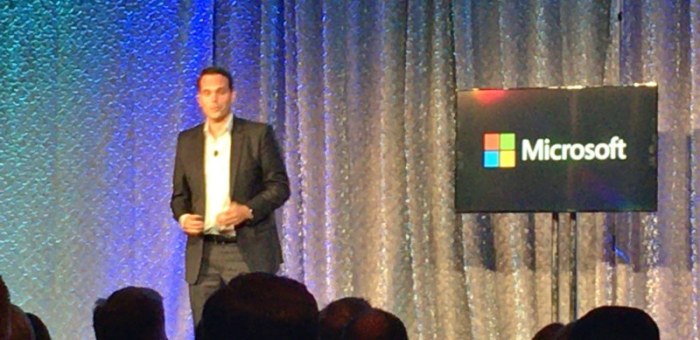
Some of these functionalities were presented by Marko Perisic and his team on Keynote, and some of them on other sessions. I’ll noticed some of the in this article, but I’ll write more about them in the future. Now, I want to speak more about future of Dynamics because I think this is something the most important in this moment. As you can see on the following picture, we have something very interested and Paul White said “This is an AND strategy”.

Based on this strategy Dynamics AX and CRM will continue to live only as part of Dynamics 365 solution. Something is not clear enough because we expect CRM as part of both Enterprise and Business edition of Dynamics 365, but AX will be part only of Dynamics 365 Enterprise edition and on other side, Project “Madeira” will be on the same position in Dynamics 365 Business edition. But NAV (GP and SL as well) will continue to exist as independent solution, in this moment available on-premises and as subscription. On the first sight this is the perfect for all NAV fans, but I need more time to be sure.
In any case, we will get new opportunities and we have to learn how to make the most of them.

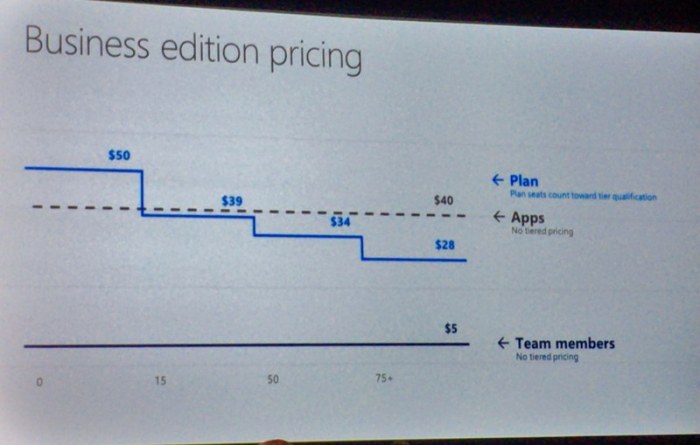
And what about Project “Madeira” and licensing. We have some pictures earlier where we found recommended priced about 40 USD for each App. That is a true, for example if you want only Project “Madeira”, you need to pay 40 USD, but if you want some other app, for example PowerApps, you need to pay the same amount for this app per user per month. But if you want to have access to all apps (currently 4 of them), you need to pay only 50 USD for all of them as Plan model (and yes, this price will decrease with the number of concurrent users). And you can use Team Members for only 5 USD as some kind of limited users. And what is good more? If some of exiting NAV clients with Perpetual licensing model want to transit to new subscription model, he will get pretty big discount for every month.
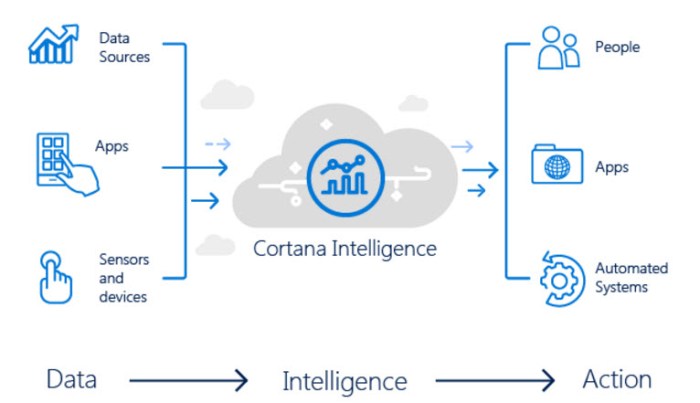
And I said that I don’t want to write about all features, but I need to notice few of them. I already wrote about Cortana Intelligence in Inventory Forecast, but now we saw Cortana Intelligence in Cash Flow Forecast; it is a perfect and you can use this in NAV 2017 and Project “Madeira” and the best is that it is very easy for using and configuring.

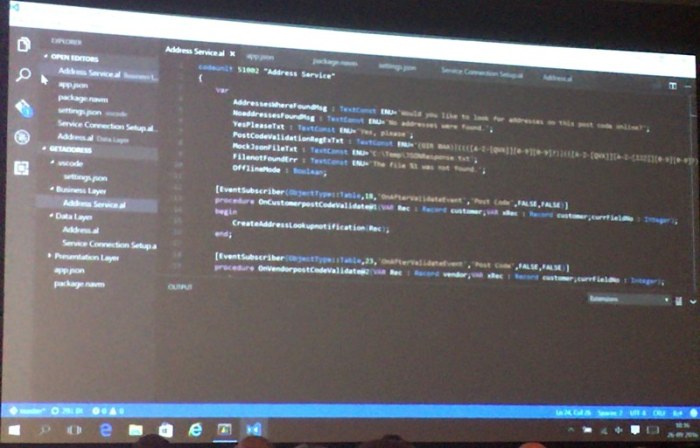
End something more – new development environments. First you can use Visual Studio Code in the future as new code oriented environment (soon more about it). Marko presented live work with new tool.
And on the end, new development tool for incredibly easy work. You just need to click on Edit button in your Web Client and you will get perfect logical environment where you can change pages, add fields to table and page… And on the end just click Stop and choose how you want to use this development… You can see all changes as preview in Web Client, Tablet Client and Phone Client. And all changes will be finished in Web Client and Windows Client, as well (of course, this is just short description – soon more about it).
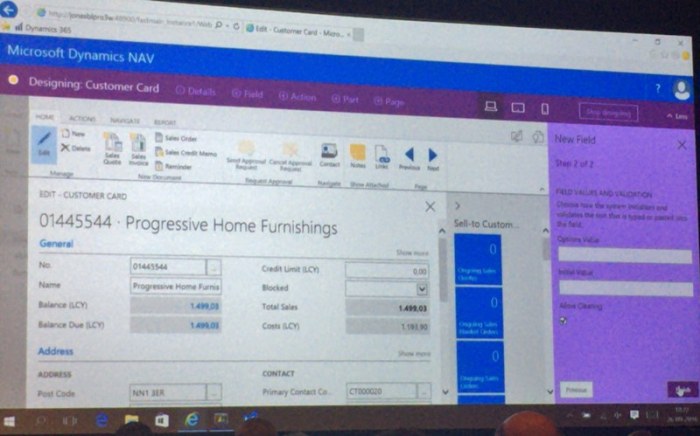
End again about dates, the new development environment preview will be available for Christmas.
I’ve just finished with all my jobs and I can start to prepare for my trip to US on Directions. I’ll depart tomorrow morning and I’ve just find some space to put my things about one very nice feature in Project “Madeira” and I hope in NAV 2017 as well (just confirmed on Directions NA, it’s part of NAV 2017 – 25.09.).
This is part of August “Madeira” update, but I finally find enough time to show it. When you run Project “Madeira”, you need to install this feature because it is Extension. But this is very easy in “Madeira”.
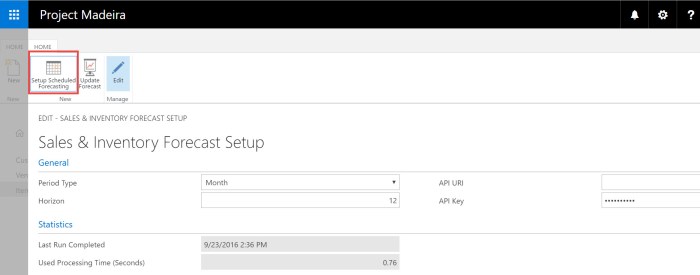
 After you finish with installation, you can configure this in Setup Scheduled Forecasting using Sales & Inventory Forecast Setup. This is naturally and there is not some unnecessary details.
When you decided how you want to put this feature to work, you can go on item list to see your predictions.
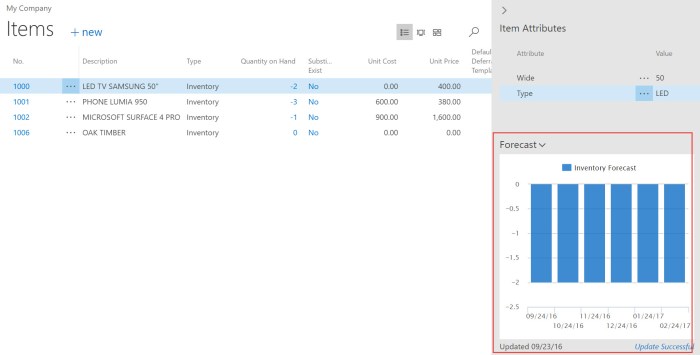
What is the most important? Complete procedure is made by Cortana Intelligence and connection to Cortana Intelligence is automated configured in Project “Madeira”; you just need to use it – nothing more. As I already said, you only can change setup if you need it. This is the new power of new products – the perfect integration with other Microsoft tools to get the best possible results. I cannot wait to start using these new features.
In any case, bye and see you in US tomorrow.
Few days ago, I wrote about new Directions NA and EMEA. Now I can announce my sessions. I’ll have sessions on both of these Directions.

First, about Directions NA, I’ll have two sessions. First session is about Azure and NAV, i.e. How to choose the best possible Azure platform for NAV. This session will be on the end of first day (5:15-6:15pm).
Second session will be related with some soft skills and it will be Water-Agile-Fall methodology and NAV implementation. This session will be the first after Keynote at the second day (10:15-11:15am) and I hope, this topic is interesting enough to come so early :).
Regarding Directions EMEA, I’ll provide the same session about NAV and Azure as on Direction NA. This session will be 12.10. at 17:15-18:15.
See you there.
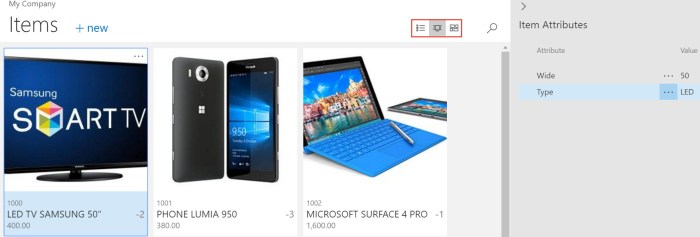
Very often, using of standard lists in NAV were not so comfortable because of specific data sets. Now, we will get some new feature that all list pages can be showed as “bricks”. If you remember, we used bricks in NAV 2016 for Phone Client. But now, we can use this for all lists: Customers, Vendors, Bank Accounts, Chart of Accounts, Currencies, Items, all Journals… You just need to choose brick view:

You can configure what you want to see on bricks and optimize space and readability for data that appears in these pages using a Brick Field Group. You can change importance of these data and their layout changing orders of them.
But if you choose Items, you can see more. Not only list and bricks, you can choose tiles as well. Difference is that you can put item picture on both bricks and tiles. Again, you can configure what you want to see by yourself:
In this moment, we have the final countdown until Dynamics NAV conference season will start. We have 47 days until the opening Directions NA and 64 days until the opening Directions EMEA this year.
This year Direction NA will be held the first, but Directions EMEA will be only 17 days later and I’m sure we have something new on both of them. Currently we have published agenda only for Directions NA, but I’m pretty sure that agendas will be similar, maybe with only small changes.
I love these conferences and I’m sure you will find a lot of reasons to attend on one of them, depending where you actually live. I think that the most important reasons will be launching of NAV 2017 and Project “Madeira” as well as Dynamics 365. You will find a lot of sessions about news in these new products. You will also learn more about integration with other systems, about using of PowerShell, how to take advantage of using Managed Services, how to improve your knowledge in lot of different areas… Also, you will learn more about project management, user experience, get some real-life experience… You will enjoy in awesome Keynotes … and maybe the most important – meet new people. I think these kind of events are the best places for networking; people are the most important wealth… and you can find and meet a lot of them on these conferences because they are the biggest NAV conferences.
In the same time, you can attend Cloud Sure Step sessions or try to pass new NAV exams powered by Association of Dynamics Professionals. I advice you to try some of these exams; I had participation in some of them and I think they are very good way to prove your expertise.
And finally, I will be lecturer on both of these conferences and I hope I’ll meet a lot of you – amazing people. See you there:
Currently Microsoft hasn’t yet published that new Cumulative Updates are already published on their blog. But they already published Cumulative Updates for NAV 2015, NAV 2013 R2 and NAV 2013 in Friday. And, they have just published CU for NAV 2016 today.

You can download all these Cumulative Updates from the following links:
There are a lot of interesting Platform and Application hotfixes and local hotfixes as well and you just need to download and test them. I’ve just noticed them and I need to check all of these.
 Totovic Dynamics 365 Blog