What behind NAV 2015?

In this moment, this question maybe is not so actual. Why? First Microsoft Dynamics NAV 2015 still not formal released. It will be in October 1st. But, I think good to know, what we can expect in next year. Yes, as we already know, Microsoft will release new version every 12 months. And we have to get used to it.

OK, next NAV release will be known as code name ‘Corfu’. Corfu is another beautiful island in the Mediterranean Sea… but, it is also future NAV release.

What will be new in this release? Currently, we do not know so much. We can expect following.

  • Workflow
  • Document Management and OCR
  • E-services integration
  • Streamlined UX across all clients

Now you can download NAV 2015!

Finally, Microsoft has published Microsoft Dynamics NAV 2015 today, for all partners. Last few days, a lot of friends have asked me from where and when they can download the last Microsoft Dynamics NAV release. Now, we can do it from Partner Source. Go to the following link to download.

You can find W1 version and 20 other localized versions, depends of country you need. For other countries, you need to wait localization partners solutions (Translation Kit will be available soon).

As previous announced, Microsoft Dynamics NAV 2015 can be ordered from the October, 1st for a new customers and from October 6th for existed customers. Customer still can order Microsoft Dynamics NAV 2013 R2 if they want it, as well downgrading license key.

Important notice: Microsoft Dynamics NAV 2015 introduces license key versioning with the following specifications:

  • Microsoft Dynamics NAV 2015 license keys are not compatible with Microsoft Dynamics NAV 2013 R2 or Microsoft Dynamics NAV 2013.
  • Microsoft Dynamics NAV 2013 R2 and Microsoft Dynamics NAV 2013 license keys are not compatible with Microsoft Dynamics NAV 2015.

UpdatePropagation Property on NAV 2015 Page

In Microsoft Dynamics NAV 2015, a new property called UpdatePropagation is added to the page fields.

UpdateProp

The introduction of this property makes it possible to update a parent page from a subpage automatically without using the page Refresh button. From child page request parent page to do update instead. The parent page first updates itself and then the children.

It sets a value that specifies what happens when a main page with a subpage is updated. The UpdatePropagation property is available on part controls and has two options; Subpage and Both.

If UpdatePropagation is set to Subpage, an update action will update the subpage only. If UpdatePropagation is set to Both, an update action will update both the main page and the subpage. This is useful if a value on the subpage changes, and you want a main page total to be refreshed automatically. Also, it works on all NAV Clients, doesn’t matter is this Windows, Web or Tablet client.

We can use the UpdatePropagation property to update a main page total, when the amount on the subpage lines is updated. To do that, add a CurrPage.UPDATE(); call, for example, in the OnValidate trigger on the subpage to have the UpdatePropagation property take effect.

Report Scheduling in NAV 2015

Microsoft Dynamics NAV 2015 offers an easy way to run reports on Microsoft Dynamics NAV Server at a specified time and deliver the resultant report to a ‘Report Inbox’ on your Role Center.

This new feature – scheduling reports lets end-users to:

  • Run performance intensive reports on the Microsoft Dynamics NAV Server.
  • Free up user interface threads while reports are running.
  • Save the resultant reports for later viewing.

The user can select when reports are run and the output format, such as .PDF or Word. We can do it when we want to print document. Only we need is to choose schedule option and fill dialog box with date and time when we want to get a report.

RepSch1

If we want to use this feature, we first need to make some configuration. We have to set up a job queue that will run the scheduled reports and add the report inbox to the Role Center. When we configure all of these and when we run report scheduling, we can see that we have new report in report inbox on role center in scheduled date and time. After that, we can double-click on these new report entry and open the report.

RepSch2

Fine new feature, especially when we have sized reports which requires a lot of times for creating. This functionality works from all clients, it doesn’t matter is this Windows, Web or Tablet Client.

Mandatory Fields in NAV 2015

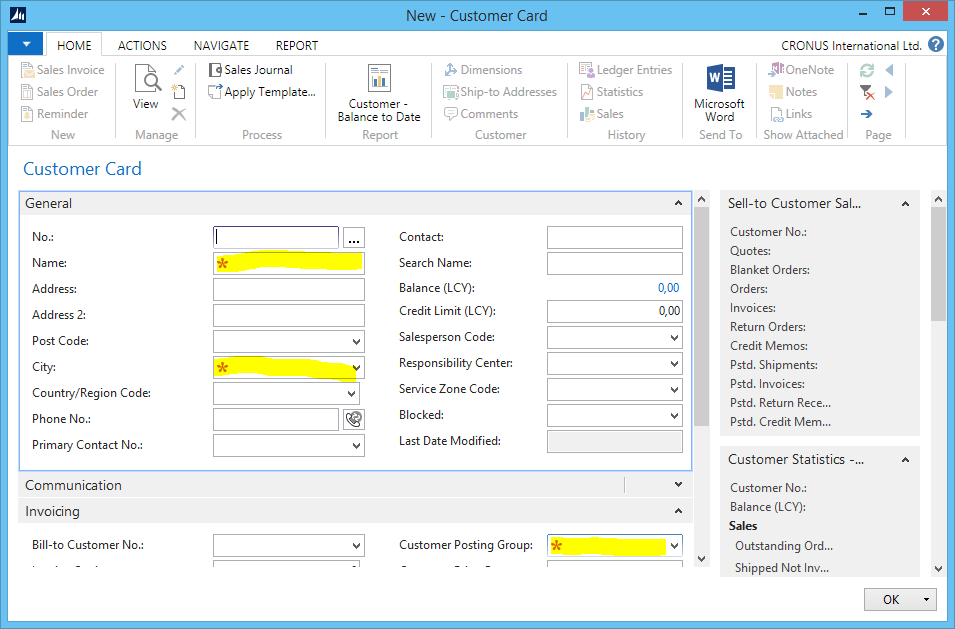
I suppose that all of you who are already developers, have requirements to mark fields that specify whether users must enter a value. Now, with new ShowMandatory property on page fields, we can do it easily. This is small, but very useful thing in NAV 2015.

When we set value in field as mandatory, the field will be marked on the page with a red asterisk and does not enforce any validation. Once the field is filled, the red asterisk disappears. When we configure this property, this red asterisk will appear on all Microsoft Dynamics NAV clients – Windows, Web and Tablet Clients. In Windows Client, the red asterisk is inside the mandatory field, but in Web and Tablet Clients, the asterisk is in front the field. Everything works the same in all clients. The ShowMandatory property can be specified as true, false, or as an expression.

ShowMand

As remark, the ShowMandatory property controls marking the page field with a red asterisk independently of the NotBlank Property. The ShowMandatory property can be used to mark all page fields, but does not enforce any validation of the field. This means that the user will be able to close a page without entering data.

Tablet Client in NAV 2015

As I already wrote, Microsoft Dynamics NAV 2015 introduce a new user interface called Microsoft Dynamics NAV Tablet Client. While the Microsoft Dynamics NAV Windows and Web Clients are designed for mouse and keyboard interaction, the Microsoft Dynamics NAV Tablet Client allows users to get access to the data they need from the touch device they prefer, but only on devices in screen sizes range, longer than 7 inches and with screen resolution 960 × 510.

One important thing, we can use new Microsoft Dynamics NAV Tablet Client on devices, regardless of their operating system. It means that we can use it on Windows tablets, but also on iPad or Android tablets.

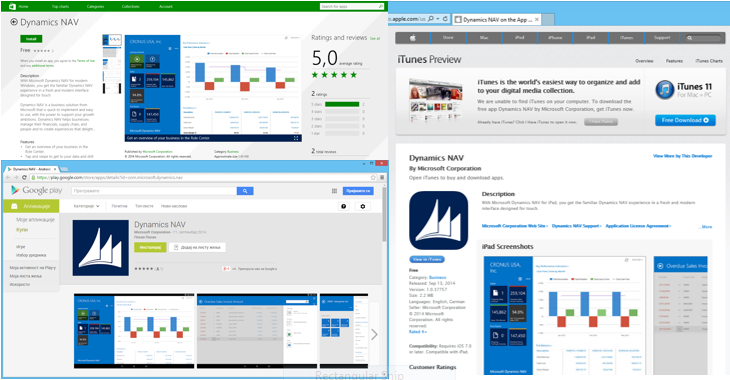
For testing purpose, you can open Tablet Client in your browser, but for your really usage, you need to use Apps. Using of SSL is mandatory because of security issues. you can download Apps from different sites, according your platform:

tc1

You can also run Tablet Client using browser (IE11 and Chrome 36.0 for Windows are prefered), but if you run Tablet Client from browsers on iPad or Android tablets, you will not be able to download files from client and you will maybe have some other limitations. You can do it from Windows tablets, but if you want other tablets and download files, you have to run this Client from Apps. Microsoft made possibility for Tablet Client using from browser only for developing and testing purpose.

Tablet Client is multilanguage client. As on Web Client, we need to configure Tablet Client on the same way for this purpose. The language that is set for the Client comes from the Web Server Instances and you can specify it on your web.config file. That means that for one Web Server Instance, we have one language. If we want to provide multiple languages, than we have to provide multiple Web Server Instances.

In following posts, I will bring you user experience using Tablet Client.

You can find here system requirements for Tablet Client on browser and Tablet Client Apps on MSDN.

NAV 2015 is Alive

Microsoft Dynamics NAV 2015 is formal presented on Direction US. Now, this release is no longer a secret and we can speak about it. This release is announcing to be available on October 1st to new customers and on October 6th to existing customers. If I’m not wrong, new NAV will be available in 25 localization versions, but for lot of other countries, we still need to prepare localizations, but I think it will not be a big job.

From tomorrow, I will be happy to make available a some technical news every day: client changes, page and report changes, new cmdlets, and lots of other enhancements.

Reservations and Planning/Projected availability calculation

Microsoft Dynamics Team Blog publish one interesting article today. This one is about impact of Reservations in the Planning and Projected availability calculation. Does planning and projecting system include or not reserved quantities in the calculation?

You can find all details on: http://blogs.msdn.com/b/nav/archive/2014/09/09/reservations-versus-planning-and-projected-availability-calculation.aspx

Excellent described processes.

System Requirements for NAV 2015

I have just finished testing installation of Microsoft Dynamics NAV 2015 on different Server platforms. I’m looking for minimum system requirements for this new release.
On the end, I can tell you that new Microsoft Dynamics NAV 2015 works fine on following system (but only on 64-bit editions):

  • Windows Server 2008 R2
  • SQL Server 2008 R2 SP2

Of course, NAV 2015 works excellent on all newer systems.

One notice, when you install NAV 2015 on this configuration, you previously have to install Windows PowerShell 3.0. Also, you have to add Windows Search on your Windows Server 2008 R2, adding it from the Server Manager.

More about NAV 2015, after keynote on Directions US (September 14th).