May 2016 Cumulative Updates for NAV 2016, 2015, 2013R2, 2013

Yesterday, Microsoft has been published the newest Cumulative Updates for Microsoft Dynamics NAV 2016, NAV 2013R2 and NAV 2013. Today morning, Microsoft has published Cumulative Update for Microsoft Dynamics NAV 2015 as well.

There are the all Cumulative Updates based on versions:

There are not so many Platform hotfixes and more Application hotfixes for almost all business area. Newer versions as usually have more hotfixes.

MPS.jpg

As usually, these cumulative updates replace previously released cumulative updates.

April 2016 CU’s for Dynamics NAV

Few days ago, Microsoft has been published new Cumulative Updates for Microsoft Dynamics NAV 2016, 2015, 2013R2 and 2013. This time, there were only few platform hotfixes (four for NAV 2016 and two per all other versions). They also include some application hotfixes and regulatory features that have been released for these NAV versions:

  • NAV 2016 – Cumulative Update 6 (Build 45480)
  • NAV 2015 – Cumulative Update 18 (Build 45483)
  • NAV 2013R2 – Cumulative Update 30 (Build 45478)
  • NAV 2013 – Cumulative Update 37 (Build 45477)

update-1170x630

You can check all hotfixes and download these cumulative updates on the following links:

What about FEFO and Costing

After my the last article, I’ve got comments about FEFO. First, thanks for reading my blog :), and then yes, it deserves to write a few sentences about it, because it is very useful feature in NAV.

But first, what actually FEFO means? It is First-Expired-First-Out method. What is the first we have to notice about it? FEFO is a picking method, but it is not a costing method. This method is important for a lot of very specific industries (pharmacy, food…), but it is just one specific way how to configure your location.

FEFO.jpg

If you want to use FEFO, your items have to have configured a serial or/and lot numbers. In additional on each item tracking code setup, the SN-Specific Warehouse Tracking field or the Lot-Specific Warehouse Tracking field must be selected. And now, we can conclude that FEFO actually uses Specific Costing Method. It is FEFO, but it is nothing more then Specific method. Everything is the same as in all other Specific Method types, but when you select FEFO on your location, system will take care about picking order using expiration date.

SpecificFEFO.jpg

You can find more about FEFO on MSDN here or in Mark Brummel Application Design book.

March 2016 CU’s for Dynamics NAV

Cumulative Updates for Microsoft Dynamics NAV 2016, 2015, 2013R2 and 2013 has been released today:

  • NAV 2016 – Cumulative Update 5 (Build 45243)
  • NAV 2015 – Cumulative Update 17 (Build 45244)
  • NAV 2013R2 – Cumulative Update 29 (Build 45254)
  • NAV 2013 – Cumulative Update 36 (Build 45241)

These cumulative updates include all application and platform hotfixes and regulatory features that have been released for these NAV versions.

update-1170x630.png

There are a really lot of application and platform hotfixes for the NAV 2016 and proportionately less for older versions. All versions, except NAV 2013 have both of application and platform hotfixes. NAV 2013 has only few application hotfixes. Some of them are common hotfixes for more versions, and some of them are only for one version.

You can check all hotfixes and download these cumulative updates on the following links:

Introduction in Dynamics NAV Costing

In almost all NAV implementations, we need to configure and use costing (inventory, manufacturing, jobs…). This is one of the main functionalities in all ERP solutions as well as in NAV. Because of that I will prepare the series of costing articles with an overview of the principles used within the costing area.

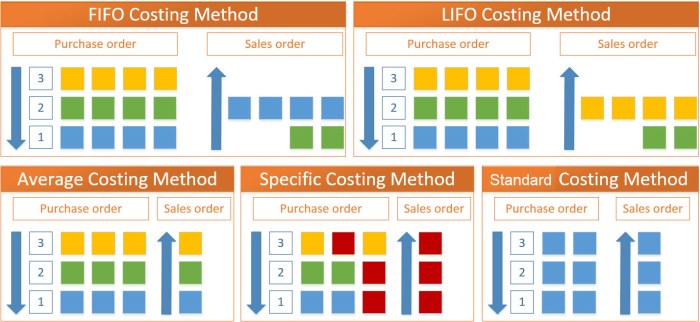
In this first part, I will make a small introduction about costing methods. Microsoft Dynamics NAV supports the five following costing methods:

  • FIFO
  • LIFO
  • Average
  • Specific
  • Standard

Now, in the following part I will just describe these costing types.
InvCost.jpg

FIFO

The FIFO costing method means “First In First Out”. It first assigns the value of the increases with the earliest posting dates on inventory. COGS is calculated using the value of the first inventory acquisitions.

An item’s unit cost is the actual value of any receipt of the item, selected by this explained FIFO rule. In inventory valuation, it is assumed that the first items placed in inventory are sold first.

LIFO

The LIFO costing method means “Last In First Out”. It first assigns the value of the increases with the most recent posting dates on inventory. COGS is calculated using the value of the most recent inventory acquisitions.

An item’s unit cost is the actual value of any receipt of the item, selected by previous explained LIFO rule. In inventory valuation, it is assumed that the last items placed in inventory are sold first.

Average

The Average costing method calculates a weighted average of the remaining inventory on the last date of the average cost period in which the inventory decrease was posted. COGS is calculated using the average value of the inventory acquisitions.

An item’s unit cost is calculated as the average unit cost at each point in time after a purchase. For inventory valuation, it is assumes that all inventories are sold simultaneously.

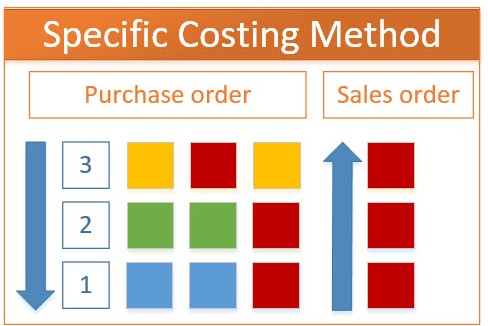
Specific

The Specific costing method overrides assumption about how cost flows from inventory increase to inventory decrease with the accurate cost information, creating a fixed application between these entries.

An item’s unit cost is the exact cost at which the particular unit was received.

Standard

The Standard costing method works with predetermined costs (rather than actual cost) for all inventory increases and it affects the value of the inventory decreases.

An item’s unit cost is preset based on estimated. When the actual cost is realized later, the standard cost must be adjusted to the actual cost through variance values.

Conclusion

This was only small introduction about costing types as preparation for the more advance knowledge about using costing in Microsoft Dynamics NAV. In the following articles, I’ll describe more about facts when users need to use these costing methods as best practices. I’ll write about all details in posting results and posting rules as well.


Posting Groups in Assembly Order in NAV

In my previous articles about using of posting groups in Dynamics NAV, I didn’t describe using of posting groups in Assembly Orders. Assembly Orders are here in the few last versions of NAV and I want to show them as well.

Using of Assembly Orders is not so complex and we can use only Items on header and Items and Resources in lines. Because of that, we can use only Inventory Setup and General Posting Setup. You can see the flow chart with description of usage these posting groups:

AssOrdFlCh.jpg

When we post one Assembly Order, we will get the following G/L Entries:

AssOrdEntr.jpg

February Cumulative Updates for NAV

Today, Microsoft has been released a new Cumulative Updates for the following NAV versions:

You can download all of these Cumulative Updates from the previous links. Of course, as we already expected, the most platform and application hotfixes are intended for the newer NAV versions. For example, NAV 2013 has only one Application hotfix and two Platform hotfixes; and few local hotfixes as well. NAV 2013 R2 has some more Application and Platform hotfixes, but there are still just few.

  • NAV 2016 and NAV 2015 again have some common hotfixes as:
  • Ways to split Sync-NAVTenant into multiple transactions
  • The Dynamics NAV client crashes if you filter on @*
  • You cannot copy a company to another tenant
  • Cannot export to Excel from the web client if the relevant page has the SourceTableTemporary property set to Yes
  • Invoke-NAVCodeunit always runs in the Dynamics NAV client time zone

There are a lot of interesting hotfixes and you can see all details on previous links.

Partner Source.jpg

New NAV Cumulative Updates

In few first days of this year, in January Microsoft has been released a new Cumulative Updates for the following NAV versions:

You can download all of these Cumulative Updates from the previous links. Of course, as we already expected, the most platform and application hotfixes are intended for the newer NAV versions.

One specific platform hotfix is prepared for all four versions – The Dynamics NAV client disconnects when you refresh a sub part.

But few of them are prepared for the last three versions (NAV 2016, NAV 2015 and NAV 2013R2):

  • Bypass license check for development permissions;
  • You cannot remove items from the Home menu of the navigation pane;
  • “Metadata for Query 50000 that is published as a web service is not valid for OData” error message when you use a web service built on a query;
  • Actions in profiles that are controlled by dynamic visibility are hidden incorrectly.

Of course, there are more very interesting hotfixes and news and some of them will be detailed described in next period. For now, just download, install and try.

New CUs for NAV 2015, NAV 2013R2 and NAV 2013

Yesterday I’ve published article about the first CU for Microsoft Dynamics NAV 2016.

Only one day after this release, Microsoft also published new Cumulative Updates for:

Now, you can download and try them.

My PPTs from Directions EMEA and NA

I’ve just published my Power Point presentations from both of Directions conferences. You can find presentations from Directions EMEA and Directions NA. I didn’t want to publish them earlier because Directions NA wasn’t closed.

Now, you can find all details from these two presentations and learn how to implement standard NAV solution in construction business. If you need some help about this, give me a question. If you want to know more about vertical solution for NAV in Construction, I will answer everything you need.

Presentation from Directions EMEA 2015

Presentation from Directions NA 2015

These presentations will be available for download until the end of this year.