Counting Named Subscription Users in Dynamics NAV

Waiting Dynamics NAV as full SaaS solution (Dynamics 365 ‘Tenerife’), a lot of partners are deploying NAV on Azure with subscription licenses. Subscription license has much better price in comparison with perpetual model, even from only BREP.

But we have a small difference here. In perpetual licensing model, users are concurrent, but n subscription model, users are named. Because of that I’ve got a lot questions how system count these users and prevent bigger number of users from licensed.

Generally, this is very easy. NAV counts number of created users and compare it with your subscription license. That moment, when you try to create new user, more than you have licensed, system will stop you.

##1

As you can see on the previous picture, I’ve got a message that creating this new user will not meet the terms of the current license. OK, it works. That means if you want to change user, you need to delete old one and than create new one.

But in subscription model, you can change number of users monthly. What if you had in one moment, because of business needs, more licensed users and now you scaled down number of users? In this case, when you try to log in, system will show the following message:

##2.PNG

That means with current license and number of users, you are not legal. But if you press OK, system will allow you to log in. But every time when you try run NAV, you will get this violation message that shows you are not legal.
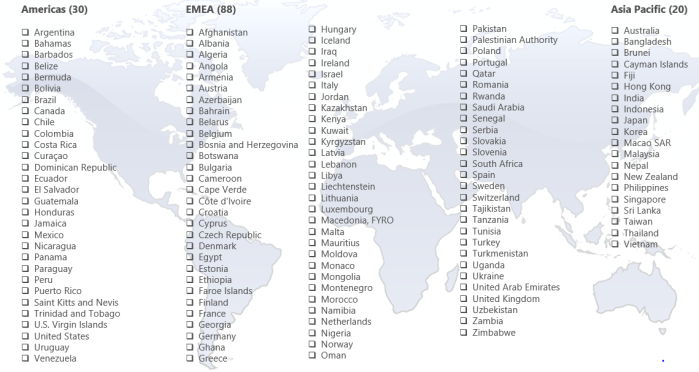
Dynamics 365 for Talent availability per countries

In my previous blog post, I hope I make a licensing process closer to you, but now when you know how to calculate price for licenses and you can start with selling process, question is where you can do it. In what countries?

Regarding this question, I can prepare two different answers. One is answer about officially availability per countries where it is possible to sell product and second answer is a new question; can we sell if we don’t have localization (in this case translation).

Product is available in 138 countries in this moment: Americas 30, EMEA 88 and Asia Pacific 20. This is the mast full list I have (but this list will be updated):

Talent1.PNG

If you have a demo environment, you can go there: System administration > System settings and check all available languages in System language field. In this moment, we have available the following 42 languages: Arabic, Czech, Danish, German (DE, AT, CH), English (AU, CA, GB, IE, IN, MY, NZ, SG, US, ZA), Spanish (ES, MX), Estonian, Finnish, French (FR, BE, CA, CH), Hungarian, Icelandic, Italian (IT, CH), Japanese, Lithuanian, Latvian, Norwegian, Dutch (NL, BE), Polish, Portuguese (BR), Russian, Swedish, Thai, Turkish and Chinese (Simplified). This is not small number of languages, but we still need more, and I hope we will get them soon. On the other side, if you are going to Attract or Onboard apps, you can find, these apps have much more languages; if I count well, there are 61 languages. It would me nice if we have minimum all these languages in HR core.

Talent2.png

I hope this amazing product will be available in more and more languages.

Licensing in Dynamics 365 for Talent

In a last period, I’ve got a lot of questions about how to make a proper licensing for Dynamics 365 for Talent. As it is a new solution, it is understandable. As I’ve already wrote a few articles about this product, I think I can help with some answers.

The first and very important, all users in this solution are named users. And if we speak about HR core part, we have two different user types and you can buy them on two separate ways. We have Full Users with total access to all HR core application and we have Team Members with very limited access (mostly, but not only for read tasks).

As I mentioned Full Users (Talent Users) can be bought on the following ways:

  • as a regular Talent User (you must take minimum 5 users) for 40 USD
  • buying Dynamics 365 for Finance and Operations, i.e. you will get full Talent Users buying Unified Operation (for 190 USD) or full Dynamics 365 Plan (for 210 USD); in both cases you will get much much more than just Talent, but Talent will be part of your completely system.

TalentLicense.PNG

If we are speaking about Team Members, you can buy them for 8 USD, but again you will not get only access to Talent with them, but also to all other Apps in Dynamics 365 package. As I mentioned, Team Member are not limited only with read rights, because you can use them for example as employee for Employee Self Service.

OK, but this is not the end. Recently, Microsoft announce two additional AI Apps for Talent (Attract and Onboard) and that means if you want to use them, you first must be a regular Talent User. Then, you can subscribe them. Price is 8 USD for each of them separately or if you want both, price will be 12 USD in total.

And again, this is not the end. Actually, it doesn’t mean it must be the end. Why? Because if you want to customize something. As you already know (I hope), this App is full SaaS and you cannot just open a code and change it. If you want to change something on forms and similar, you can do it using PowerApps. In this case person who will make these customizations must have PowerApps Plan 2 (40 USD) license, but other users who will use these forms, have to have minimum PowerApps Plan 1 (7 USD) license. That means, not all users, only these who will use these new features. And just to know, if you are buying some Dynamics Plan, you will get PowerApps for free.

PowerAppsLicense.PNG

And again, it is similar situation if you want to use PowerBI for additional reports or Flow for additional workflows.

I hope I covered all models of licensing here. But just keep in mind, it is possible to be some changed, because it is a new App in Dynamics 365 family and with new releases, it is possible to be some changes. And I didn’t mentioned, but just to be sure: all pries are on monthly basis.

My Session(s) on eXtreme 365 Conference

This year I’ll start with my sessions little bit earlier then usually. My first conference where I’ll have a lecture will be eXtreme in Dubrovnik. In a past, this conference was mainly for the Dynamics CRM solutions, but from the 2017., we have not only CRM, but AX, NAV… as well.

So, this year I’ll be there with minimum one session. I’ll speak about Dynamics 365 ‘Tenerife’ (and NAV as well) in a real world of integrations using Flow and CDS. I hope it will be interesting. If I’ll have more lectures, I’ll announce it here as well.

In a mean time, you can go and check more details about eXtreme 365 conference here, and I recommend to register if this is suitable for you.

eXtreme365.PNG

NAV 2018 Web Client Improvements

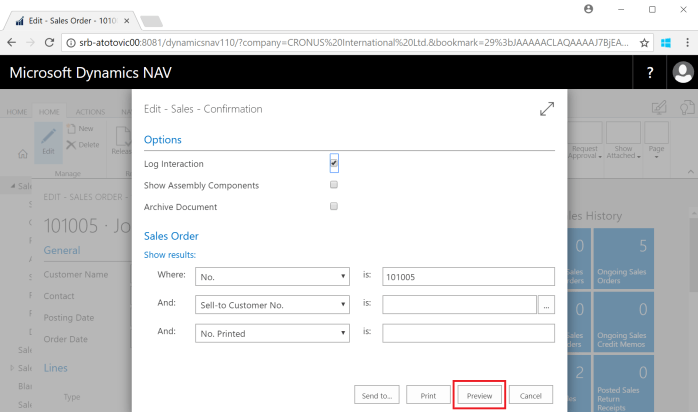
With new Dynamics 2018, there is a lot of improvement in a Web Client. One of the first improvements is availability of Print Preview for non-Internet Explorer browsers (Google Chrome, Microsoft Edge, Mozilla Firefox, Safari). In these cases, the Preview button didn’t appear on the request pages of reports. Now it exists.

Preview1.PNG

We have possibilities to change size of previewed document, use “select text” or “pan the document”, as well as download document or print it from preview.

Preview2.PNG

On the other side, now we can use Web Client as tool for user personalization. Of course, when we change something, it can be viewed in Windows Client as well, but place for configuration is Web Client.

I think that Web Client is good enough and it can be used as the main client (as we have in Dynamics 365 ‘Tenerife’); of course, some of the features are still better in Windows Client, but this client can be used in regular daily business (I know some of my colleagues will not agree with me, but I think this is more related with our habits). But I expect more and more new features in Web Client (we already saw future UX on Directions).

In some features, I more prefer Web Client in comparison with Windows Client (example is Ribbon on documents, where we have all actions for lines in the main ribbon).

Ribbon3.PNG

OK, there is a still some limitations and you can find them on the following links for both, NAV 2018 and NAV 2017.

Browser Limitations with the Microsoft Dynamics NAV Web Client:

·        Dynamics NAV 2018

·        Dynamics NAV 2017

Feature Limitations of the Microsoft Dynamics NAV Web Client:

·        Dynamics NAV 2018

·        Dynamics NAV 2017

How to install NAV 2018?

OK, two days ago NAV 2018 has been released and I hope all of you were already downloaded this new version. Installation process is still very easy, but I want to show just few points where you need to take care.

When you run setup and try to customize your installation, you will see now one more thing here – Modern Development Environment (by default this is enabled, but just check it). If you don’t want to work with extensions, you don’t need it, but I hope you will develop only with extensions in this version.

01.PNG

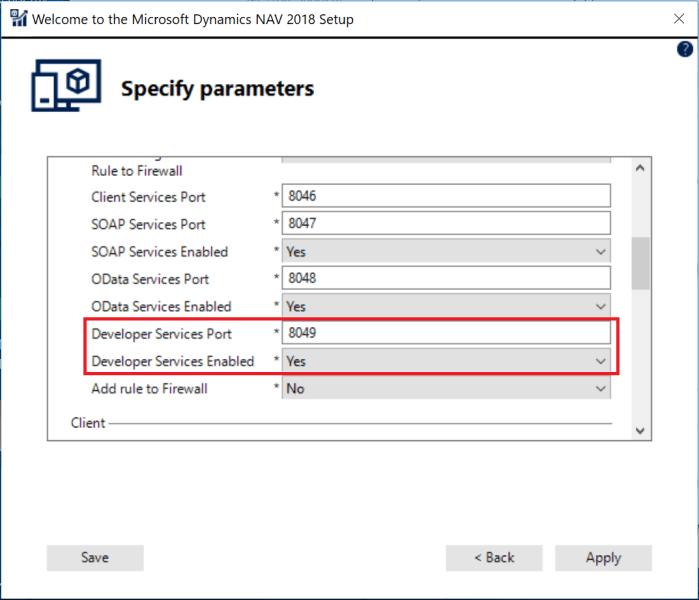
After that, just keep eyes opened on the next step, when you need to specify parameters. OK, if you don’t do it, you can do it later. But anyway, I think it is much easier to do when you install NAV. This is related again with Modern Development Environment, and this time it is not enabled by default. You need to change Developer Service Enabled option to YES and to choose Developer Services Port. After that, everything is the same as in previous NAV versions.

02.PNG

But if you didn’t finish previous step during installation process, you just need to run NAV Administration tool and add Port on Development tab and to restart service.

11.PNG

Or you can do it using PowerShell if you prefer with the following cmdlet (do not forget to restart service after changing):

Set-NAVServerConfiguration <InstanceName> -KeyName 'DeveloperServicesPort' -KeyValue <PortNumber>

Now, you are ready to work with NAV 2018 and to make your first extension.

PS

And just to mention, you can find System Requirements for Dynamics NAV 2018 here. But I tried to install NAV on SQL 2017 although there is noticed that NAV 2018 is available on SQL 2016 and SQL 2014 (and Azure SQL as well). However, I installed it on SQL 2017 and it works. I’ll check it with more details, and if I find something, I’ll publish it.

NAV 2018 is alive!

Today is December 1st and this is date when Dynamics NAV 2018 become general available. If you want to download this version, you can do it from here. At this place, you can find W1 version and additional 22 localized versions. If you want to download Partner Translation Toolkit, you cannot do it now, but it will available soon. And very important, in order to run Microsoft Dynamics NAV 2018, you must have a valid Microsoft Dynamics NAV 2018 license file. More about licensing in Dynamics NAV 2018 can be found here.

Currently, I don’t want to write about news in details. If you want to see what is new in this version, you can download the following documents:

Download and enjoy in new version.

NAV2018

Dynamics NAV and Microsoft Flow

Hi, for all of you who want to learn how to use Dynamics NAV and Dynamics 365 for Financials with Microsoft Flow in a practice, I’ll provide webinar together with NAVUG.

navug

Today I just want to share this information with you and I’ll keep you in touch. Soon more on NAVUG web site. For now, just to save a date, it will be at Wednesday, February 14, 2018 (9:00AM-10:00AM EST).

All sessions from NAV TechDays 2017

NAV TechDays 2017 has just finished a few days ago and I already wrote about my expressions. Now, all sessions are already published and I want to have all of them on the one place. There are all of them:

Opening Keynote

Deep dive into the new development tools by Stanislaw Stempin, Jesper Schulz-Wedde and Esben Nyhuus Kristoffersen (all from Microsoft Development Center Copenhagen)

Desktop & Mobile Client Enhancements by Horina Serbanescu, Andrea Tino and Tomas Grubliauskas (all from Microsoft Development Center Copenhagen)

Application SaaSification by Henrik Frovst Madsen and Tommaso Pimpo (all from Microsoft Development Center Copenhagen)

Azure Functions Deep Dive by Vjeko Babic (Cloud Ready Software)

C/AL, Coding for Performance by Jasminka Thunes (NxM Business Solutions) and Jörg Stryk (STRYK System Improvement)

Creating great API’s by Anders Larsen and Nikola Kukrika (all from Microsoft Development Center Copenhagen)

Rock ‘n Roll with VSCode by Waldo (iFacto & Cloud Ready Software)

PowerApps, Common Data Services and Common Data Model by Michael Nielsen (ForNAV) and Mark Brummel (NAV Skills)

Easier and DevOps-friendly Dynamics NAV environments using Docker / Windows Containers by Tobias Fenster (Axians Infoma), Jakub Vaňák (Marques Olivia) and Freddy Kristiansen (MDCC)

Best practices to get automated tests running on your solution by Luc van Vugt (fluxxus.nl) and James Crowter (Technology Management)

Office 365 business apps powered by Dynamics 365 “Tenerife” platform by Ievgenii Korovin, Andreas Moth and Monica Ahuja (all from Microsoft Development Center Copenhagen)

Source Code Management with Visual Studio Code Made Easy by Soren Klemmensen (360 Visibility) and Jonas Andersen (Elbek & Vejrup)

Enjoy and see you there the next year…