If you are interested in testing new Microsoft Dynamics NAV 2016 (ex NAV ‘Corfu’) features, now it is a possible. If you want to be a part of this Microsoft Testing and Adoption Program about Microsoft Dynamics NAV ‘Corfu’ Limited Beta, you have to nominate yourself and fill the following nomination form.
Microsoft Dynamics NAV
NAV 2016 on Azure SQL Server
NAV 2016 database can be deployed on Azure SQL Server. Until yesterday, this news was a secret. I wanted to write about it, but it was by the NDA. Now, this news was published at WPC in Atlanta and we can discuss about it. But, the most of this is still by NDA and I cannot speak everything about this topic.

This feature will enable the better experience of NAV on Azure and better possibility for migration of NAV implementation to cloud.
Regarding that, I will have session with this topic on NAV Tech Days 2015 in Antwerp, Belgium. If you want to know how to deploy and configure NAV 2016 database on Azure SQL Server, come on this awesome conference and be patient J.
NAV ‘Corfu’ is now NAV 2016
Today at WPC in Orlando, Microsoft have published official name of new NAV. Now, it is Microsoft Dynamics NAV 2016. New NAV will be released in few following months with really lot of news. Some of them are: Phone Client, better In/On, works natively with Power BI and CRM Online, e-Everything, Posting Preview, OCR, Workflow,…
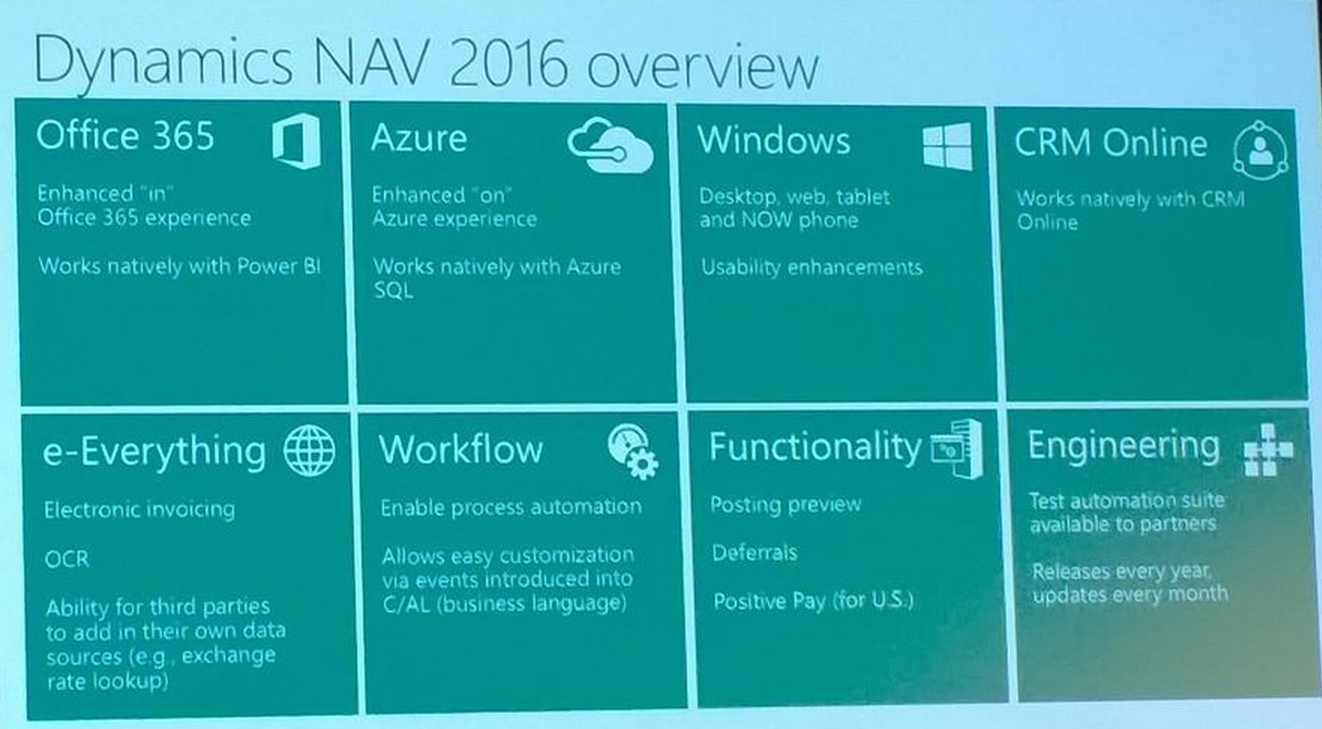
These information are official and you could see them on WPC. But, you can expect more details very soon (after NDA).
New Cumulative Updates for NAV2013R2 (CU21) and NAV2013 (CU28)
Two days after publishing of the newest Cumulative Update for Microsoft Dynamics NAV 2015, Microsoft has published new Cumulative Updates for two older versions NAV 2013 and NAV 2013 R2, as well. There are:
- Cumulative Update 21 for Microsoft Dynamics NAV 2013 R2 and
- Cumulative Update 28 for Microsoft Dynamics NAV 2013.

You can download them from previous links. These CUs are named as Build 41768 (NAV 2013 R2) and Build 41767 (NAV 2013). You can see that these CUs have both Platform and Application hotfixes. The most of Application hotfixes are for NAV 2013 R2 and only three of them for NAV 2013.
New Cumulative Update 9 for NAV 2015 has been released
Cumulative Update 9 for Microsoft Dynamics NAV 2015 has been released today. You must convert the database if you are upgrading to this cumulative update from a cumulative update earlier than Cumulative Update 9. It includes the most of application area (Cash Management, Finance, Inventory, Jobs, Manufacturing, Sales, Service and Warehouse) and very useful platform hotfixes and regulatory features that have been for Microsoft Dynamics NAV 2015.
It also has a lot application hotfixes for following localizations: Australia, Belgium, Czech Republic, Germany, Spanish, France, Italy, NA, Netherlands and Russia.
You can download Cumulative Update 9 for Microsoft Dynamics NAV 2015 from here. This CU is named as Build 41779.
NAV TechDays 2015 Announcement

NAV TechDays is one of the best Microsoft Dynamics NAV technical conferences. This conferences is organized by Mibuso (I think all of you who work with NAV already knows what is Mibuso). NAV TechDays is the place where some of the best developers and leading business owners cross paths, exchange ideas, find partners and conceive projects. Every year conference has more and more attendees. I expect the same situation this year as well.
NAV TechDays 2015 is scheduled in November 19 & 20 (with pre-conference day at November 18). Currently we already know some of lectures and all of the labs on pre-conference day. On pre-conference day you can participate on one of the following labs:
- Power BI for Dynamics NAV
- Working with PowerShell in NAV 2015
- Troubleshooting Essential for SQL Server and Dynamics NAV
- Let it build! (TFS Build for Dynamics NAV)
- NAV ALM using Team Foundation Server
- Implementing the RoleTailored client with success
- Installing and Configuring SQL Server for Microsoft Dynamics NAV
- Developing control add-ins for Microsoft Dynamics NAV
- NAV on Azure & in Office 365
- An Introduction to Scrum
- Generic, Repeatable & Low footprint coding techniques
- Microsoft Dynamics NAV Application Architecture and Design Patterns
After this pre-conference day there will be two days of high valuable technical sessions. All speakers are the very experienced and well known in NAV world. The most of them are the MVPs or Microsoft employees. You can find all of them here.
Currently we already know titles of three sessions, prepared by Jorg, Arend and Vjeko. I also know title of my session on NAV TechDays. It will be one very exciting news about NAV ‘Corfu’ and Microsoft Azure, but currently I cannot publish it because this news is still by NDA. In few following months I will publish this title.
You can fill registration form on this page https://navtechdays.com/2015/register and I hope to see you there.
Now, I will continue with my Posting Groups series J and some new topics on this blog… See you…
How to Deploy NAV 2015 on Azure
First of all, I will make small introduction for all people who don’t know what a Microsoft Azure is. With simple words, Microsoft Azure is Microsoft cloud computing and services platform with physical infrastructure all around the world. On this cloud platform, there is a virtual machines, SQL databases, storages, with Visual Studio online, and many other things, as one “global operating system”. Microsoft Azure also can includes Microsoft Dynamics NAV services.
I will explain some basic deployment topologies that are supported. We can choose topology with one or two virtual machines.
If we choose to deploy Microsoft Dynamics NAV on a single virtual machine, the Microsoft Dynamics NAV Web Server components, Microsoft Dynamics NAV Server, SQL Server, and Microsoft Dynamics NAV database components will be installed on the same virtual machine.

If we choose to deploy Microsoft Dynamics NAV on a two virtual machines, the Microsoft Dynamics NAV Web Server components and Microsoft Dynamics NAV Server will be installed on one virtual machine, and the SQL Server and Microsoft Dynamics NAV database components will be installed on another virtual machine.

In the first scenario, this virtual machine represents a single cloud service on Microsoft Azure, and in second scenario each virtual machine represents a cloud service on Microsoft Azure. In both of these topologies, users can access Microsoft Dynamics NAV data by using the Windows client (from a ClickOnce site or without it), the Web or Tablet client and OData and SOAP web services.
If we want to deploy Microsoft Dynamics NAV 2015 on Microsoft Azure, we can use NAV Provisioning Tools for Microsoft Azure that support the automated deployment of Microsoft Dynamics NAV 2015 on Microsoft Azure virtual machines, using both of topologies. You can find NAV Provisioning Tools as Windows PowerShell scripts on Microsoft Dynamics NAV 2015 installation DVD on \\NAV2015DVD\WindowsPowerShellScripts\Cloud\HowTo\

You can find few files in this folder. First of all, you must configure Set-PartnerSettings file and after that you can run one of the following PowerShell scripts Example-1VM (deployment on 1 VP) or Example-2VM (deployment on 2 VMs).
If you want to deploy Microsoft Dynamics NAV 2015 on only one VM (usually for test or demo environment), you can find all details on How Do I video: https://msdn.microsoft.com/en-us/dynamics/nav/mt147285
Also, if you want to deploy Microsoft Dynamics NAV 2015 on two VMs (usually for production environment), you can find all details on How Do I video: https://msdn.microsoft.com/en-us/dynamics/nav/mt147286
In some other articles, I will describe all steps how to make Multitenancy environment or how to use production database, license, language etc.
Posting Groups #25 – Job WIP Posting (3 – Cost Value)
In one of my previous posts, I have already described how you can post Job WIP entries if you use Cost Value as recognized cost in WIP posting method. But, it was only part of posting when you calculate Job WIP for the first time. But if you have already posted Job WIP entries and want to post WIP, again after new usage posting (as Contract).
In this situation, system first need to post correction of previous Job WIP entries and that post new entries. You can see how there G/L entries look like on following table:
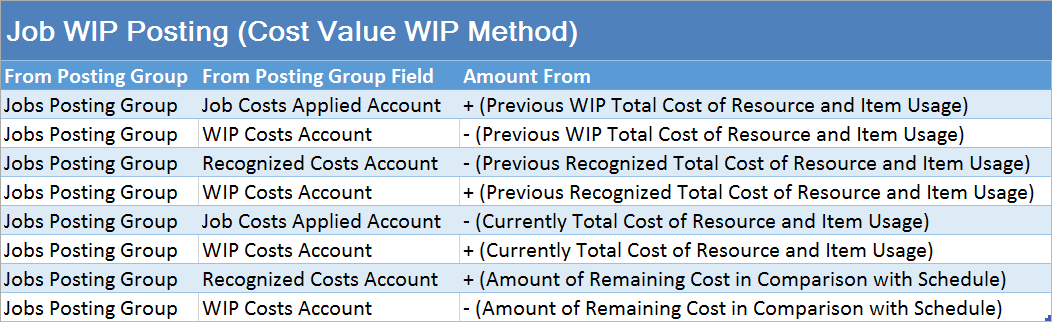
When we speak about “Remaining Cost in Comparison with Schedule”, we already think about relation between Contract usage posting and values as Schedule.
Posting Groups #24 – Job WIP Posting (2)
If you have the same example as in previous post, but with using different methods of WIP posting (e.g. Completed Contract, Cost of Sales or Contract-Invoiced Cost), you will get the some different results. To repeat, my example was only posted usage of resources and items, without invoicing. System calculates WIP for all Resource and Item usage, based on Unit Cost and consumed Quantity. Result of this posting is following:

How to Upgrade NAV
Today, Microsoft has published new article about best practices and tips and tricks in upgrading process when you want to upgrade your solution to NAV2013R2 or NAV2015. After this first part about this topic, Microsoft already publish a second part with the same topic.The main reason why to read this article is because, the Classic Client is no longer supported by Microsoft. Now, it is the right time to make upgrade of your old NAV version.
Anyway, you can find awesome articles about this upgrade process here on MSDN Blog and part 2, as well. I recommend these articles.
 Totovic Dynamics 365 Blog