Posting Groups in Service Management with Warranty

I’ve already show how looks like using of posting groups in Service Management in NAV, but when you use Service Item with currently active Warranty, there are some differences. Generally, system will use Line Discounts configured on Service Item as Warranty % for “parts” and “labor”. If you have 100% warranty, posting will be as the following:

SM-w01.jpg

System posted inventory cost for all item line based on costing type. But for each line (Item, Resource…) system posts sales line amount and the discount with the same value.

But, when you have warranty with the less percentage than 100%, it will be a bit difference. System will post item cost again, but for each line, system posts sales line amount, discount and value as difference between sales amount and discount:

SM-w02.jpg

Registration Opened for Directions EMEA 2016

Directions EMEA 2016 in Prague attendee registration has opened from today. You can make registration here. You can use the early bird in registration and save as much as 300 EUR:

Super Early Bird Feb 16 to Apr 29   745 EUR (net)
Early Bird Apr 29 to July 31   895 EUR (net)
Normal July 31 to Oct 15 1.045 EUR (net)

Directions EMEA will be probably the biggest NAV Event in 2016 and you can have a really big benefit if you will be there. You can learn a lot of different topics and meet a lot of interesting people. Directions EMEA will be held on October 12-14, 2016 in Prague, Czech Republic.

DirectionsEMEA

In the same time, registration for Directions NA 2016 in Chandler, AZ is still not opened. I hope it will be soon. In the meantime, you can find the last registration information here.

See you there.

Posting Groups in Service Management in NAV

I’ve already wrote 27 articles about using of Posting Groups in NAV. Now, I’ll continue this series with the new topic – Service. When we use Service Order, all posting will be based on the following flow-chart:

ServiceFlCh.jpg

You can notice, this is very similar with postings in Sales, but we have some specifics about using of additional fees. But if you look at the part based on Service Lines, everything is the same. I want to accent that this part is drawn for items ()because of usage Inventory Posting Group and Location); if you use G/L Account or Resource, there will not be inventory postings.

Now, let look at the posting results. First, if we decide to post “Ship and Consume” from Service Line, that means these lines have been used for servicing but cannot be included in the invoice to the customer and we will have only inventory postings if we used items (in other cases, we will not have anything for posting):

Serv1.jpg

But if we decide to post “Ship and Invoice” from Service Line, the result will be different. In this case, we have some additional entries except inventory posting:

Serv2.jpg

And on the end, we need to finish posting from Service Order. If we have not some additional fees for invoicing, it will not be anything for posting, but if we have additional fees, it looks the same (for “Ship and Consume” and “Ship and Invoice” examples):

Serv3.jpg


MS SQL is a Global ODBMS Leader

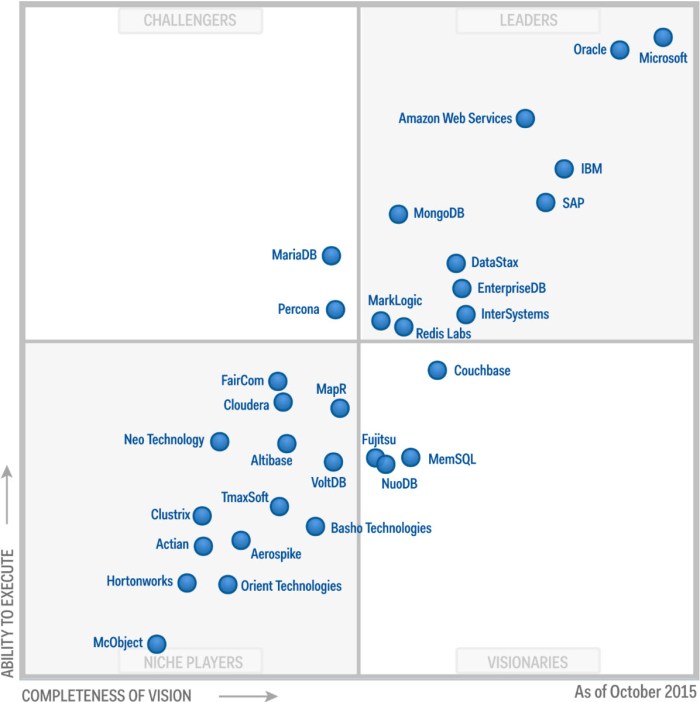
A few days ago, I’ve wrote about place of Power BI in Gartner survey about BI & Analytics solutions. Power BI was a global leader on Gartner Magic Quadrant. Now, we have new Gartner story about Operational Database Management Systems. For the first time, MS SQL is an absolutely leader and on better position in comparison with Oracle database.

ODBMS Gartner.jpg

The operational database management system (DBMS) market is concerned with relational and nonrelational database management products suitable for a broad range of enterprise-level transactional applications. These include purchased business applications, such as those for ERP, CRM, catalog management and security event management, and custom transactional systems built by organizations’ own development teams. Also included in Gartner’s definition of this market are DBMS products that support interactions and observations as new types of transaction. (from Gartner)

Microsoft deserves this position because they market its SQL Server DBMS for the operational DBMS market, as well as the Microsoft Azure SQL Database (a DBMS platform as a service), and the NoSQL DBMSs Microsoft Azure DocumentDB and Azure Tables.

It is very important that Microsoft continue with working on enterprise SQL Servers and on Azure SQL as well. And finally about NAV. Microsoft Dynamics NAV (from NAV 2016) works on both of these SQL versions and I think this cooperation between strong database and ERP solution will continue to deliver amazing business solutions.

Dynamics NAV Comparison Tool

If you want to upgrade your existing Dynamics NAV solution, now you can use NAV Feature Comparison Tool with added NAV 2016 features.

You just need to select you current NAV release and system will compare it with NAV 2016 and you can see key differences. All of these can help you to decide upgrade or not for sure. You can compare all version from the release 4.

You can find this new tool on the following link:

https://www.microsoft.com/dynamics/upgrade-compare/nav/default.html

CompTool.jpg

New Dynamics Exams – finally

Finally we’ve started with Dynamics Exams. Currently, there are following exams available:

  • NAV Core Application Setup Certification
  • GP Core Financial Setup & Functionality Certification
  • GP Core Installation & Configuration Certification

As you seen, currently there are only three exams, but we will get new NAV exams in Q2 2016:

  • NAV Core Installation & Configuration Certification
  • NAV Core Development Certification

All these exams are prepared by Association of Dynamics Professionals. The vision of the Association of Dynamics Professionals (DynamicsPro) is that every Dynamics professional recognizes and adheres to high quality and certification standards for all Microsoft Dynamics products. I am part of this project and I think these exams are really good way to approve your knowledge and recognition. I know other people who are involved in these exams preparation and I strongly believe in this. Exams were written by people who know what it takes to have a successful project. They will help consultants deliver excellent service and ensure they meet professional quality standards.

Beginning this month – February, exams will be available on many different location in US and finally in Europe. You can register for exams here. Please take a look and register for the next exam in your area. If you don’t see something in your area, check back often, as DynamicsPro will be adding new exam dates and locations regularly.

Thea are currently available on the following locations, based on the next schedule:

  • Tuesday, February 23, 2016: Houston, Minneapolis, New York, Phoenix
  • Wednesday, March 2, 2016: Atlanta
  • Thursday, March 10, 2016: Las Vegas
  • Tuesday, March 15, 2016: Washington, DC
  • Tuesday, March 22, 2016: Minneapolis, Phoenix
  • Tuesday, March 29, 2016: Netherlands
  • Tuesday, April 5, 2016: Midlands, England
  • Thursday, April 7, 2016: Tampa
  • Tuesday, June 7, 2016: Chicago

You can expect on more location soon. Online exam delivery has been delayed, but it will be available in the future. Be among the first in the industry to prove your knowledge and skills on the latest versions of Microsoft Dynamics NAV and GP through this new certification program.

February Cumulative Updates for NAV

Today, Microsoft has been released a new Cumulative Updates for the following NAV versions:

You can download all of these Cumulative Updates from the previous links. Of course, as we already expected, the most platform and application hotfixes are intended for the newer NAV versions. For example, NAV 2013 has only one Application hotfix and two Platform hotfixes; and few local hotfixes as well. NAV 2013 R2 has some more Application and Platform hotfixes, but there are still just few.

  • NAV 2016 and NAV 2015 again have some common hotfixes as:
  • Ways to split Sync-NAVTenant into multiple transactions
  • The Dynamics NAV client crashes if you filter on @*
  • You cannot copy a company to another tenant
  • Cannot export to Excel from the web client if the relevant page has the SourceTableTemporary property set to Yes
  • Invoke-NAVCodeunit always runs in the Dynamics NAV client time zone

There are a lot of interesting hotfixes and you can see all details on previous links.

Partner Source.jpg

Power BI is a Global BI Leader

One of the great new features in Microsoft Dynamics NAV 2016 is natively working with Power BI. You can use this feature very easy using OData web service in NAV and copying this URL to Power BI when you try to use it. You just need to choose to import your content pack from Microsoft Dynamics NAV.

PowerBI_Content.jpg

Because of that, I want to write few words about this solution. This BI tool is not only for Microsoft Dynamics NAV, of course. You can use Power BI with i.e. other Dynamics product or with almost every database you want. This is is really powerful and modern tool for analyzing and visualization your data. And everyday is better and better. You can find a lot information about this product here and I don’t want to write about functionalities.

I’ve just wanted to show how other people outside Microsoft see this product. Gartner organized a huge survey about BI products and we can see this results in famous Gartner Magic Quadrant for Business Intelligence and Analytics Platforms. You can see that Gartner has positioned Microsoft as a Leader in this area. Microsoft is a leader for the ninth consecutive year, but for the first time, Microsoft is placed furthest in vision within the Leaders quadrant.

BI_Gartner.jpg

It means we can expect more and more capabilities and new benefits of this solution. Well done Microsoft.

Posting Groups #27 – Deferrals in Sales

Few days ago I’ve published how you can use Posting Groups in Microsoft Dynamics NAV 2016 when you have purchase where you use Deferrals. Now, I want to show you how it looks like when you use Deferrals in sales process. In my old post, you can find everything about using Posting Groups in standard sales process. Now, I’ll show difference. One of the main difference is that system doesn’t use inventory posting groups when posts sales invoice (the same as in purchase scenario).

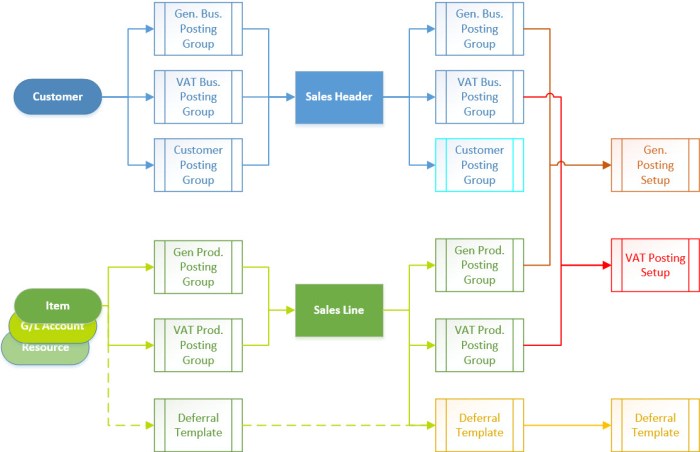
In the following chart, you can understand how system uses Posting Groups when we have deferrals on Sales document:

SalDefChart.jpg

When we post document and get Posted Sales Invoice, we will get the following G/L Entries. You can find completely description of them in the next table:

SalDefEntries.jpg

When you use Items and Resources, system will use Sales Account from General Posting Setup, but if you use G/L Account in the sales line, system will use this G/L Account you typed.

You can notice that we have more line amounts. Number of lines is based on number of period defined in Deferral Template. For each period, we have two lines (positive and negative). We have always first period lines, but other period lines are behind all entries, because they have not the same posting date. Their posting date is based on setup in Deferral Template.

And I’ve forgot one things in the last post. If you want to see all lines using Navigate, you have to delete Posting Date in Navigate page or if you didn’t it, you have to delete Posting Date from filters in General Ledger Entry.

What is Microsoft Azure Stack?

Microsoft Azure Stack is a totally new thing, currently in “technical preview” phase. It changes currently model of using Azure. Before it, you could use a lot of Azure features (Management Portal, VMs, Storage, Azure SDK…), but hosted in the Azure cloud within Microsoft data centers. Now, with Azure Stack, you can use all these Azure features in your own datacenter in your private cloud.

Maybe you think, it is replacement for Windows Server, but it is not a true. Azure Stack is a cloud platform and enables you to make your private cloud platform where you can run Windows Servers or some other servers. Azure Stack makes Azure on not exclusive Microsoft datacenters. I think, this will be great way of using different cloud system who enables a really good hybrid cloud. With this, we can use the same deployment and development tools to build and deploy system that resides either in the Microsoft Azure Cloud or within the some other datacenter, because we can mix IaaS and PaaS services independently of datacenter owners. Almost all features on Azure Management Portal and usage of Microsoft Azure will be the same on Azure Stack and it can make life easier for IT Pros and Developers.

Azure Stack.png

If you want to learn something new, you can find Microsoft Azure Stack Technical Preview documentation here. You can also download Microsoft Azure Stack Technical Preview. Try it, but I think it’ll make a revolution in future cloud systems.