Bricks in NAV 2016 Phone Client

When we use lists in NAV 2016 Phone Client, we can notice some differences. This difference is based on new Field Group in NAV 2016. We can use a Brick Field Group to optimize space and readability for data that appears in page types such as ListPart, ListPlus, and List. The brick view compresses up to six columns of data and is only displayed when the page is shown on the NAV Phone client.

Picture1

This view has some limitations, for example you cannot delete directly in the list, indentation in repeater controls is not available, factboxes, multi selection, custom sorting, and advanced filtering are not available…

To open the Field Groups window, choose View, and then choose Field Groups. In a table, we can see two Field Groups: DropDown and Brick. If Brick Field Group doesn’t exists, DropDown is interpreted as Brick. Depending on the number of columns that we defined in the Field Group for the Brick, the layout was dynamically change.

Picture2.png

The brick layout supports using the Style Property and StyleExpr Property on pages that lets you mark, for example, numbers as favorable or unfavorable.

New NAV Cumulative Updates

In few first days of this year, in January Microsoft has been released a new Cumulative Updates for the following NAV versions:

You can download all of these Cumulative Updates from the previous links. Of course, as we already expected, the most platform and application hotfixes are intended for the newer NAV versions.

One specific platform hotfix is prepared for all four versions – The Dynamics NAV client disconnects when you refresh a sub part.

But few of them are prepared for the last three versions (NAV 2016, NAV 2015 and NAV 2013R2):

  • Bypass license check for development permissions;
  • You cannot remove items from the Home menu of the navigation pane;
  • “Metadata for Query 50000 that is published as a web service is not valid for OData” error message when you use a web service built on a query;
  • Actions in profiles that are controlled by dynamic visibility are hidden incorrectly.

Of course, there are more very interesting hotfixes and news and some of them will be detailed described in next period. For now, just download, install and try.

NAV 2016 Video Courses

Microsoft Dynamics NAV 2016 is about two month and half here. Currently, you can find a lot of instructions on MSDN and very interesting How Do I videos.

But, you can also find official video courses on DLP and Microsoft IT Academy. Microsoft already published these seven following courses:

  • Introduction to Microsoft Dynamics NAV 2016
  • Finance Essentials in Microsoft Dynamics NAV 2016
  • Finance Advanced in Microsoft Dynamics NAV 2016
  • Application Setup in Microsoft Dynamics NAV 2016
  • Installation and Configuration in Microsoft Dynamics NAV 2016
  • Development Environment Introduction in Microsoft Dynamics NAV 2016
  • Data and Code Upgrade in Microsoft Dynamics NAV 2016

I really recommend to see these courses. And you can expect some new courses soon, as well.

Also, you can expect more exams about NAV made by Association of Dynamics Professionals.

CU2 for NAV2016 has been released

Microsoft has been released new, second Cumulative Update for Microsoft Dynamics NAV 2016 in Saturday. This CU is actually Build 43897. You can download this CU from this link.

We can find a lot of platform hotfixes. If you are one of Android users for Universal Apps and you had some problems, now there are solved. Also, there some important improvements in working with Extensions.

Application hotfixes cover Administration, Finance, Inventory, Jobs, Manufacturing, Prepayments, Purchase, Sales, Service, VAT and Warehouse areas. There are also a lot of local application hotfixes (AT, AU, CH, CZ, DE, ES, FI, FR, IT, NA, NL, NO, RU, UK)

Cannot Connect Web Client to NAV on Azure SQL

In my last two articles, I’ve showed you how to deploy Microsoft Dynamics NAV 2016 on Azure using Azure SQL Server. Now, if you already finished it any you want to use NAV Web Client, you have to install Web Server components on VM you configured as service tier and create Endpoint for WebClient on this VM, opening port 8080. Now you have to login with different username (for example, Admin username you already used on your VM). Now, you have to type the following URL: http://<AzureVM_Name>.cloudapp.net:8080/DynamicsNAV90/WebClient/

If you have problem with connecion and get the error message, this is probably because port 8080 is not opened. If you want to open this port, you have to open Remote Desktop Connection to your VM and run the following: Control Panel > Windows Firewall > Advanced Settings > Inbound Rules.

AzuWC_CP_Fw.png

If you can find “Microsoft Dynamics NAV 2016 Web Client” as rule, you need to add 8080 as Local Port. But if you cannot find it, create a new rule (using the command in the right pane) and add this name and local port.

Do You Have Suggestions for Better NAV?

Very often I hear ideas how NAV can be better, but people think Microsoft doesn’t listen. This is not true, Microsoft really wants to hear all your suggestions. Customer feedback is very important for Microsoft. Because of that, spend a bit of time to give your suggestions about NAV.

If you don’t know how you can do it, just try to login to Microsoft Connect. You can add your suggestions here or support some other good idea. If you want to create a new, just click on this button and choose NAV as your product.

Connect

If you want to give a chance to your idea, try to be detailed with reasons why it will improve NAV. I know, many of you already know for this possibility, but many of you don’t know. Give your ideas and make an NAV better.

Report Layouts per Customer in NAV 2016

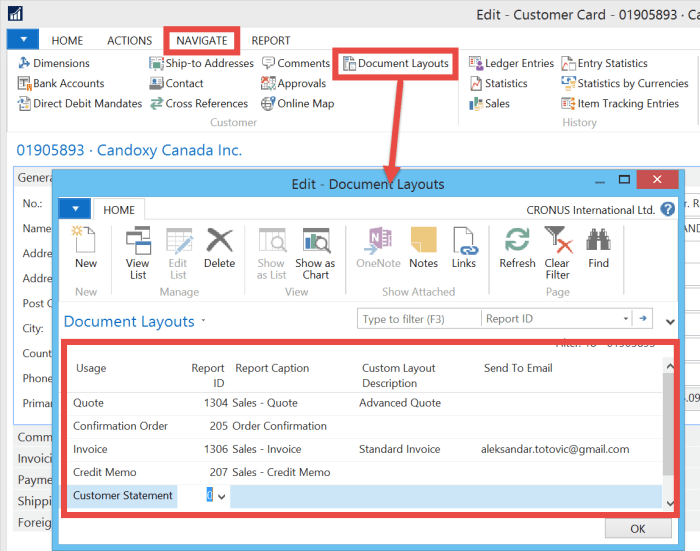
Microsoft Dynamics NAV 2016 is released about one month and we could see a lot of different new features. One of the small but amazing news is possibility to add different report layouts per each customer. This was one of very often requirement in implementation process and finally we can use it.

We can choose different reports per customer and after that, different report layouts. We can also add an e-mail as default per each document. It is possible for Quote, Order Confirmation, Invoice, Credit Memo and Customer Statement.

CustomerRepLayouts

We just need to open a customer card and find Document Layouts on Navigate tab. Than choose report IDs and layouts. Eventually, you can add an e-mail. You can use RDLC or Word layouts, as well. Now, if you print one of these documents, you will see that these report document layouts are configured as default.

If you want to make new document report Word layout, I already wrote about it here.

Directions NA and Directions EMEA 2016

Few days ago, Directions 2015 season has finished. Directions EMEA in Mannheim has finished in first part of October and Directions NA in Orland has finished on the end of the same month. There were a really amazing conferences, bigger then ever. We had a a lot of excellent sessions and announcements of the last NAV release.

After all these news, we have a complete year to make some good projects with NAV 2016 using all these knowledge we learned on Directions sessions. Now we have some also amazing NAV conferences (NAV TechDays and Convergence), but with them this year conference season is finished.

What we can expect the next year? Of course, we are waiting new Directions, as well. Currently, we already know where Directions will be and start to prepare for them with never better NAV.

See you there.

New CUs for NAV 2015, NAV 2013R2 and NAV 2013

Yesterday I’ve published article about the first CU for Microsoft Dynamics NAV 2016.

Only one day after this release, Microsoft also published new Cumulative Updates for:

Now, you can download and try them.