Using NAV Outlook Client on iPhone

Today I held presentation about features in NAV 2017 and D365 for Financials. When I presented working with NAV 2017 in Outlook, I remembered that I had never show how we can use NAV (or D365 for Financials) in Outlook on the phone. I’m not sure if someone wrote about this and I want to give you some directions about it.

If you use standard Office application on your phone, you can not use this App for NAV/Financials. But we still can provide it. If you have iPhone, you can download OWA for iPhone from App Store. When you install this app, you can use all features as we used on standard desktop or online Outlook about NAV/Financials, but you need to use the latest update of Office 365 for business.

iphonenav1.jpg

iphonenav2.jpg

When you install and login as Office 365 user, you can notice that when you receive mail, you will see small add-in Financials/NAV. You can use this add-in or if you have some document link, just click on link and open a document. You can see all standard information as on standard Outlook or edit something. On the same way, you can run this add-in from calendar as well.

If you want to have everything the same on your iPad, just download the same App and repeat all steps.
NAV Between Two Directions

I didn’t write so much in the last few days. I was on a small vacation after Directions NA. Now I’m waiting my flight and I just heard my flight is delayed. It will be a long trip and because of that I’ve found some time for writing on the Vegas airport.

Directions NA has just finished and I think we got two fabulous products – NAV 2017 and Dynamics 365 Financials. OK, we are still waiting the final releases, but we could see almost everything about them. And I’m writing “Dynamics 365 Financials”, not “Project Madeira”, because few days ago I saw new name in my solution. That means we will not use Project “Madeira” name in the future.

dyn365fin

Looks fine and I’ll use to use this new name. And what we got with this. Generally we got the new product based on the same source code as NAV 2017, but I’m sure they will be absolutely different products in the future; they will have only the same father and mother 🙂 And with Dynamics 365 we cannot continue with the standard customizations; that means we will must use extensions and we have to use to use extensions in the future, not only because Dynamics 365 – because of NAV as well.

OK, there are a really more and more interesting things about these two products and I’ll start to write about them from tomorrow when I arrive to home. But in the meantime, we are expecting Directions EMEA in only 9 days and we will see everything about that once more and I’m sure hear something new again. I’ll have one session on Directions EMEA with the same topic as on Directions NA – how to choose the best Azure platform for NAV. See you there in nine days.

And yes I forgot, the next Directions NA will be again in Orlando, but this time at the JW Marriott Orlando Grande Lakes at September 17th-20th. Bye Chandler for now and I hope, see you there the next year.

dirspeak

NAV 2017 Limited Beta W1

In my previous post, I said that you can download NAV 2017 limited beta version. But there was a problem. If you tried to download you could see that W1 (and NL as well) were missing.

But now, Microsoft fixed it and you can download all version (W1 and NL as well). You can find 20 different localization versions (W1 + 19 other countries). Once again, just follow this link to sign Agreement and you can download it after that.

Good luck with new NAV. From tomorrow, I’ll start with series of articles about new features. I hope you will like it, but still the best place to find everything new in NAV 2017 is Directions NA and EMEA. See you there.

What is New in NAV 2017?

I notice, Microsoft yesterday has published a “What’s New in Microsoft Dynamics NAV 2017 Limited Beta” document on a PartnerSource. And they also provide a link to download this limited beta version here. In the same time, during the Directions conference call we were introduced with Directions sessions and where NAV will be in the future (you can find more details about it on Waldo blog). Because of that, I strongly suggest to download both of them to see what is new and how it works.

whatsnew.jpg

Of course, when I looked in the document, I’m seeing there are still some new thinks still didn’t published (I think this is still by NDA or…). But briefly, these are the most important news.

  • Improving incoming documents with OCR support for document lines, filtering…
  • Item Categorizing and Item Attributes (I’ve already wrote about this).
  • Finally we can cancel sales and purchase invoice and credit memos.
  • We have Account Categories and some other functional improvements (Reconciliation, Jobs, Fixed Assets, some US financial reports…).
  • Simplified setup of CRM and better features in CRM integration.
  • Better Office 365 integration and especially introduce in NAV on Outlook mail and calendar.
  • Smart notifications and finally really good extensions capabilities (you will like both of them). You can find a lot about new extensions on Mark Brummel blog. And something really new – Application area tags (I’ll write more about it soon).

OK this is just briefly, and I will write more about these features soon as something more.

How to Configure Bricks – Madeira and NAV2017

I’ve got a few questions how to configure Bricks I already wrote on NAV 2017. Generally, Bricks are not something new. We already had a Bricks on NAV 2016, but we used them only in Phone Client. I already wrote how to configure Bricks on Phone Client here.

I don’t expect something special in NAV 2017 about Bricks. To open the Field Groups window, on Table Designer just choose View, and then choose Field Groups. In a table, we can see two Field Groups: DropDown and Brick. If Brick Field Group doesn’t exists, DropDown is interpreted as Brick.

Brick.jpg

What is new here? News is that we can use Bricks in other clients. I still cannot speak more about it (it is still by NDA), but everything I mention is the same as on NAV 2016. And yes, if you want picture on item, you need add picture as part of Brick Field Group. About Project “Madeira” you cannot use Development Environment for customization and you can change it only using Extensions.

I hope, this is good enough. More about it when we get official release of NAV 2017.

Bricks in Project Madeira and NAV2017

Very often, using of standard lists in NAV were not so comfortable because of specific data sets. Now, we will get some new feature that all list pages can be showed as “bricks”. If you remember, we used bricks in NAV 2016 for Phone Client. But now, we can use this for all lists: Customers, Vendors, Bank Accounts, Chart of Accounts, Currencies, Items, all Journals… You just need to choose brick view:

CustomersBricks.jpg

You can configure what you want to see on bricks and optimize space and readability for data that appears in these pages using a Brick Field Group. You can change importance of these data and their layout changing orders of them.

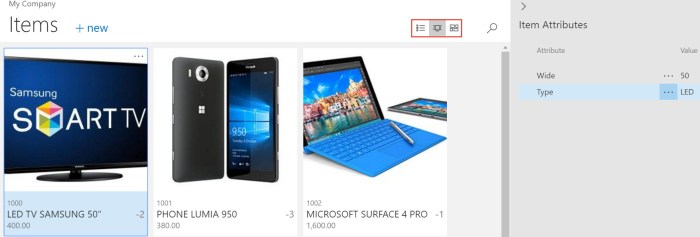
But if you choose Items, you can see more. Not only list and bricks, you can choose tiles as well. Difference is that you can put item picture on both bricks and tiles. Again, you can configure what you want to see by yourself:

ItemsTiles.jpg

Directions 2016 NAV Conferences

In this moment, we have the final countdown until Dynamics NAV conference season will start. We have 47 days until the opening Directions NA and 64 days until the opening Directions EMEA this year.

Directions.png

This year Direction NA will be held the first, but Directions EMEA will be only 17 days later and I’m sure we have something new on both of them. Currently we have published agenda only for Directions NA, but I’m pretty sure that agendas will be similar, maybe with only small changes.

I love these conferences and I’m sure you will find a lot of reasons to attend on one of them, depending where you actually live. I think that the most important reasons will be launching of NAV 2017 and Project “Madeira” as well as Dynamics 365. You will find a lot of sessions about news in these new products. You will also learn more about integration with other systems, about using of PowerShell, how to take advantage of using Managed Services, how to improve your knowledge in lot of different areas… Also, you will learn more about project management, user experience, get some real-life experience… You will enjoy in awesome Keynotes … and maybe the most important – meet new people. I think these kind of events are the best places for networking; people are the most important wealth… and you can find and meet a lot of them on these conferences because they are the biggest NAV conferences.

In the same time, you can attend Cloud Sure Step sessions or try to pass new NAV exams powered by Association of Dynamics Professionals. I advice you to try some of these exams; I had participation in some of them and I think they are very good way to prove your expertise.

And finally, I will be lecturer on both of these conferences and I hope I’ll meet a lot of you – amazing people. See you there:

NAV Madeira is NAV 2017

We know the name now. The next release of Microsoft Dynamics NAV will be NAV 2017. It is no longer a secret and we will not use the code name NAV “Madeira” in the future.

New version will have a lot of new improvements, but I’ll share more about it with you very soon (it is still by NDA). Currently, this is just a small fast news.

July 2016 NAV Cumulative Updates

Yesterday (July 5th) new NAV Cumulative Updates have been released. As usually in expectation of new NAV version, Microsoft published updates for the last four NAV versions:

You can download them for the previous links. If you are thinking if this is the right moment for your upgrade to the last version and the last Cumulative Update, the answer is YES. Very soon we will get the newest very impressive NAV version and this will be the first step in preparation for using the newest NAV version.

upgrade-dynamics-nav-course-img.png

As usually, NAV 2016 has the most of hotfixes, both platform and application, NAV 2015 slightly less and for the other two versions, just few of them. You can also find some local application hotfixes.


New Extensions for Project Madeira

When I run Project ‘Madeira’ for the first time, I found only three extensions there:

  • QuickBooks Data Migration
  • PayPal Payments Standard
  • Envestnet Yodlee Bank Feeds

All of them were created by Microsoft. But now, we can find eight of them (one new from Microsoft and few of them by ChargeLogic and Sana Commerce).

MadeiraExtensions.jpg

It looks nice to see new extensions here from other vendors. I hope we will have a hundreds of them in few months as well.

But I’m afraid about their visibility when we have a hundreds or thousands of them. I use brick view for the best visibility, and yes – search works fine, but I think we have to have some additional tags. Minimum I need is Category tag, because we will have a lot of completely different types of extensions (data migration, notifications, integrations, payment, some specific vertical or horizontal solutions, localisations,…). Also, it will be fine to have Market tab because some of extensions are for global market, but some of them will be only for some specific countries.

I expect to have some kind of rating as well. We will have a lot of similar extensions, and we need something for differentiation. I think these ideas can improve ‘Madeira’ experience. But it look it will be a great product.