Posting Groups #8 – Revaluation Posting

In my last post, I have touched Revaluation process, but only for Standard cost changing. We can use Revaluation for other cases, as well.

If we change cost only for items on stock, it will be the same situation as on previous example. But, if we want to change cost for already sold or consumed stock, it will be with some differences. First, when we change the cost, we will get the same entries, as I already show in previous post. But, when we run Adjust Cost – Item Entries batch job, we will get the new G/L entries.

I made three scenarios:

In the first scenario, I have raw material with FIFO cost type. I consume this raw material on production order to produce finish goods, configured as also FIFO cost type. In this case, result of posting in G/L entry will be as following:

RevPOfifo

In the second scenario, everything was the same, but only finish goods was configured as Standard cost type. In this case, result of posting in G/L entry will be a bit different, as following example:

RevPOstd

And, in the third scenario, I change the cost on already sold items. In this scenario, G/L entries will be as following:


RevSO

Posting Groups #7 – Change Standard Cost

If you use Standard cost type for your Items and you want to change it, you need to use Standard Cost Worksheet. When you run Implement Standard Cost Changes command, all changes will be moved to Revaluation Journal.

When you post Revaluation Journal, you will get following G/L entries, if you have cost increasing:

std_rev_1

If you have cost decreasing, you will get the same Accounts, but the different values, as following:

std_rev_2

Posting Groups #6 – Manufacturing Posting (Std. Cost Type)

In my previous post, I describe all G/L posting results when we do with production, but using FIFO costing method. It this new example, I will describe results of posting when we have finish goods with Costing Method configured as Standard.

In this case, we use the same flow chart for posting groups, as I have described in my previous post.

In this example, when we post consumption and output, we will get following entries in G/L Ledger. In this case, we will get entries from cost of Item consumption and cost of Work Centers using, and value for output Item based on Standard Cost:

C&OJPstd

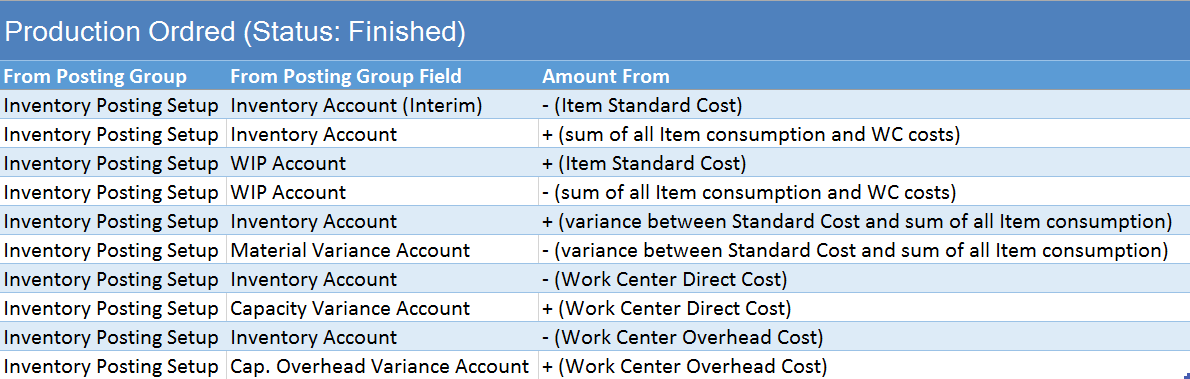
When we change status of Production Order to Finished, we will get additional G/L Entries. These are correction of standard cost on output Item and variance from standard to actual cost. You can find these entries in next table:

POsFstd

Posting Groups #5 – Manufacturing Posting

When we post manufacturing processes, we have Production Order as the base document. Then, we can use Production Journal (for posting in one step), or Consumption and Output Journals (for posting in two steps). Never mind, what you variant use, result in G/L Entries is the same.

In any case, we have some rules about using posting groups. Some posting groups are used from items, and other from work centers. In following chart, you can see how system uses posting groups in manufacturing posting.

Production Diagram

Difference in G/L Entries can be based on Costing Method you use for output items. It is not the same when you use Standard or some other costing methods. In this example, I will describe non-standard method (in this case I have used FIFO). I will describe using of standard method in next post.

In this example, when we post consumption and output, we will get following entries in G/L Ledger. These are only cost of Item consumption and cost of Work Centers using:

C&OJPfifo

When we change status of Production Order to Finished, we will get additional G/L Entries. These are cost of output Item, calculated from consumption Items and Work Centers usage. You can find these entries in next table:

POsFfifo

Posting Groups #4 – Adjust Cost – Item Entries Posting

When we run Adjust Cost – Item Entries batch job, system forwards any cost changes from inbound entries, to the related outbound entries. In our small example, we will see what we will get after post Item Charges to already sold items. Currently, we will use very simple example; we have only purchased and sold item.

In this example, automatic cost adjustment is not configured. We can use example with additional costs using Item Charge or using higher cost on Invoice in comparison with Receipt.

When we run this batch job, we will get G/L Entries as result. You can find completely description of them in next table:

ACIE-1

System will post only the difference between the higher and lower costs. System will use Inventory Posting Setup from Inventory Posting Group and Location on source document. On the same way, system will use General Posting Setup from the same source document, but from General Business and Production Posting Groups from document header and line.

In some other examples, it can be more complex posting, but I will process this examples in another articles.

MS Network 5 Retrospection

Last week, I was mainly in Neum (Bosnia and Herzegovina). Small town Neum on Adriatic see was a host of the MS Network 5, the biggest Microsoft Conference in Bosnia. I was on this conference for the second time, and I’m honored to be a part of this conference.

I have spent a 24 hours in my car on this trip, but I’m still happy about my participation on this conference. This is not Dynamics conference, but I was impressed how many people want to learn something about NAV. I had to stay an extra half-hour after the lecture to give an answers on all questions and I’m really happy about this. People want NAV and want to upgrade to the newest version.

Except my lecture, I attended on other sessions and learned a lot of news about other technology from my friends (outside NAV). I think I have to learn other technology every time I can. We have a small problems about internet in hotel, but this was a challenge how to prepare demo on Azure without internet :). But we solved all these problems, and everything was an awesome.

Big thank to Enis and other guys from Microsoft in Bosnia. I will gladly be a part of this conference the next year. We had adventures on trip (guys in my car know what I say) and big friendship on conference. In one word, awesome. See you.

WP_20150428_004

Posting Groups #3 – Item Charges Purchase Posting

When we post purchase of items, we have item charges very often. We can post item charges on the same order with items or on different one. In my example, I will use independent document for already receipted items.

In this case, we have the similar rules about using posting groups as we post item purchase. Some posting groups are used from document header, and other from document line, as I already described in older post. But, in this case some of posting groups are inherited from the already posted receipt. You can see all combination on following chart:

Dijagram Item Charge

When we post this document, we will get G/L Entries as result. You can find completely description of them in next table:

PPI-ic

Posting Groups #2 – Item Sale Posting

Similar as purchasing, when we want to post item sale, we can do it in one step (posting shipment and invoice in the same time) or in two steps (posting shipment in the first step, and then posting invoice). You can also use some additional ways with Warehouse Management, but the G/L entries will be the same.
In my example, I have used second way with line and invoice discounts, for better example.
But, in any case as in purchase model, we have some rules about posting groups. Some posting groups are used from document header, and other from document line. In following chart, you can see how system uses posting groups on documents.
Dijagram Sale
When we finish posting of shipment, we will get only two entries in G/L Ledger. These are only entries about inventory:
PSS-i
When we post invoice related with posted shipment, we will get more entries in G/L Entries. You can find completely description of them in next table:
PSI-i

Posting Groups #1 – Item Purchase Posting

When we want to post item purchase, we can do it in one step (posting receipt and invoice in the same time) or in two steps (posting receipt in the first step, and then posting invoice). In my example, I have used second example. In my example, I also use line and invoice discounts, for better example.

But, in any case, we have some rules about posting groups. Some posting groups are used from document header, and other from document line. In following chart, you can see how system uses posting groups on documents.

Dijagram

When we finish posting of receipt, we will get only two entries in G/L Ledger. These are only entries about inventory:

PPR-i

When we post invoice related with posted receipt, we will get more entries in G/L Entries. You can find completely description of them in next table:

PPI-i1

Using of Posting Groups – Table of Content

Posting groups in Microsoft Dynamics NAV are very important part of configuration process. All G/L Entries depends of correctly configured posting groups. We can find a lot of them: General Business and Product Posting Groups, VAT Business and Product Posting Groups, Customer and Vendor Posting Groups, Inventory Posting Groups…

Sometime, it is very confusing how it works, especially for unexperienced people. Because of that, I will prepare small school of using of posting groups. In following posts, I will prepare a lot of examples to be clear what we get.

This post will be updated with TOC of all regarding posts to have everything on one place.

A) Purchase & Sales

A1) Item Purchase Posting

A2) Item Sales Posting

A3) Item Charges Purchase Posting

A4) Item Sale Posting with Payment Method

A5) Item Returns Posting (Sales & Purchase)

A6) Finance Charge Memos and Reminders with Fees

A7) Prepayments Posting

A8) Payment Posting with same and different currencies

A9) Payment Discounts and Tolerances

A10) Deferrals in Purchase

A11) Deferrals in Sales

B) Inventory Management

B1) Adjust Cost – Item Entries Posting

B2) Change Standard Cost (using Revaluation)

B3) Revaluation Posting

B4) Assembly Orders

C) Production Management

C1) Manufacturing Posting (FIFO & Average)

C2) Manufacturing Posting (Standard Cost Type)

D) Fixed Assets

D1) FA Purchase Posting (Acquisition and Maintenance)

D2) FA Depreciation Posting

D3) FA Reclassification Journal Posting

D4) FA Sales Posting

D5) FA Sales Credit Memo Posting

D6) FA Write-Down and Appreciation Posting

D7) FA Disposal Posting

E) Jobs

E1) Item Purchase for Job Posting

E2) Job WIP Posting (part 1)

E3) Job WIP Posting (part 2)

E4) Job WIP Posting (part 3) – Cost Value WIP Method

F) Service Management

F1) Consumption and Invoicing using Service Order

F2) Posting in Service Order with Warranty Option