Automatic Recording Permissions in NAV 2016

In older NAV versions, every time we needed more permissions sets then we already have in NAV, we have had a problem. It was not so easy and we had to be careful with this process. There was no some automatic tool for permissions recording. Now, we got it.

If we need more permissions sets, we can make them manually as earlier. But now we can use new automatic tool as well. This tool for recording permissions is based on the code coverage functionality. We can do more different activities on NAV and it will be recorded.

permissionset

We just need to create a new Permission Set and choose Permissions. We need to click Start button and then we have to work all activities this role need to do. For example, open Sales Orders, create new, and create new Customer and new Item. When you finish with activities, click Stop button on Permissions and system will fill your page with all user rights. System will add only tables you used with Read permission; you have to add other permissions you need (Insert, Modify, Delete).

If you have forget some activities, you can do it again and after you click Yes on question “Do you want to add the recorded permissions?”, you will get add new rights.

This is really useful feature. Maybe we could use some of similar solutions, but now we have it in standard NAV.

Sending Electronic Invoice in NAV 2016

We already be able to send invoice as e.g. PDF in mail attachment and it was good feature, but now in NAV 2016 we can do more. We have a really new good feature for invoice sending. Now, we can send business documents electronically. The same situation is for purchase documents; we can receive and convert vendor’s invoices to a purchase invoices in NAV. As document exchange service, we will use external provider. Standard NAV will support sending and receiving electronic invoices and credit memos in the PEPPOL format.

Before we start with using electronic documents, we need to configure Document Exchange Service Setup.

e1

Then, we have to make Document Sending Profile as we need. This is place where we can choose how we want to send our invoice to customer. If we want to send electronic document directly Through Document Exchange Service, you need to set it and then choose format.

e2

After that, we have to add this profile to our customer. Before we send document to our customer, it must have configured VAT Registration No. or GLN. To send document, we have to choose Post and Send on our Sales Invoice and system will send it.

We can also decide to send our sales invoice in electronic format as mail attachment. To do it, we have to configure Document Sending Profile on different way:

e3

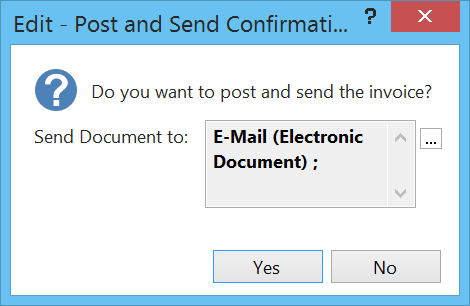
Now, when we run Post and Send on our Sales Invoice, system will make an e-mail (every time when we choose Post and Send system will give us possibility to change way of document preparation and sending).

e4

When you see your electronic document, you can see that it is an XML file. You can also choose to save this document on disc or some other possibilities.

e5

NAV 2016 Web/Tablet Client – Multi Company and Language

One of the lacks in old Web Client was impossibility to change companies and/or languages. It was pretty inconvenient for using. Answers from Microsoft were that we have to use different Web Server Instances. But, imagine we have 10 companies and we need 3 languages. What the final number of Web Server Instances will be necessary?

I suppose my customers will survive this issue on Web Client, but imagine one manager who manage 10 companies and uses Tablet Client. We cannot expect from on manager to change instances for each of his companies.

websettings

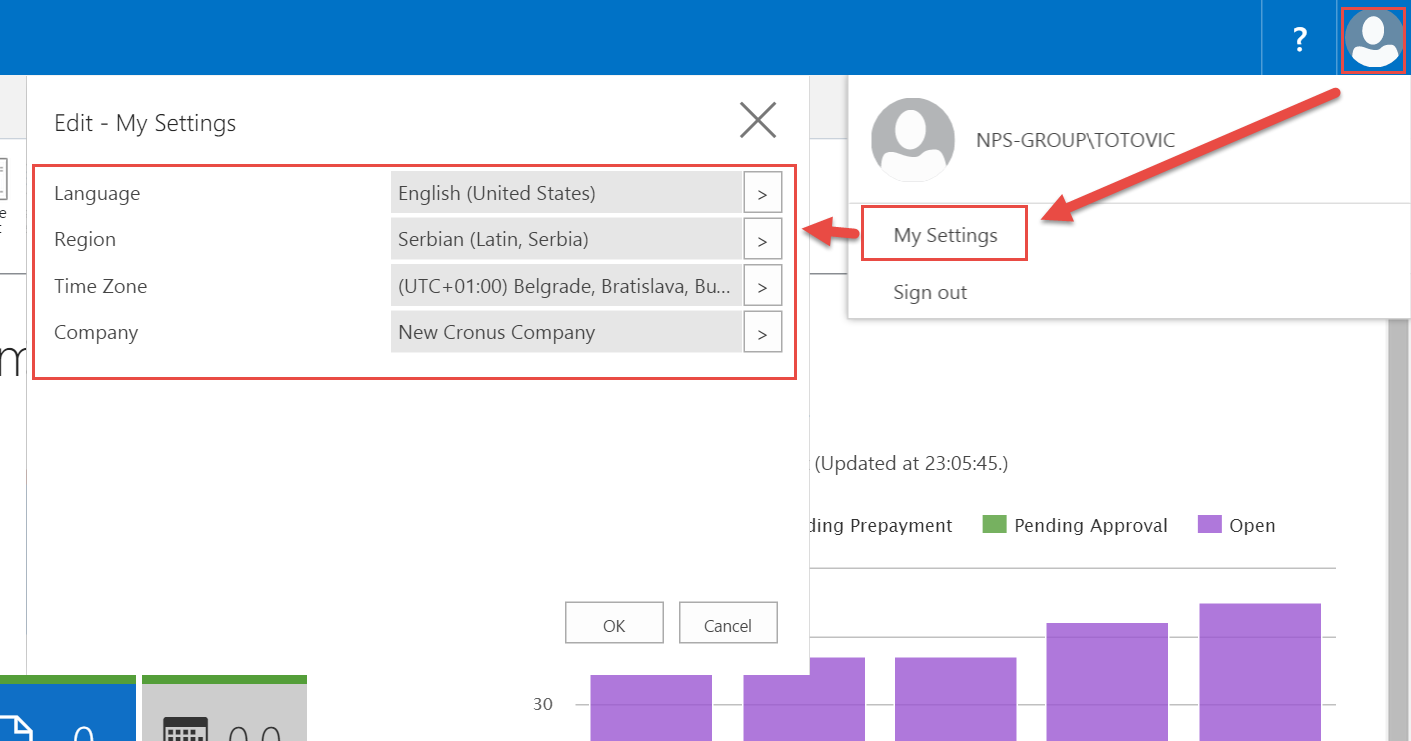
But, as I said, it was a problem. Only, it was. Finally we have got a solution for our wishes. Microsoft is listening us. We got everything we ask and more. Now it is now possible to dynamically switch the language, region, time zone, company, and work date of the Microsoft Dynamics NAV Web Client. As I said, it is more then we ask. But, the best is we can use it on Tablet and Phone Client as well.

tablet sett

For the most changes, we just need to set changes and sign out and sign in again to have the change take effect. We can change it using “My Settings” command. These settings are now removed from the Web.config file and it is now part of Web Client user configuration.

NAV 2016 Web/Tablet Client – Freeze Pane

In Microsoft Dynamics NAV 2016 Web and Tablet Client, we can use Freeze Pane. We cannot configure it in Web Client, but we can use it here. If you want to configure Freeze Pane, you have to do it in Windows Client.

webfreeze

If you do not specify Freeze Pane, system will froze the first columns by default in Web and Tablet Client. Web Client is not so clear as Windows Client and this small feature is the important to make Web Client more used.

NAV 2016 Web/Tablet Client – Hiding/Showing Columns

Web Client in NAV 2015 was really good, but it still needed some small improvements. I was in situation to provide only Web Client to one my small client. So it was my research, whether it is possible to use only Web Client.

My conclusion was that it is possible. When you don’t know for Windows Client, Web Client is just fine. Maybe it is not the most comfortable, but it is fine (especially for smaller clients). But if you now for something better (Windows Client) then Web Client has a lot of small limitations.

Now, with new NAV (2016) release, Microsoft has improved lot of them and I can notice that Web Client is better than Windows Client in some points. One of the biggest lacks was impossibility to hide and show columns.

Now, we can do it very easy. By my opinion, it is better made in comparison with Windows Client. You just need to press right-click on heading and choose Hide Column or Choose Column.

showhide1

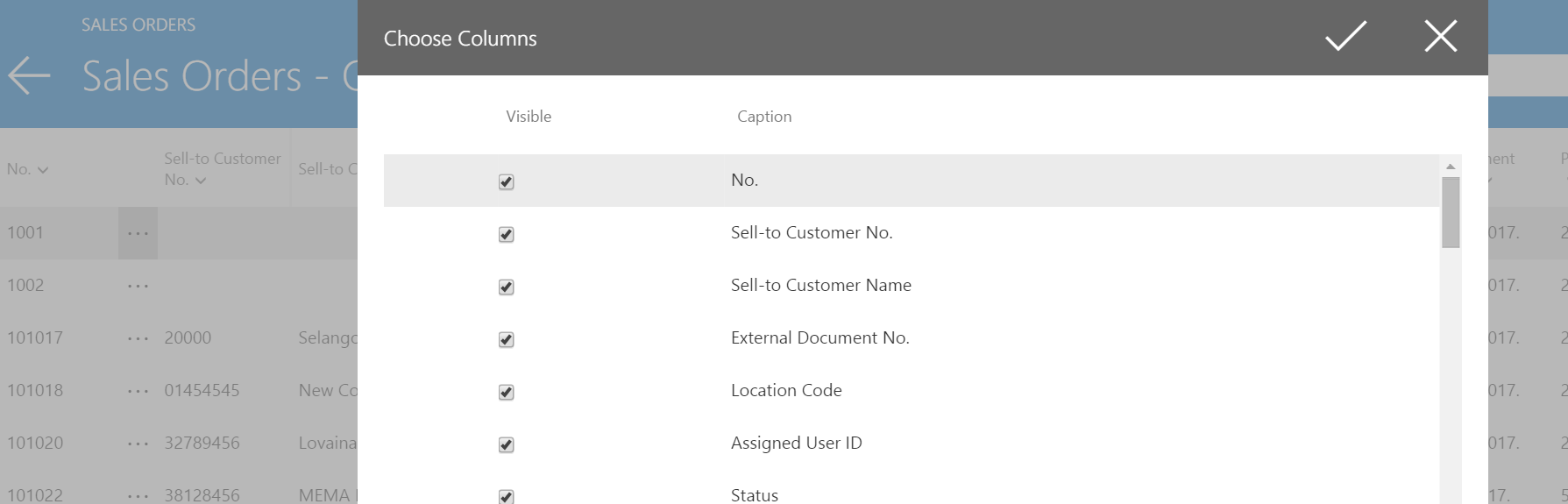
If you want to choose Choose Column, you will open something very similar as in old Classic Client and choose what field you want to display. I just love this small feature. It is easy and fast way to choose columns. The setting will be saved for the next time you use NAV.

showhide2

OK, unfortunately it still have some limitations. Columns are added based on the same order, as they are specified on the page; they cannot be reordered. And to not forget, the same feature is on Tablet Client as well and you can see it is very similar.

showhide3

And finally, these are not the only improvements on Web and Tablet Clients. We have a lot of them and I will show some of them in future posts in few following days.

Directions EMEA 2015 Review

One day after Directions EMEA was closed. I’m again in my country and I’m in my company again. NAV 2016 is now reality and unfortunately, there is no localization for my country; we’ve just started with localization process.

The last three days in Mannheim were amazing. We have had the biggest Direction EMEA event ever with 1369 attendees from 532 companies and 42 countries. Event organization was simple perfect; everything was as you expect and Congress Center Rosengarten was the excellent place. And not to forget, we have had beautiful Oktoberfest theme dinner.

WP_20151004_001

Unfortunately because of my backache, I could not be involved in event as I really want. But, I’ve tried to see as many sessions as I could. There were awesome sessions about NAV 2016, MVP track and really good other tracks. There were also phenomenal workshops and Cloud SureStep track as well. Maybe I’ve forget some of tracks, but all of them were amazing. And it was the first time I’ve had my own session on Directions. In was beautiful feeling and the great honor.

About new NAV 2016, as an MVP I’ve been part of the ACE program and I already saw the most of new features, but all sessions about these news were still very interesting. All these news are amazing and it was very hard not to talk about them.

And now we will have Directions NA in two following weeks in Orlando. I hope, it will be the great event as well. I will be there for the first time in my life and I will have my session again.

WP_20151007_007

After this event we will finishing with Directions season this year. I’ll waiting next year and new Directions season. Directions EMEA 2016 will be in Prague on October 12-14. See you there next year with new NAV ‘Madeira’.

New C/AL Editor in NAV 2016

Microsoft Dynamics NAV 2016 has finally introduced a new code editor as we used for the years on other platforms. But this time, Microsoft did a really good work. Now, it is really good editor with a lot of new features, people always ask.

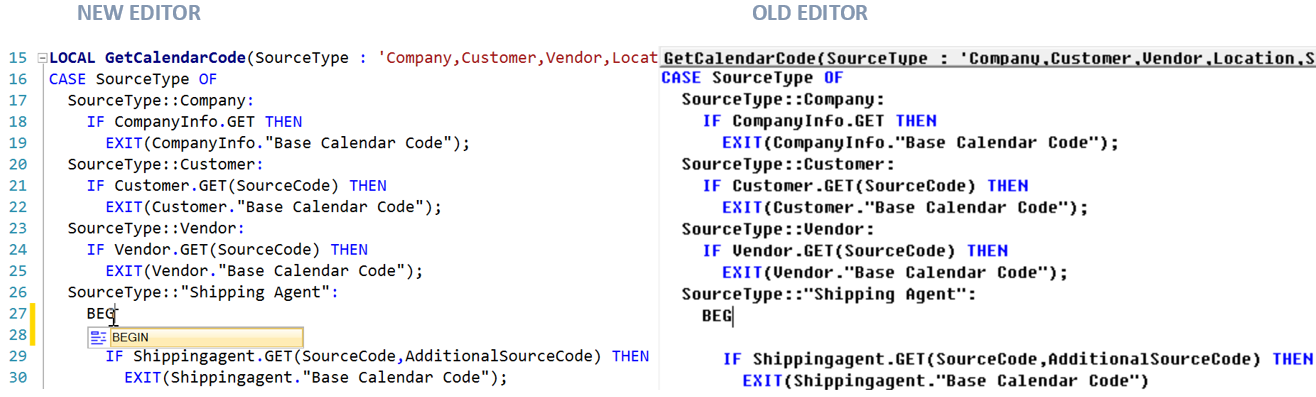
When we compare old and new editor, there are a lot of differences on the first sight.

CALs

On the first sight, we can see different showed Triggers. If we try to type some command, variable, constant, function…, we will see that we have autocompleting tool which help us in typing. Then we can see we have line numbers as well and proper syntax highlighting for comments, strings… We can also use very nice syntax tooltip and we have “Undo” function. You can also get very useful information when you put your mouse over…

CAL1

These are not all improvements, but some of the most interesting. Run you C/AL editor in NAV 2016 and try. Great news in NAV 2016 and really good job.

NAV 2016 System Requirements

Since begin of August, I’ve tried to research what are the minimum system requirements for Microsoft Dynamics NAV 2016. First I’ve published one post about it, but I’ve deleted it. It wasn’t completed. Now, I have the freshest tested information and I hope everything will be fine in the production, as well.

In this process I’ve checked only NAV and Web Server and Windows Client requirements. You can find all my conclusions in following text. But you must to know, there are not officially requirements; these requirements are based only on my testing.

Supported Operating Systems (Server and Windows Client)

First, NAV Sever works only on 64-bit edition of operating systems. I’ve concluded that these OS are completely qualified as base for NAV and Web Server:

  • Windows Server 2008 R2
  • Windows Server 2012
  • Windows Server 2012 R2
  • Windows Server 2016 (Technical Preview 3)
  • Windows 7
  • Windows 8
  • Windows 8.1
  • Windows 10

You can see I’ve also checked installation on next Windows Server release – Windows Server 2016 (Technical Preview 3) and everything was working fine.

Older OS as Windows Server 2008 R2 and Windows 7 also require some additional software as Windows PowerShell 3.0. You can download Windows PowerShell 3.0 as part of Windows Management Framework 3.0.

Also, all these operating systems require enabled Windows Search. If this is not enabled on your server, you can do it adding new Windows Search role in Server Manager.

If you want to run Microsoft Dynamics NAV 2016 Windows Client, you can do it on the same operating systems, but you can do it on both of them, 64-bit or 32-bit editions. If you install Windows Client on some of the 64-bit edition OS’s, you will get two Windows Clients (32-bit and 64-bit); 64-bit will be by default, but you can change default client as well. But if you install on 32-bit OS edition, you will get only 32-bit Windows Client. I will explain more about it in new post.

SQL Servers

The same situation is as for OS, SQL Servers also require 64-bit editions only. You can use NAV 2016 on following SQL Servers:

  • Microsoft SQL Server 2008 R2 (SQL Server 2008 R2 is out of mainstream support, but I’ve tested NAV 2016 and in my tests everything was fine; but I think we have to make more tests in any case)
  • Microsoft SQL Server 2012
  • Microsoft SQL Server 2014
  • Microsoft SQL Server 2016 CTP2.2
  • Azure SQL Server

You can see that I also check installation on next SQL release – Microsoft SQL Server 2016 CTP2.2 and everything was working fine. This will be helpful in the future with information about new Windows Server.

About using NAV 2016 on Azure SQL, I have to say much more. It is a really good news and I will write a new post only about it.

Hardware sizing

All of these configuration I’ve checked, have worked with minimum 1,75GB RAM.

REMARK:

As I already said, these are not officially Microsoft system requirements. These are information based on my personal testing and they will maybe be different in officially release.

NAV 2016 on MVP’s blogs

Last two days we can find a lot of good new about NAV 2016. I want to give you links to other very interesting articles written by few MVPs. You can find them in following:

Waldo’s blog:

Brummel blog:

Hougaard blog:

Vjeko’s blog:

Kauffmann’s blog:

And, of course official Microsoft Dynamics blog:

Keep reading. Sorry if I forgot someone.