Marketing Campaign Automation in Click Dimensions – Step by step

In my previous blog about making marketing campaign automation in Click Dimensions, I just wanted to cover top processes and share an idea how I solved this requirement. But when you know what you want, creating Marketing Campaign Automation in Click Dimensions is not so complex, and now I’ll show you how to do it, but this time step-by-step.

Marketing List

I prefer to start with creating Marketing List, because you will use it in creating automation, and it won’t be a good idea to forget it.

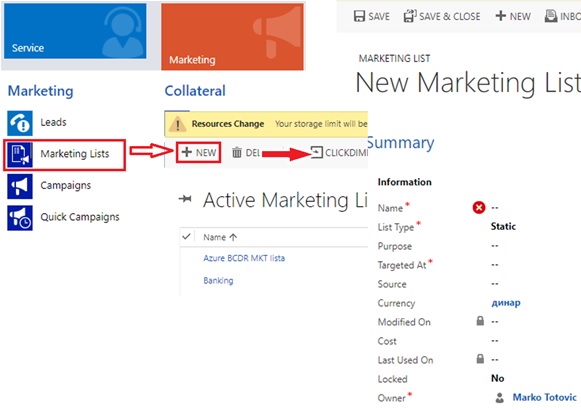
So, everybody who has ever used Microsoft Dynamics 365 for Sales knows how to create marketing list, but I will explain it in a few sentences. First you are going to the Marketing card, and in the row Marketing you will see Marketing Lists. After entering the marketing list, you need to fulfill what is necessary in creating marketing list.
CD1.jpg

I will not be so long on this, but everything is shown on pictures, so if somebody is doing this for the first time please follow the pictures.

Email Templates

Now we are coming in to Click Dimensions, so who have not ever used Click Dimensions I will explain everything step by step, and for those who already use Click Dimensions, maybe you will learn something new.

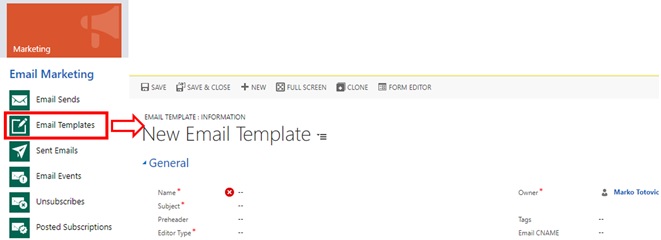
So, Click Dimensions is located on Marketing card, so you are probably figuring that we won’t go out of Marketing card in creating this automation. Let’s go back on creating, first we have to create Email Template. We are going to row Email Marketing, where we will find and enter it to the Email Templates.
CD2.jpg

After we entered this, we are starting with creating an Email Template, so we first have to fulfill necessary data, and then click on Save (as creating everything in Dynamics 365 for Sales). After saving your data you have to enter this in the editor to really create template.

In editor, way of working is ‘drag & drop’, so it is easy and intuitive. So, you need to choose what you will put in your email, and just save it.

CD3.jpg

Depends on how many emails you want to send in one automation, you have to create as much email templates.

Campaign Automation

As you see this is going pretty easy and fast. So, we’ve came to the main thing in this step by step explanation. So, we are still on Marketing Card, and this time we are going in row Marketing Automation where we have to enter only one thing we have in this row, and that is Campaign Automation.

CD4.jpg

After entering it you just need to begin with creation of regular New Campaign Automation. After you open a Campaign Creator, you will see that the only thing that is mandatory to fulfill is the Name of this Campaign, and after typing the name we just must save this, and to be prepared to go into the Builder where we will create the campaign.

Builder

Builder is placed on the ribbon inside of Campaign Automation you’ve created, and you have to enter it from the start with creating with your automation.

CD5

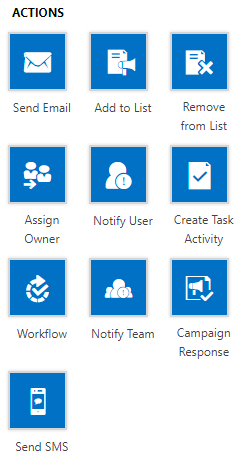
The Builder is intuitive created, and you can work easy through this process. It has ’Triggers’, ’Actions’, ’Timers’, and ’Series’. In this text I will explain how to use only some of the triggers, and actions.

So, we will start with trigger ’Added to List’ and this works as drag & drop, so you just have to choose what you will use and to move it to white background. And after starting with our trigger, we will add the next one as action, and in this example, this action will be ’Send Email’.

CD6.jpg

After doing this, we will again use one trigger, and not this is an ’Email Interaction’. And just to know, when trigger is not used on the beginning of the whole design it will have ’yes’ and ’no’ conditions sides. It is important to know that you can’t finish with opened any of these sides of trigger, without actions. So, it is better to have the trigger on the beginning (to avoid thinking what actions to put on both of sides). After we add our second trigger, we will first focus on our ‘true’ side. Because it is some email campaign we will use in ‘true’ side action ’Assign Owner’ and in ‘false’ side ’Remove from List’. Now we have just created what campaign will do, and you just have to fulfill some more information and we have finished.

First by clicking on first trigger ’added to list’ you will see on the right side that instead of triggers and actions something new appear, and in that place in first trigger, you just have to bring your marketing list which is mandatory, and to check check-box for ’Run on entire list’. That means that this automation will collect all your contacts from your marketing list, but if you type in some new contact, this automation will automatically add it to list.

After this is finished, we are going on our action in the same way by clicking on it. Now you will have to type some more information, but not so much. Mandatory is to select which email template you want to use in this automation, so you will use one you have created on the beginning. After that you have to type in subject, and to choose from which name and email address this mail will be sent.

After that, you have to go on the next trigger, and you have to choose from which series the email will be sent, and in can be only that you’ve used in a step before. After that you have to choose what is an interaction you want to monitor (email clicking, or email opened). In this example, I’ll use clicking. And only timer configuration is left if you want to use it. I’ve set here on the timer that if in 3 days nothing happens that this interaction is going in to ‘false’ side.

If condition is positive, we’ve put action ’Assign Owner’ and setting up of this action is easy. You have just to choose a display name, and to type which user will be assigned if somebody open our email.

If our condition is negative, it is similar. You just have to choose from which list you want to delete if somebody didn’t respond to campaign. Of course, it will be the list from which you have started. This is because, as I already mentioned, we must have action on the end of each condition.

CD7

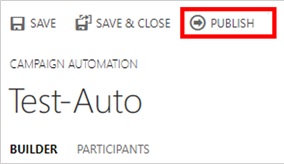
And we finally arrived at the end. It just left to save this, and after saving, you just have to click ’PUBLISH’ and whole Campaign Automation is starting, as your email is sent.
CD8.jpg

Making Flow in Click Dimensions – Marketing Automation

Today I had a challenge or maybe opportunity 😊 to set up marketing automation process in Click Dimensions Campaign Automation for the first time. This is reason I want to share this experience with you.

In the beginning it looked pretty easy, and I just needed to create few email templates (it depends how much templates we need), after that I have to create marketing list and to create new campaign automation which look pretty easy because it works on the first sight as Microsoft Flow, just with less actions and triggers.

As I said, looked quite easy. When you enter the campaign automation builder, it looks like you will finish just in a few minutes, and you will do it, just if you know some “secret weapons” 😊.

Of course, every time when you are working with some kind of workflows, you must start with triggers, and to continue with actions and triggers in combination as much as you need. But in my case, I had to start with email trigger and as much as I wanted to finish it, it always made some issues. After a few attempts I realized that my email triggers have a problem in that it doesn’t know which email to use. But if you want to begin with saying this mail you will use is not possible to use because this is an action, and of course you can’t start with an action…

CD 2

After a lot of thinking and trying to get over this problem, because there are not a lot of triggers I realized that I must begin with Manual Entry (which is note normal to use, when you have a few hundreds or thousands emails to enter in list), and that was a problem. But as I said in the beginning of this article, it is not hard to work in Click Dimensions campaign automation, but you have to know some things, and I realized that the best way was to start with marketing list triggers entry and it finally started working.

CD 3.PNG

Then it came to the next problem, but this time on the end, because we must close the triggers. Just to be clear, in Click Dimensions Campaign Automation, at the end of builder, you must put the action, so again it was problem to realize which action would be normal to use; when you compare it with Microsoft Flow, it can be little bit confused, because Flow doesn’t require it. If I use email action again, it will be in some circle which could never be closed, and further I didn’t want to delete someone from my marketing list because they didn’t answer to this campaign, because they will maybe respond at the next, and my trouble continues. But I realized that there is no other way to close it except of using ‘remove’ from the list action. Again, I had to get over new problem to finish this campaign automation, and with little thinking I remembered to create the clone of my marketing list and to use it from beginning of my campaign automation process, and in that way, I will keep my marketing list on original one.

These problems took me some time, but after resolving all of them, I found out that using of Click Dimensions Campaign Automation process if quite easy, but you need to try few times before it works, and after some time of using it often you will really create every Campaign Automation in few minutes.

CD 1

My Session(s) on eXtreme 365 Conference

This year I’ll start with my sessions little bit earlier then usually. My first conference where I’ll have a lecture will be eXtreme in Dubrovnik. In a past, this conference was mainly for the Dynamics CRM solutions, but from the 2017., we have not only CRM, but AX, NAV… as well.

So, this year I’ll be there with minimum one session. I’ll speak about Dynamics 365 ‘Tenerife’ (and NAV as well) in a real world of integrations using Flow and CDS. I hope it will be interesting. If I’ll have more lectures, I’ll announce it here as well.

In a mean time, you can go and check more details about eXtreme 365 conference here, and I recommend to register if this is suitable for you.

eXtreme365.PNG

NAV 2018 Web Client Improvements

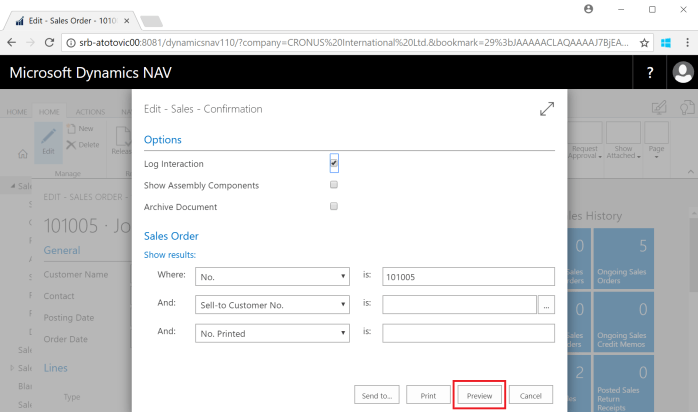
With new Dynamics 2018, there is a lot of improvement in a Web Client. One of the first improvements is availability of Print Preview for non-Internet Explorer browsers (Google Chrome, Microsoft Edge, Mozilla Firefox, Safari). In these cases, the Preview button didn’t appear on the request pages of reports. Now it exists.

Preview1.PNG

We have possibilities to change size of previewed document, use “select text” or “pan the document”, as well as download document or print it from preview.

Preview2.PNG

On the other side, now we can use Web Client as tool for user personalization. Of course, when we change something, it can be viewed in Windows Client as well, but place for configuration is Web Client.

I think that Web Client is good enough and it can be used as the main client (as we have in Dynamics 365 ‘Tenerife’); of course, some of the features are still better in Windows Client, but this client can be used in regular daily business (I know some of my colleagues will not agree with me, but I think this is more related with our habits). But I expect more and more new features in Web Client (we already saw future UX on Directions).

In some features, I more prefer Web Client in comparison with Windows Client (example is Ribbon on documents, where we have all actions for lines in the main ribbon).

Ribbon3.PNG

OK, there is a still some limitations and you can find them on the following links for both, NAV 2018 and NAV 2017.

Browser Limitations with the Microsoft Dynamics NAV Web Client:

·        Dynamics NAV 2018

·        Dynamics NAV 2017

Feature Limitations of the Microsoft Dynamics NAV Web Client:

·        Dynamics NAV 2018

·        Dynamics NAV 2017

Dynamics NAV and Microsoft Flow

Hi, for all of you who want to learn how to use Dynamics NAV and Dynamics 365 for Financials with Microsoft Flow in a practice, I’ll provide webinar together with NAVUG.

navug

Today I just want to share this information with you and I’ll keep you in touch. Soon more on NAVUG web site. For now, just to save a date, it will be at Wednesday, February 14, 2018 (9:00AM-10:00AM EST).

All sessions from NAV TechDays 2017

NAV TechDays 2017 has just finished a few days ago and I already wrote about my expressions. Now, all sessions are already published and I want to have all of them on the one place. There are all of them:

Opening Keynote

Deep dive into the new development tools by Stanislaw Stempin, Jesper Schulz-Wedde and Esben Nyhuus Kristoffersen (all from Microsoft Development Center Copenhagen)

Desktop & Mobile Client Enhancements by Horina Serbanescu, Andrea Tino and Tomas Grubliauskas (all from Microsoft Development Center Copenhagen)

Application SaaSification by Henrik Frovst Madsen and Tommaso Pimpo (all from Microsoft Development Center Copenhagen)

Azure Functions Deep Dive by Vjeko Babic (Cloud Ready Software)

C/AL, Coding for Performance by Jasminka Thunes (NxM Business Solutions) and Jörg Stryk (STRYK System Improvement)

Creating great API’s by Anders Larsen and Nikola Kukrika (all from Microsoft Development Center Copenhagen)

Rock ‘n Roll with VSCode by Waldo (iFacto & Cloud Ready Software)

PowerApps, Common Data Services and Common Data Model by Michael Nielsen (ForNAV) and Mark Brummel (NAV Skills)

Easier and DevOps-friendly Dynamics NAV environments using Docker / Windows Containers by Tobias Fenster (Axians Infoma), Jakub Vaňák (Marques Olivia) and Freddy Kristiansen (MDCC)

Best practices to get automated tests running on your solution by Luc van Vugt (fluxxus.nl) and James Crowter (Technology Management)

Office 365 business apps powered by Dynamics 365 “Tenerife” platform by Ievgenii Korovin, Andreas Moth and Monica Ahuja (all from Microsoft Development Center Copenhagen)

Source Code Management with Visual Studio Code Made Easy by Soren Klemmensen (360 Visibility) and Jonas Andersen (Elbek & Vejrup)

Enjoy and see you there the next year…

NAV TechDays 2017 Recap

One day after NAV TechDays 2017 in Antwerp is finished. Again, amazing conference with 1.236 attendees this year and big thanks to Luc Van Dyck for organization of this event.

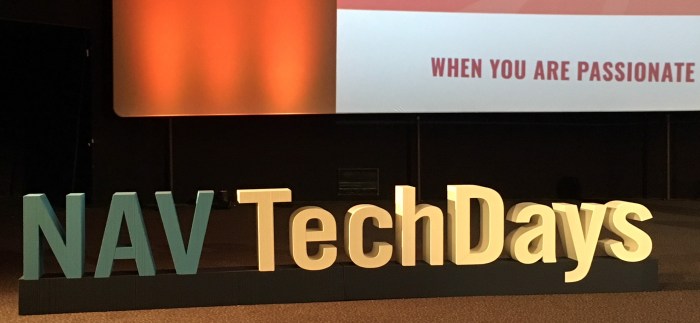
NAVTechDays1.JPG

There were a plenty of amazing sessions provided by Microsoft staff and by some well known MVPs. But I think that this NAV TechDays is marked with new NAV and Dynamics 365 ‘Tenerife’ challenge, ie Extensions v2 in Visual Studio Code, new integration directions, new deployment models… I don’ want to write in detail about all these sessions; as I mentioned all where I was been were amazing. But soon, they will be published on mibuso official channel on YouTube and I’ll make reference on them in the next article when they will be published. And, then all of you who were not been there can see these sessions.

NAVTechDays2

But just to know, attending this conference is not just about sessions, but also networking, because you can fins 1.000+ professionals all around the world on one place.

I’m waiting the next year and November 22-23 in Antwerp (schedule these dates right now). And once more, thank to Luc, all speakers and sponsors…

Translation in Extensions in NAV / D365 Tenerife

Today is announced November Update for new NAV Development Environment. There a lot of good things in this preview, but by my opinion one thing stands out. Maybe I think so, because I’m from countries where Microsoft doesn’t prepare official localization, and because of that partners need to do it by them self.

Anyway, from this update, it is possible to add translation to Extensions. This is the first step in providing localization via extensions. I don’t want to say that everything else is simplify, but this was necessary feature to do it. OK, translation will not be made as before, and now we need to accept different approach, but feature is here.

translation.png

I don’t want to write about this and other features in detail, because this is already published on Microsoft official blog and you can read there.

The most important NAV events in 2018

We’ve just finished amazing NAVUG Summit in Nashville and got all confirmation about NAV future as SaaS and on-prem options. But in this period we can start to make a plan for the next year about the most important events, because almost all of them are already announced.

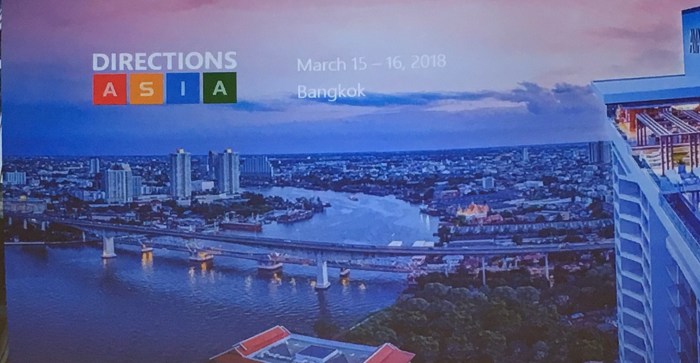
First in the spring 2018, we will have Directions Asia in Bangkok in period March 15 – 16. By my opinion, this event will be very important to attend, because Dynamics 365 ‘Tenerife’ is planed for this spring.

Bangok.JPG

After that, one month later we will move to Europe to Summit EMEA in Dublin, Ireland in period from April 24th to 26th.

Dublin.PNG

Later this year after summer, on the fall 2018, we will have another well known conferences. First we will start with Directions NA, this time in beautiful California, in San Diego between September 30 and October 3.

SanDiego.JPG

This time, NAVUG Summit will come before Directions EMEA, and it will be in October 15-18 at sunny Arizona in Phoenix.

Phoenix.JPG

And on the end, one month after North America premiere, we will have Directions EMEA, this time in Hague in Netherlands. It will be held in period October 31 – November 2.

Hague

Of course, we have one more very important – NAV TechDays, but we still don’t know when it will be the next year.

But if you want to plan all Dynamics important conferences (these four and even more), you can open my page with Dynamics conferences with all details.

The future of NAV – a small wrap up

These days we got a lot of messages about the future of our product – Dynamics NAV. Now I’m seating in a plane and traveling to Nashville on NAVUG Summit and finally have found some time to make a small wrap up with all important things. I think now, after two Directions in North America and EMEA, picture is clearer.

Roadmap

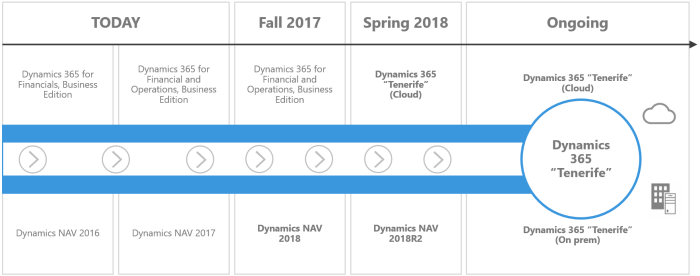
The first thing I want to mention is roadmap of Dynamics NAV. I think it is absolutely clear that in this moment we have Dynamics NAV 2017 as ‘on prem’ and ‘on cloud ready’ solution, but as SaaS, we have Dynamics 365 for Financial and Operations Business Edition, generally based on Dynamics NAV. But this is just in this moment, because Marko Perisic announced in Madrid last week that we will have published Dynamics NAV 2018 at December 1st. This announced is mostly based on partners feedback and this is absolutely this what partners wanted. For now, SaaS solution will stay the same, with the same name and in the same countries (US, Canada and UK). But with this new NAV version, partners will get new solution and the most important, with this new NAV version they can start to use Visual Studio Code for Extensions v2. This is important because partners now can start immediately with new model of development and to be ready for the spring and new solution.

NAV##1

At the spring 2018, we will finally get already announced new product – Dynamics 365 “Tenerife”, but only as cloud SaaS solution. As on-prem solution, we will get Dynamics NAV 2018 R2, but with the same code base as Dynamics 365 “Tenerife”. In this moment I don’t know a reason why we will still have the same product with the different names ‘on cloud’ and ‘on prem’. But very soon, we will continue with only one name – currently code name Dynamics 365 ‘Tenerife’. System will have new modern web interface, sandbox and lot of new features (more about it in another post).

And ant the spring, we will get Dynamics 365 for Sales App with less features (ex Business Edition) and Dynamics 365 for Marketing as preview. Both of these products was presented on Directions and they really look nice and rich.

New Package – New Opportunities

As I said, I don’t want to write about all new features in the future release, but what with the whole package. The main idea is to stop to implement ERP and/or CRM; but to continue to implement full business solution. This is what clients need; they don’t care what part of system it is, the just need to solve their problems and their requirements. And as the new business solution, we will have Dynamics 365 as business solution who cover most of the potential client’s needs. That means we will not sell e.g. ERP, but solution. In this solution we will see what real requirements client has and implement adequate Apps with adequate level of features. Price will depend of this, but we will don’t know prices, because of lot of changes. By my opinion, very important is that now we can combine Apps from ex Business Edition and ex Enterprise Edition. With this we will have more agility in implementation process. And of course, all of this will be integrated with Common Data Service. And even better, we can use CDS for our integrations. We can use not only Dynamics 365 Apps, but also PowerApps, Flow, Office 365, Power BI, 3th party Apps… as the same business environment.

NAV##2

Conclusion

The final message is by my opinion very clear and very positive. For both partners and customers. Don’t afraid, Microsoft will not stop with this amazing product. Rebranding is not canceling. But with new name, we will get still the same powerful product, but with the great new opportunities as well.

I can write probably more, but I think this is more than enough as the first wrap up after two Directions. Future of our product is a clear.