Dynamics 365 Finance Release Date

Today on NAVUG Summit, we finally got a release date of new Dynamics 365 Finance (ex Project “Madeira”). Dynamics 365 Finance will be available at November 1st.

Dyn365Available.jpg

It will be available just one week after general availability of NAV 2017. But, this availability will be for US and Canada market. I’m still not sure, but I expect Dynamics 365 Finance for Europe market in Q1 or Q2 next year. I cannot wait this moment because I strongly believe this is a product which will make a huge impact on global ERP market.

OK, tomorrow is new day and the start of new conference – Directions EMEA. We will wait and I’m sure we will get some new interesting things from beginning.

NAV Between Two Directions

I didn’t write so much in the last few days. I was on a small vacation after Directions NA. Now I’m waiting my flight and I just heard my flight is delayed. It will be a long trip and because of that I’ve found some time for writing on the Vegas airport.

Directions NA has just finished and I think we got two fabulous products – NAV 2017 and Dynamics 365 Financials. OK, we are still waiting the final releases, but we could see almost everything about them. And I’m writing “Dynamics 365 Financials”, not “Project Madeira”, because few days ago I saw new name in my solution. That means we will not use Project “Madeira” name in the future.

dyn365fin

Looks fine and I’ll use to use this new name. And what we got with this. Generally we got the new product based on the same source code as NAV 2017, but I’m sure they will be absolutely different products in the future; they will have only the same father and mother 🙂 And with Dynamics 365 we cannot continue with the standard customizations; that means we will must use extensions and we have to use to use extensions in the future, not only because Dynamics 365 – because of NAV as well.

OK, there are a really more and more interesting things about these two products and I’ll start to write about them from tomorrow when I arrive to home. But in the meantime, we are expecting Directions EMEA in only 9 days and we will see everything about that once more and I’m sure hear something new again. I’ll have one session on Directions EMEA with the same topic as on Directions NA – how to choose the best Azure platform for NAV. See you there in nine days.

And yes I forgot, the next Directions NA will be again in Orlando, but this time at the JW Marriott Orlando Grande Lakes at September 17th-20th. Bye Chandler for now and I hope, see you there the next year.

dirspeak

NAV 2017 Official Release Date and News from Directions

I’ve finished with a first two days on Directions NA. Both of these days I had sessions and I couldn’t prepare this article earlier. I wanted to say a lot, but I couldn’t.

First, NAV 2017 still didn’t official released, but finally we know when to expect. Not on Directions NA and not on Directions EMEA, but few days after that. Official release of Dynamics NAV 2017 will be at October 24th. And, Microsoft also promised that we will get official release of Dynamics 365 for Financials (ex. Project “Madeira”) shortly after. OK, we will wait these dates, but generally we already know what we will get with these releases.

1.jpg

Some of these functionalities were presented by Marko Perisic and his team on Keynote, and some of them on other sessions. I’ll noticed some of the in this article, but I’ll write more about them in the future. Now, I want to speak more about future of Dynamics because I think this is something the most important in this moment. As you can see on the following picture, we have something very interested and Paul White said “This is an AND strategy”.

2.jpg

Based on this strategy Dynamics AX and CRM will continue to live only as part of Dynamics 365 solution. Something is not clear enough because we expect CRM as part of both Enterprise and Business edition of Dynamics 365, but AX will be part only of Dynamics 365 Enterprise edition and on other side, Project “Madeira” will be on the same position in Dynamics 365 Business edition. But NAV (GP and SL as well) will continue to exist as independent solution, in this moment available on-premises and as subscription. On the first sight this is the perfect for all NAV fans, but I need more time to be sure.

In any case, we will get new opportunities and we have to learn how to make the most of them.

3.jpg

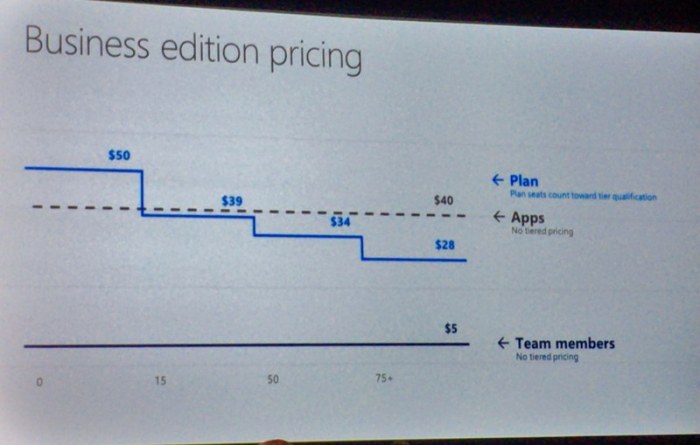
And what about Project “Madeira” and licensing. We have some pictures earlier where we found recommended priced about 40 USD for each App. That is a true, for example if you want only Project “Madeira”, you need to pay 40 USD, but if you want some other app, for example PowerApps, you need to pay the same amount for this app per user per month. But if you want to have access to all apps (currently 4 of them), you need to pay only 50 USD for all of them as Plan model (and yes, this price will decrease with the number of concurrent users). And you can use Team Members for only 5 USD as some kind of limited users. And what is good more? If some of exiting NAV clients with Perpetual licensing model want to transit to new subscription model, he will get pretty big discount for every month.
4.jpg

And I said that I don’t want to write about all features, but I need to notice few of them. I already wrote about Cortana Intelligence in Inventory Forecast, but now we saw Cortana Intelligence in Cash Flow Forecast; it is a perfect and you can use this in NAV 2017 and Project “Madeira” and the best is that it is very easy for using and configuring.

5.jpg

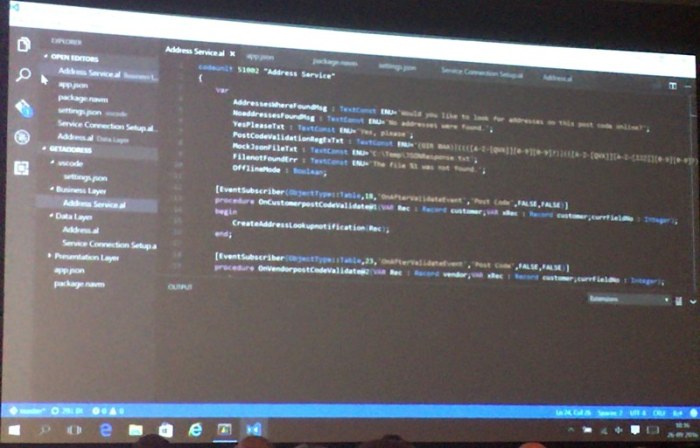
End something more – new development environments. First you can use Visual Studio Code in the future as new code oriented environment (soon more about it). Marko presented live work with new tool.
6.jpg

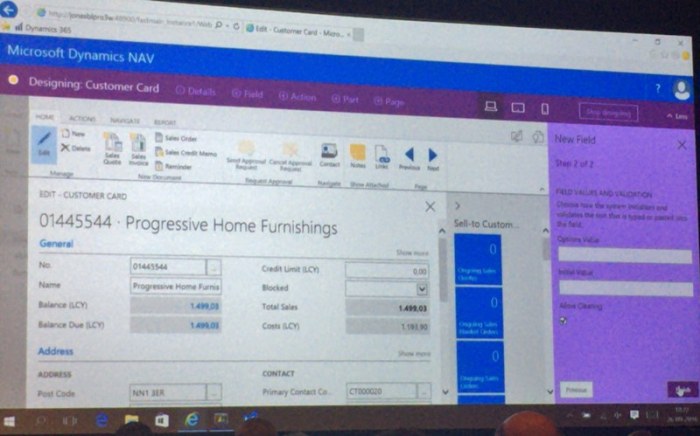
And on the end, new development tool for incredibly easy work. You just need to click on Edit button in your Web Client and you will get perfect logical environment where you can change pages, add fields to table and page… And on the end just click Stop and choose how you want to use this development… You can see all changes as preview in Web Client, Tablet Client and Phone Client. And all changes will be finished in Web Client and Windows Client, as well (of course, this is just short description – soon more about it).
7.jpg

End again about dates, the new development environment preview will be available for Christmas.

Sales and Inventory Forecast Using Cortana Intelligence for Project “Madeira”

I’ve just finished with all my jobs and I can start to prepare for my trip to US on Directions. I’ll depart tomorrow morning and I’ve just find some space to put my things about one very nice feature in Project “Madeira” and I hope in NAV 2017 as well (just confirmed on Directions NA, it’s part of NAV 2017 – 25.09.).

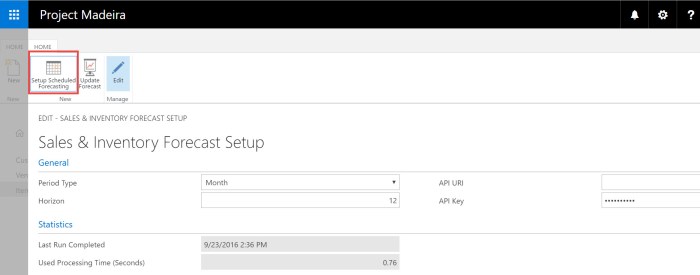
This is part of August “Madeira” update, but I finally find enough time to show it. When you run Project “Madeira”, you need to install this feature because it is Extension. But this is very easy in “Madeira”.

1-1.jpgAfter you finish with installation, you can configure this in Setup Scheduled Forecasting using Sales & Inventory Forecast Setup. This is naturally and there is not some unnecessary details.
1-2

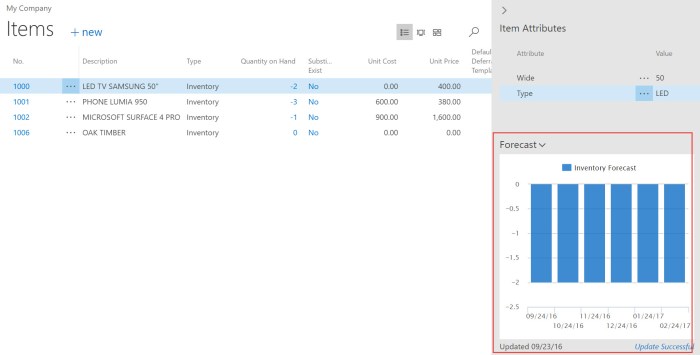
When you decided how you want to put this feature to work, you can go on item list to see your predictions.

1-3

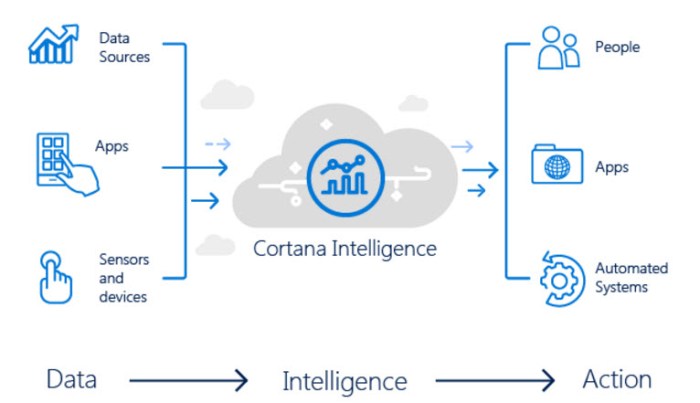
What is the most important? Complete procedure is made by Cortana Intelligence and connection to Cortana Intelligence is automated configured in Project “Madeira”; you just need to use it – nothing more. As I already said, you only can change setup if you need it. This is the new power of new products – the perfect integration with other Microsoft tools to get the best possible results. I cannot wait to start using these new features.

1-4

In any case, bye and see you in US tomorrow.

Directions 2016 NAV Conferences

In this moment, we have the final countdown until Dynamics NAV conference season will start. We have 47 days until the opening Directions NA and 64 days until the opening Directions EMEA this year.

Directions.png

This year Direction NA will be held the first, but Directions EMEA will be only 17 days later and I’m sure we have something new on both of them. Currently we have published agenda only for Directions NA, but I’m pretty sure that agendas will be similar, maybe with only small changes.

I love these conferences and I’m sure you will find a lot of reasons to attend on one of them, depending where you actually live. I think that the most important reasons will be launching of NAV 2017 and Project “Madeira” as well as Dynamics 365. You will find a lot of sessions about news in these new products. You will also learn more about integration with other systems, about using of PowerShell, how to take advantage of using Managed Services, how to improve your knowledge in lot of different areas… Also, you will learn more about project management, user experience, get some real-life experience… You will enjoy in awesome Keynotes … and maybe the most important – meet new people. I think these kind of events are the best places for networking; people are the most important wealth… and you can find and meet a lot of them on these conferences because they are the biggest NAV conferences.

In the same time, you can attend Cloud Sure Step sessions or try to pass new NAV exams powered by Association of Dynamics Professionals. I advice you to try some of these exams; I had participation in some of them and I think they are very good way to prove your expertise.

And finally, I will be lecturer on both of these conferences and I hope I’ll meet a lot of you – amazing people. See you there:

Create Items with Item Templates in New NAV and Madeira

First, this feature is currently published in Project “Madeira” and I’m sure it will be part of NAV 2017, but almost all about NAV 2017 is still by NDA and I cannot write about it.

But this feature is looks fine and I want to share it. When we created new Items we usually used Item Category to preconfigure some fields for item. But now, I think we have a better feature. We can just configure page “Set Up Customer/Vendor/Item Templates” with a lot of data. And that means this feature is not connected only with Items (you notice it right); you can also use this feature as template for other codes.

MadeiraTemplates.jpg

Now, you can chose one of the templates from list or to create your own template choosing table number to dedicate template to some of the tables. OK, if you want to create Item Template, you will use table 27.

When you open Item template, you can see that now you can configure lot of different fields, as for example:

  • Base Unit of Measure
  • Automatic Extended Texts
  • Type (Inventory or Service)
  • Price include tax and Price/Profit Calculation with profit and discount groups
  • Costing Method and Indirect Cost
  • and Posting groups in Financial Details

But you can do even more, you can open Dimensions command from ribbon and preconfigure dimensions and dimension value and as well as value posting for dimensions (mandatory, same code, no code). And now when you want to create new Item, system will ask you what Item Template you want to use from all enabled templates.

MadeiraSelectTempolate.jpg

If you want to change something you can later use command “Apply Template” from ribbon to add some template to your item.

If you didn’t use some template or if you changed some details, you can also use command “Save as Template” to save these values as template for some other usage.

MadeiraRibbon.jpg

Interesting feature and you can use this not only for items. This is more standardized feature in comparison with older versions.

Microsoft Dynamics 365!

Today, Microsoft published story about Microsoft Dynamics 365 on Partner Source and on their blog. And in the same moment, they’ve also published Microsoft AppSource. What is this?

MSDyn365.jpg

Microsoft says that this represents the end-to-end intelligent business applications in the cloud and it will be worldwide available in the fall of this year. Generally Dynamics 365 will bring the best of Dynamics ERP and CRM solutions and currently it is based on Project “Madeira” (but not only; we can expect the enterprise edition of Dynamics 365 based on AX) and CRM Online, but not only on them. It will provide the main business processes as Finance, Sales, Customer Service, Field Service, Operations, Marketing and Project Service Automation.

And even more. This is not closed system. This system is natively integrated with big data and IoT, Power BI, Cortana Intelligence, Microsoft Flow,… everything what you need and when you need. Classic Software-As-A-Service story, but very advanced. I think I don’t need to spend my words about integration with Office 365; this integration will be extremely deep (you already saw just a part of this in my previous article about using “Madeira” with Outlook).

Dynamics365.jpg

And of course, if you want to know something more about it, the best is to attend on WPC during the July. Microsoft will provide three session about this new solution. You can also see more about it on Summit this year (Scott Guthrie will speak about it) and I hope on Directions.

You can expect more from me about this soon. But this is just small the first introduction about new solution in the family; remember this name – Microsoft Dynamics 365.