NAV 2017 will be available Oct.28

All of use expected general availability of NAV 2017 yesterday, but we need to wait just few days more. As we can find on Partner Source, Microsoft announced general availability of NAV 2017 for October 28. On this day, we will get:

  • Product for downloading
  • Partner Translation Toolkit
  • Language Modules

At the same time, we can already find what is new in NAV 2017 and new license guide for NAV 2017. Use these few days to learn all news about NAV 2017 and after that we can start with new product.

My presentations from Directions conferences

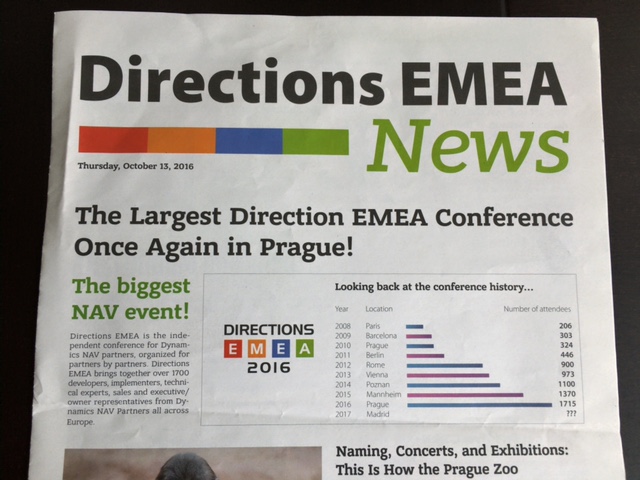
Directions EMEA was finished one week ago. Ten days before, we finished with Directions NA conference. Both of these conferences were amazing and it was an honor to attend on them and to have some presentations.

DirEMEANews.jpeg

After these presentations, people who attended ask me to get these presentations. I know that both of Directions will publish these presentations, but in the mean time, I want to give you everything I prepared.

On the following link, you can get all three presentations:

  • DirectionsNA – Water-Agile-Fall methodology and NAV implementation
  • DirectionsNA – Choosing the best possible Azure platform for NAV
  • DirectionsEMEA – Choosing the best possible Azure platform for NAV

Thank you for being on my sessions and see you the next year in Orlando and/or Madrid. If you have some additional questions, do not hesitate to ask (you can use direct messaging on blog). Cheers.

Dynamics 365 Finance Release Date

Today on NAVUG Summit, we finally got a release date of new Dynamics 365 Finance (ex Project “Madeira”). Dynamics 365 Finance will be available at November 1st.

Dyn365Available.jpg

It will be available just one week after general availability of NAV 2017. But, this availability will be for US and Canada market. I’m still not sure, but I expect Dynamics 365 Finance for Europe market in Q1 or Q2 next year. I cannot wait this moment because I strongly believe this is a product which will make a huge impact on global ERP market.

OK, tomorrow is new day and the start of new conference – Directions EMEA. We will wait and I’m sure we will get some new interesting things from beginning.

My Session on NAV TechDays 2016

Recently, I’ve published information about my sessions this fall. But now, I’m spreading a scope of my lecture to the end of this year. After Directions NA and Directions EMEA, where I’ll speak about choosing the best Azure platform for NAV and about using combined waterfall and agile project methodology, I’ll be lecturer on local Microsoft conference in Serbia – MS Sinergija. On this conference I’ll speak about differences between NAV 2017 and Project Madeira (Dynamics 365).

And finally, on the end of this year conference season, I’ll be lecturer on NAV TechDays. First I wasn’t sure if I have enough time to make session by my standards, but I decided to have common session with Steven Renders about, by my opinion very interesting topic – Power BI and NAV.

NAVTechDays.jpg

We chose the title: The Power of Power BI and Dynamics NAV. We will speak together and this will be the first time to have a common session with some colleague. I hope, Steven and I will synchronize everything very good and you will love this session. If you want to know more about topic, you can use link above.

But in short lines, you will see what it takes to develop a dashboard in Power BI Desktop. Starting from getting the data out of Dynamics NAV, we will create a data model. On one hand we will see how to achieve this using Power Query, which we will enhance with measures, calculated columns and tables using DAX. On the other hand we will use OLAP Cubes, connected to Dynamics NAV and other sources, to build the data model. How to create dashboards… what about DAX, M and R… how to compare using of OLAP cubes with ODATA Web Services based data…

See you there, soon.

Bricks in Project Madeira and NAV2017

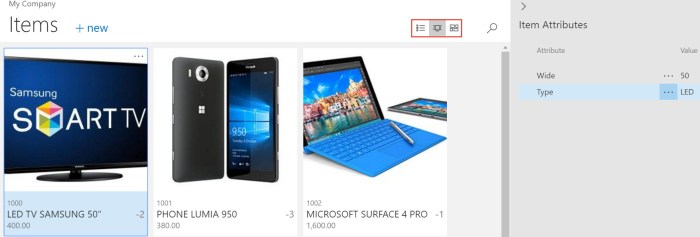
Very often, using of standard lists in NAV were not so comfortable because of specific data sets. Now, we will get some new feature that all list pages can be showed as “bricks”. If you remember, we used bricks in NAV 2016 for Phone Client. But now, we can use this for all lists: Customers, Vendors, Bank Accounts, Chart of Accounts, Currencies, Items, all Journals… You just need to choose brick view:

CustomersBricks.jpg

You can configure what you want to see on bricks and optimize space and readability for data that appears in these pages using a Brick Field Group. You can change importance of these data and their layout changing orders of them.

But if you choose Items, you can see more. Not only list and bricks, you can choose tiles as well. Difference is that you can put item picture on both bricks and tiles. Again, you can configure what you want to see by yourself:

ItemsTiles.jpg

New Dynamics NAV August 2016 Cumulative Updates

Currently Microsoft hasn’t yet published that new Cumulative Updates are already published on their blog. But they already published Cumulative Updates for NAV 2015, NAV 2013 R2 and NAV 2013 in Friday. And, they have just published CU for NAV 2016 today.

nav_cu.jpeg

You can download all these Cumulative Updates from the following links:

There are a lot of interesting Platform and Application hotfixes and local hotfixes as well and you just need to download and test them. I’ve just noticed them and I need to check all of these.

Item Attributes in NAV 2017

How many times you needed some additional attributes on item? And every time you added some new field or something… Now, we will have a small, but smart feature in new NAV2017 – “Item Attributes”. Well, I still cannot say it will be in new NAV for sure, because currently it is a part of Project “Madeira”. But the most of the new features in “Madeira” will be part of NAV2017 and my title is named as you read because of that.

What is Item Attributes? This is something similar to dimensions. We have one additional table with Item Attributes. You can create Attributes as you want. And for each assigned Attribute to Item, you can assign Item Attribute Value (again as you want). You can use a lot of different attributes and everything depends by your needs.

MadeiraItemAtt1.jpg

Good thing is when you add your attributes and values to some item, you can see all of them in fact box in the right side of page, on both of them card or list. And even more, you can filter your items based on Item Attributes.

MadeiraItemAtt2.jpg

MadeiraItemAtt3.jpg

You can choose different attributes and you can use standard filters when you want to use attribute values for filtering (you can easy use “Select More” for this purpose).

All these examples are made on Project “Madeira” and you can do it by yourself using Project “Madeira” demo instance. You can also find more about Item Attributes here.

Create Items with Item Templates in New NAV and Madeira

First, this feature is currently published in Project “Madeira” and I’m sure it will be part of NAV 2017, but almost all about NAV 2017 is still by NDA and I cannot write about it.

But this feature is looks fine and I want to share it. When we created new Items we usually used Item Category to preconfigure some fields for item. But now, I think we have a better feature. We can just configure page “Set Up Customer/Vendor/Item Templates” with a lot of data. And that means this feature is not connected only with Items (you notice it right); you can also use this feature as template for other codes.

MadeiraTemplates.jpg

Now, you can chose one of the templates from list or to create your own template choosing table number to dedicate template to some of the tables. OK, if you want to create Item Template, you will use table 27.

When you open Item template, you can see that now you can configure lot of different fields, as for example:

  • Base Unit of Measure
  • Automatic Extended Texts
  • Type (Inventory or Service)
  • Price include tax and Price/Profit Calculation with profit and discount groups
  • Costing Method and Indirect Cost
  • and Posting groups in Financial Details

But you can do even more, you can open Dimensions command from ribbon and preconfigure dimensions and dimension value and as well as value posting for dimensions (mandatory, same code, no code). And now when you want to create new Item, system will ask you what Item Template you want to use from all enabled templates.

MadeiraSelectTempolate.jpg

If you want to change something you can later use command “Apply Template” from ribbon to add some template to your item.

If you didn’t use some template or if you changed some details, you can also use command “Save as Template” to save these values as template for some other usage.

MadeiraRibbon.jpg

Interesting feature and you can use this not only for items. This is more standardized feature in comparison with older versions.
NAV Madeira is NAV 2017

We know the name now. The next release of Microsoft Dynamics NAV will be NAV 2017. It is no longer a secret and we will not use the code name NAV “Madeira” in the future.

New version will have a lot of new improvements, but I’ll share more about it with you very soon (it is still by NDA). Currently, this is just a small fast news.

Microsoft Dynamics 365!

Today, Microsoft published story about Microsoft Dynamics 365 on Partner Source and on their blog. And in the same moment, they’ve also published Microsoft AppSource. What is this?

MSDyn365.jpg

Microsoft says that this represents the end-to-end intelligent business applications in the cloud and it will be worldwide available in the fall of this year. Generally Dynamics 365 will bring the best of Dynamics ERP and CRM solutions and currently it is based on Project “Madeira” (but not only; we can expect the enterprise edition of Dynamics 365 based on AX) and CRM Online, but not only on them. It will provide the main business processes as Finance, Sales, Customer Service, Field Service, Operations, Marketing and Project Service Automation.

And even more. This is not closed system. This system is natively integrated with big data and IoT, Power BI, Cortana Intelligence, Microsoft Flow,… everything what you need and when you need. Classic Software-As-A-Service story, but very advanced. I think I don’t need to spend my words about integration with Office 365; this integration will be extremely deep (you already saw just a part of this in my previous article about using “Madeira” with Outlook).

Dynamics365.jpg

And of course, if you want to know something more about it, the best is to attend on WPC during the July. Microsoft will provide three session about this new solution. You can also see more about it on Summit this year (Scott Guthrie will speak about it) and I hope on Directions.

You can expect more from me about this soon. But this is just small the first introduction about new solution in the family; remember this name – Microsoft Dynamics 365.