NAVUG European Congress

This year, we will have NAVUG Congress in Europe for the first time. This congress is the amazing idea and it is intended for NAV users. Stuttgart in Germany will be a host of this conference. The conference is scheduled at the beginning of May (9-10 May).

Stuttgart.jpg

It will be the great opportunity to meet your colleagues all around the Europe and a lot of really good experts as well. Lot of them will be speakers and I hope you will learn something new. Unfortunately, I’ll not be on this conference because of other obligations, but I hope I’ll be there next year.

What about FEFO and Costing

After my the last article, I’ve got comments about FEFO. First, thanks for reading my blog :), and then yes, it deserves to write a few sentences about it, because it is very useful feature in NAV.

But first, what actually FEFO means? It is First-Expired-First-Out method. What is the first we have to notice about it? FEFO is a picking method, but it is not a costing method. This method is important for a lot of very specific industries (pharmacy, food…), but it is just one specific way how to configure your location.

FEFO.jpg

If you want to use FEFO, your items have to have configured a serial or/and lot numbers. In additional on each item tracking code setup, the SN-Specific Warehouse Tracking field or the Lot-Specific Warehouse Tracking field must be selected. And now, we can conclude that FEFO actually uses Specific Costing Method. It is FEFO, but it is nothing more then Specific method. Everything is the same as in all other Specific Method types, but when you select FEFO on your location, system will take care about picking order using expiration date.

SpecificFEFO.jpg

You can find more about FEFO on MSDN here or in Mark Brummel Application Design book.

Calculating COGS in NAV

Generally COGS (Cost of Goods Sold) is an unknown parameter that must be recorded and calculated. We have (or we can have) exactly information about Beginning Inventory and Net Purchases, but COGS depends of Costing Method:

cogs.jpg

This is because it is connected with fluctuations over time in the unit acquisition costs of inventory items. COGS will be an unknown value until we choose costing method for each item.

The choice of a costing method has two consequences. It determines which purchase entries and sales entries will be applied to each other when you post a document. This is the application method part of the costing method and I’ve already wrote about it. It also influences the unit cost calculation, which is itself used for posting to the general ledger. This is the cost flow assumption part of the costing method. I’ve already wrote basically about costing methods in Microsoft Dynamics NAV.

And do not forget, regardless of what costing type you use, all of them have minimum one common thing. When the quantity on inventory is zero, the inventory value must also be zero.

Now I want to give you some examples how system uses different costing methods.

1-FIFO.jpg

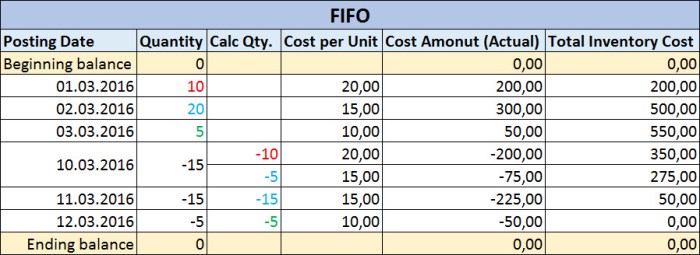
When we use FIFO method, system will post quantity decreasing every time based on the first input. If we use LIFO method, situation is totally opposite; quantity decreasing is based on the last input.

1-LIFO.jpg

When we use average costing method, posting of quantity decreasing however, determined by calculating a weighted average of the remaining inventory at the valuation date of the inventory decrease.

1-Average.jpg

In situation when we use standard costing method, system doesn’t use purchase cost from posted invoices. System will use Standard Cost for all inventory postings (increase and decrease).

1-Standard.jpg

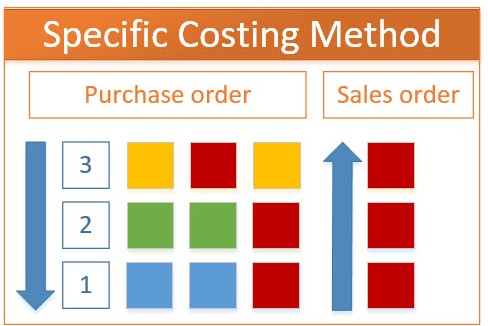
And at the end, when we use specific costing method, system is not based on some time order. If we use this costing method, it means we have assumption that individual units of items can be physically identified, typically with serial and/or lot numbers. Every time when we want to post inventory decreasing, we have to choose what exactly inventory unit we want to consume/sale.

1-Specific.jpg


Costing in NAV – Inventory Posting

Costing methods usually differ in the way that they value inventory decreases. But, regardless of what costing type you use, all of them have minimum one common thing. When the quantity on inventory is zero, the inventory value must also be zero. The next common thing is way of the posting all incoming and outgoing entries. This posting results entries as quantity and as value. Quantity posting describes the change in quantity on inventory and this transaction is stored in Item Ledger Entries. Value posting describes the change in inventory value and this transaction is stored in Value Entries. Each entry in Value Entries table is linked with entry in the Item Ledger Entries table. More entries in the Value Entries table can be applied with the same entry in the Item Ledger Entry.

Each Item ledger entry is applied against each other. All these applications between incoming and outgoing quantities in the Item Ledger Entries are stored in the Item Application Entry table as links between inventory increase and inventory decrease in an Item Ledger Entry. NAV records the entry number of the Item Ledger Entry corresponding to the inventory increase in the Inbound Item Entry No. field and the entry number of the Item Ledger Entry corresponding to the inventory decrease in the Outbound Item Entry No. field. The program also reduces the Remaining Quantity fields in the corresponding item ledger entries by the applied quantity.

Based on the Inventory Posting Setup, system will post all these entries to the General Ledger Entries.

InventoryPosting.jpg


March 2016 CU’s for Dynamics NAV

Cumulative Updates for Microsoft Dynamics NAV 2016, 2015, 2013R2 and 2013 has been released today:

  • NAV 2016 – Cumulative Update 5 (Build 45243)
  • NAV 2015 – Cumulative Update 17 (Build 45244)
  • NAV 2013R2 – Cumulative Update 29 (Build 45254)
  • NAV 2013 – Cumulative Update 36 (Build 45241)

These cumulative updates include all application and platform hotfixes and regulatory features that have been released for these NAV versions.

update-1170x630.png

There are a really lot of application and platform hotfixes for the NAV 2016 and proportionately less for older versions. All versions, except NAV 2013 have both of application and platform hotfixes. NAV 2013 has only few application hotfixes. Some of them are common hotfixes for more versions, and some of them are only for one version.

You can check all hotfixes and download these cumulative updates on the following links:

Introduction in Dynamics NAV Costing

In almost all NAV implementations, we need to configure and use costing (inventory, manufacturing, jobs…). This is one of the main functionalities in all ERP solutions as well as in NAV. Because of that I will prepare the series of costing articles with an overview of the principles used within the costing area.

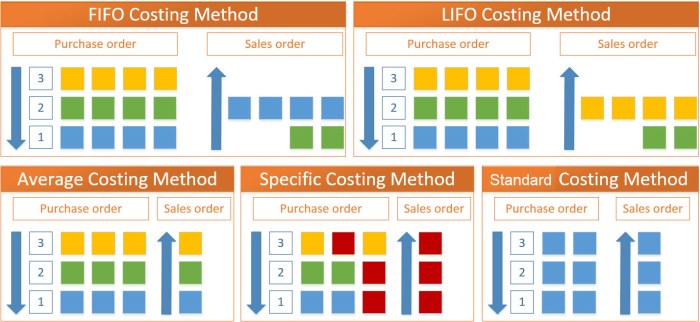
In this first part, I will make a small introduction about costing methods. Microsoft Dynamics NAV supports the five following costing methods:

  • FIFO
  • LIFO
  • Average
  • Specific
  • Standard

Now, in the following part I will just describe these costing types.
InvCost.jpg

FIFO

The FIFO costing method means “First In First Out”. It first assigns the value of the increases with the earliest posting dates on inventory. COGS is calculated using the value of the first inventory acquisitions.

An item’s unit cost is the actual value of any receipt of the item, selected by this explained FIFO rule. In inventory valuation, it is assumed that the first items placed in inventory are sold first.

LIFO

The LIFO costing method means “Last In First Out”. It first assigns the value of the increases with the most recent posting dates on inventory. COGS is calculated using the value of the most recent inventory acquisitions.

An item’s unit cost is the actual value of any receipt of the item, selected by previous explained LIFO rule. In inventory valuation, it is assumed that the last items placed in inventory are sold first.

Average

The Average costing method calculates a weighted average of the remaining inventory on the last date of the average cost period in which the inventory decrease was posted. COGS is calculated using the average value of the inventory acquisitions.

An item’s unit cost is calculated as the average unit cost at each point in time after a purchase. For inventory valuation, it is assumes that all inventories are sold simultaneously.

Specific

The Specific costing method overrides assumption about how cost flows from inventory increase to inventory decrease with the accurate cost information, creating a fixed application between these entries.

An item’s unit cost is the exact cost at which the particular unit was received.

Standard

The Standard costing method works with predetermined costs (rather than actual cost) for all inventory increases and it affects the value of the inventory decreases.

An item’s unit cost is preset based on estimated. When the actual cost is realized later, the standard cost must be adjusted to the actual cost through variance values.

Conclusion

This was only small introduction about costing types as preparation for the more advance knowledge about using costing in Microsoft Dynamics NAV. In the following articles, I’ll describe more about facts when users need to use these costing methods as best practices. I’ll write about all details in posting results and posting rules as well.

How to Configure Limited Users in NAV?

A few days ago I’ve wrote about new possibilities in using of Limited Users in NAV 2016. I think this is big improvement, because we can use limited users for much more roles.

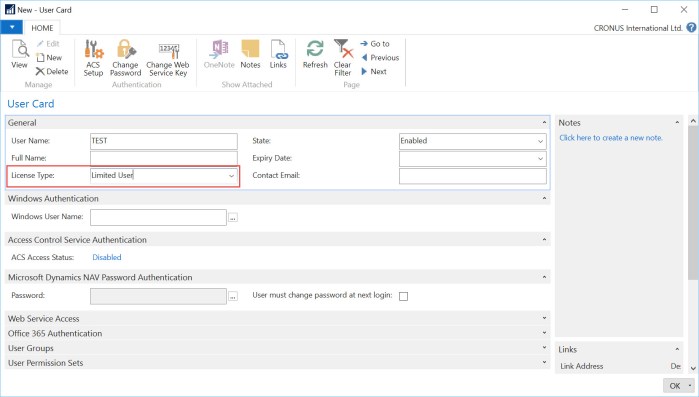
But I got a few comments about configuration limited users. OK, you can configure users as limited and this is all. Nothing more.

l-1.jpg

But people wants to configure what three additional application tables these limited users can use. Base on the standard NAV, this is not possible. These users get write access to a maximum of three application tables in the object range 0 – 99,999,999 other than the General Ledger Entry table. But system will count the first three used application tables beside the default tables. This is counted by the session. That means, users can use different three application tables in different sessions.

Some of administrators still want to limit these users on some specific tables. There is not feature for this requirement, but it can be made using User Permission Sets. We can create one permission set with all read permission on all tables (or less if you want this). Then, we can configure additional permission set with all permissions (insert, modify, delete) on our default 151 application tables. And on the end we can configure specific permission set based on our requirements for three additional tables.

Every time when we want to configure new limited user, we just need to add him these first two permission sets and one specific for him (or his role). In this case this limited user will have read permission to all tables and all other permissions to default tables and three we added to him. In this case, his three application tables will not depends of his first usage in session.

This is not some specific feature, but it is useful work around solution for configuration.

Limited Users in NAV 2016

I suppose the most of you have already used Limited Users. It is pretty good possibility to save some money for users who have not a lot different processes to work in NAV. But limitation was a big; you could insert in only 3 tables by your need and in 80 additional by default. It was enough for some basics processes (creating contacts, HR, warehouse and similar).

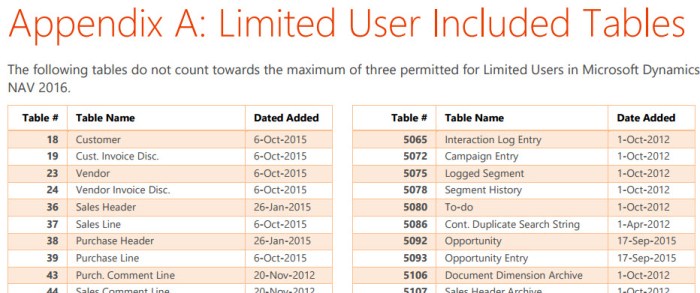
But from NAV 2016, we have a pretty greater possibilities. That means we can use for inserting even 151 default tables; you can find completely list here. Some of the most important default tables for insert are:

  • Customers and Vendors
  • Customer and Vendor Invoice Discounts
  • Sales and Purchase Headers and Lines
  • Deferrals
  • Sales/Puchase Price and Line Discount
  • Assembly Order Headers and Lines
  • Incoming Documents
  • Workflow tables

You can see that with these tables in combination with three additional by your needs, we can use Limited Users for a lot different processes. It can decrease project cost and improve quality.

LimitedUsers.jpg

Posting Groups in Assembly Order in NAV

In my previous articles about using of posting groups in Dynamics NAV, I didn’t describe using of posting groups in Assembly Orders. Assembly Orders are here in the few last versions of NAV and I want to show them as well.

Using of Assembly Orders is not so complex and we can use only Items on header and Items and Resources in lines. Because of that, we can use only Inventory Setup and General Posting Setup. You can see the flow chart with description of usage these posting groups:

AssOrdFlCh.jpg

When we post one Assembly Order, we will get the following G/L Entries:

AssOrdEntr.jpg

Posting Groups in Service Management with Warranty

I’ve already show how looks like using of posting groups in Service Management in NAV, but when you use Service Item with currently active Warranty, there are some differences. Generally, system will use Line Discounts configured on Service Item as Warranty % for “parts” and “labor”. If you have 100% warranty, posting will be as the following:

SM-w01.jpg

System posted inventory cost for all item line based on costing type. But for each line (Item, Resource…) system posts sales line amount and the discount with the same value.

But, when you have warranty with the less percentage than 100%, it will be a bit difference. System will post item cost again, but for each line, system posts sales line amount, discount and value as difference between sales amount and discount:

SM-w02.jpg