Directions EMEA 2015 Review

One day after Directions EMEA was closed. I’m again in my country and I’m in my company again. NAV 2016 is now reality and unfortunately, there is no localization for my country; we’ve just started with localization process.

The last three days in Mannheim were amazing. We have had the biggest Direction EMEA event ever with 1369 attendees from 532 companies and 42 countries. Event organization was simple perfect; everything was as you expect and Congress Center Rosengarten was the excellent place. And not to forget, we have had beautiful Oktoberfest theme dinner.

WP_20151004_001

Unfortunately because of my backache, I could not be involved in event as I really want. But, I’ve tried to see as many sessions as I could. There were awesome sessions about NAV 2016, MVP track and really good other tracks. There were also phenomenal workshops and Cloud SureStep track as well. Maybe I’ve forget some of tracks, but all of them were amazing. And it was the first time I’ve had my own session on Directions. In was beautiful feeling and the great honor.

About new NAV 2016, as an MVP I’ve been part of the ACE program and I already saw the most of new features, but all sessions about these news were still very interesting. All these news are amazing and it was very hard not to talk about them.

And now we will have Directions NA in two following weeks in Orlando. I hope, it will be the great event as well. I will be there for the first time in my life and I will have my session again.

WP_20151007_007

After this event we will finishing with Directions season this year. I’ll waiting next year and new Directions season. Directions EMEA 2016 will be in Prague on October 12-14. See you there next year with new NAV ‘Madeira’.

New C/AL Editor in NAV 2016

Microsoft Dynamics NAV 2016 has finally introduced a new code editor as we used for the years on other platforms. But this time, Microsoft did a really good work. Now, it is really good editor with a lot of new features, people always ask.

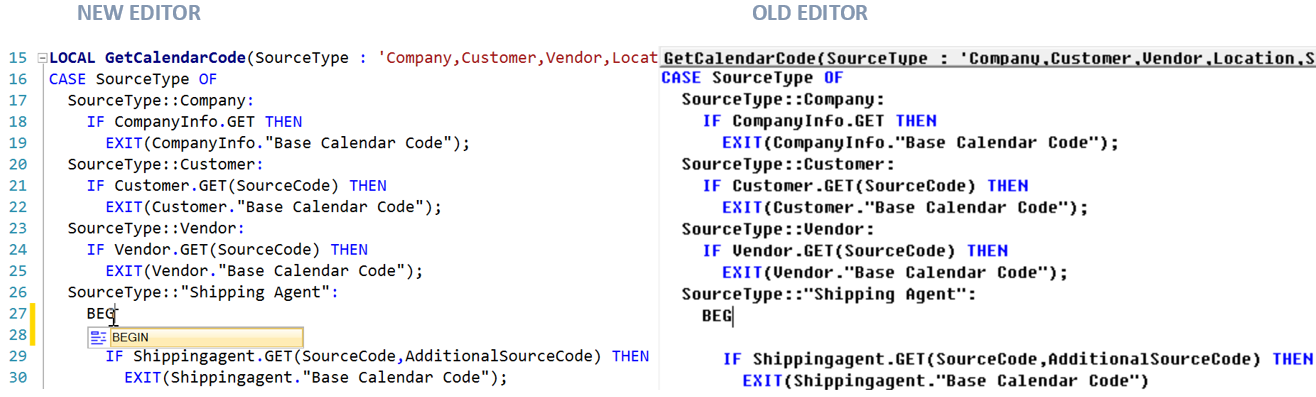
When we compare old and new editor, there are a lot of differences on the first sight.

CALs

On the first sight, we can see different showed Triggers. If we try to type some command, variable, constant, function…, we will see that we have autocompleting tool which help us in typing. Then we can see we have line numbers as well and proper syntax highlighting for comments, strings… We can also use very nice syntax tooltip and we have “Undo” function. You can also get very useful information when you put your mouse over…

CAL1

These are not all improvements, but some of the most interesting. Run you C/AL editor in NAV 2016 and try. Great news in NAV 2016 and really good job.

NAV 2016 System Requirements

Since begin of August, I’ve tried to research what are the minimum system requirements for Microsoft Dynamics NAV 2016. First I’ve published one post about it, but I’ve deleted it. It wasn’t completed. Now, I have the freshest tested information and I hope everything will be fine in the production, as well.

In this process I’ve checked only NAV and Web Server and Windows Client requirements. You can find all my conclusions in following text. But you must to know, there are not officially requirements; these requirements are based only on my testing.

Supported Operating Systems (Server and Windows Client)

First, NAV Sever works only on 64-bit edition of operating systems. I’ve concluded that these OS are completely qualified as base for NAV and Web Server:

  • Windows Server 2008 R2
  • Windows Server 2012
  • Windows Server 2012 R2
  • Windows Server 2016 (Technical Preview 3)
  • Windows 7
  • Windows 8
  • Windows 8.1
  • Windows 10

You can see I’ve also checked installation on next Windows Server release – Windows Server 2016 (Technical Preview 3) and everything was working fine.

Older OS as Windows Server 2008 R2 and Windows 7 also require some additional software as Windows PowerShell 3.0. You can download Windows PowerShell 3.0 as part of Windows Management Framework 3.0.

Also, all these operating systems require enabled Windows Search. If this is not enabled on your server, you can do it adding new Windows Search role in Server Manager.

If you want to run Microsoft Dynamics NAV 2016 Windows Client, you can do it on the same operating systems, but you can do it on both of them, 64-bit or 32-bit editions. If you install Windows Client on some of the 64-bit edition OS’s, you will get two Windows Clients (32-bit and 64-bit); 64-bit will be by default, but you can change default client as well. But if you install on 32-bit OS edition, you will get only 32-bit Windows Client. I will explain more about it in new post.

SQL Servers

The same situation is as for OS, SQL Servers also require 64-bit editions only. You can use NAV 2016 on following SQL Servers:

  • Microsoft SQL Server 2008 R2 (SQL Server 2008 R2 is out of mainstream support, but I’ve tested NAV 2016 and in my tests everything was fine; but I think we have to make more tests in any case)
  • Microsoft SQL Server 2012
  • Microsoft SQL Server 2014
  • Microsoft SQL Server 2016 CTP2.2
  • Azure SQL Server

You can see that I also check installation on next SQL release – Microsoft SQL Server 2016 CTP2.2 and everything was working fine. This will be helpful in the future with information about new Windows Server.

About using NAV 2016 on Azure SQL, I have to say much more. It is a really good news and I will write a new post only about it.

Hardware sizing

All of these configuration I’ve checked, have worked with minimum 1,75GB RAM.

REMARK:

As I already said, these are not officially Microsoft system requirements. These are information based on my personal testing and they will maybe be different in officially release.

NAV 2016 on MVP’s blogs

Last two days we can find a lot of good new about NAV 2016. I want to give you links to other very interesting articles written by few MVPs. You can find them in following:

Waldo’s blog:

Brummel blog:

Hougaard blog:

Vjeko’s blog:

Kauffmann’s blog:

And, of course official Microsoft Dynamics blog:

Keep reading. Sorry if I forgot someone.

After NAV 2016, NAV ‘Madeira’ Is Coming

Unfortunately because of my backache, I cannot be involved in this year Directions EMEA as I really want. But I try as I can. On other side, I have more time to write.

Yesterday and today we’ve heard a lot of amazing news in NAV 2016. It is one of the best releases and I think we can say that people from Microsoft made awesome product. A lot of functional features and more technical really good things. We will speak about them in few following months. There will be a lot of documents, videos… I hope a new projects…

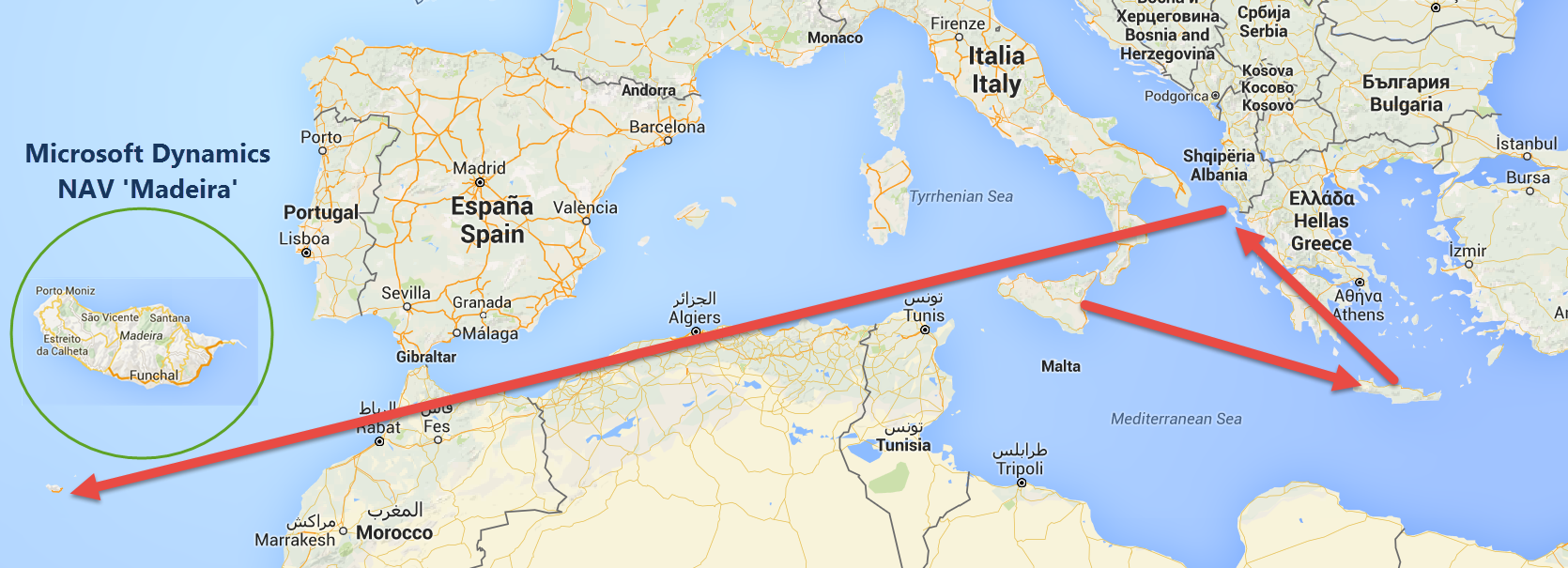
But what next. For now, we have information where will be the next Directions EMEA. It will be one of the most beautiful cities on the world – Prague, for the second time. And we also know what a code name of next NAV release is. It is NAV ‘Madeira’ and we can start to find it on an open see.

NAV-Madeira

What we can expect in this new release? Currently, we know only few initial priorities, but it looks pretty good:

  • Office 365: Further enhanced “in” Office 365 experience
  • Azure: Pre-packaged Azure ML services
  • Core Product: Developer experience, More service integrations
  • Deployment: Fast set up, Easy configuration

A now, let’s start to use NAV 2016 and waiting for new features the next year in the same time.

What is Posting Preview in NAV 2016?

I’m sure that your clients many times asked to make some feature to see results of posting before they post document, at least G/L entries as report. My clients asked for this a hundred times.

This was on first sight very simple requirement, but in practice… Now with NAV 2016, we finally got it. And not only we did get it… we have got the awesome feature. It looks like so simply and because of that it is awesome.

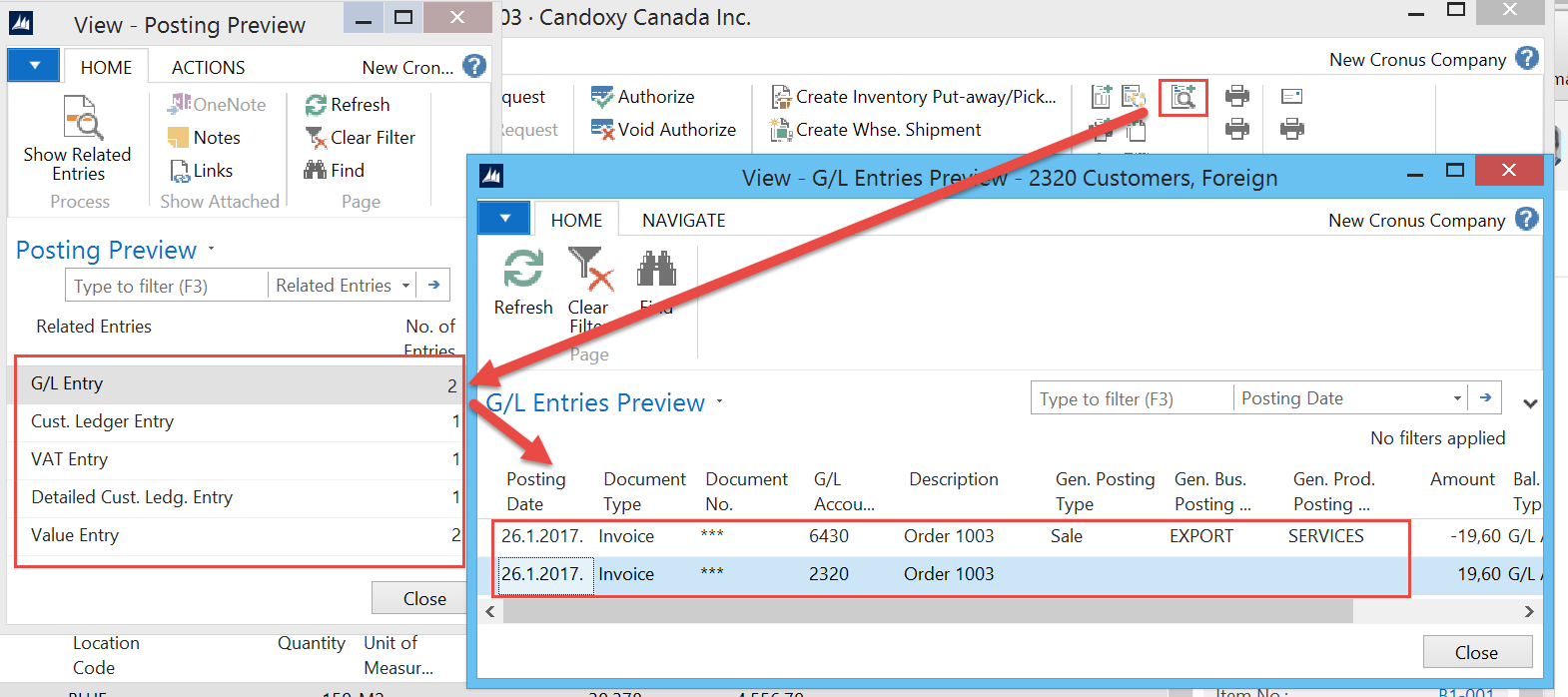
You just need to click on Preview Posting command in your ribbon and you will get completely navigated page with all entries (G/L entries, Customer/Vendor entries, VAT entries, Value entries…). Everything is the same as you already post this document, but this is not posted. All links are here… perfect.

PreviewPosting

Of course, you will not see Document No. for example; this is because we still have not this data.

You can find this feature on almost all documents and journals. It miss maybe only on few of them. This solution is based on temporary tables. When you look at these objects, everything will be clearer.

PreviewObjects

Try it and you will see how good it is.

NAV 2016 Phone Client

Few months ago, Microsoft has announced new Phone Client for Microsoft Dynamics NAV 2016. With today’s NAV 2016 general availability, we can check it. First, NAV has new icon; sails no longer exist. This is new set of icons:

NAVIcons

And now again, Phone Client. You can download new NAV 2016 App for iPhone from Apple iTunes. Also it is possible to download from Google Play and Windows Store. You just need to type “Dynamics NAV” in search and you can easy find them. Download them and type your service, username and password. Finally, you can use NAV on all devices and all systems. It looks line:

NAVMobile

If you’ve just installed NAV 2016 from Partner Source, you can check how it looks like using Web browser. You just need to add phone.aspx behind .. /WebClient/ (smilar as for Tablet Client emulation) and change the size of browser to emulate phone size; and you don’t need a HTTPS certificates. You will see that Phone Client looks awesome and everything works fine and smoothly. And you can use camera from your phone directly in NAV, for example for document capturing. But for this feature, you have to use this app from phone, because camera cannot be emulated from your browser.

More news, soon.

Directions EMEA and NAV 2016 General Availability

This is my first reporting from Directions EMEA this year. I’ve arrived in Mannheim two days earlier because of my other obligations and I registered yesterday after rain stopped, but this is actually first day of Directions EMEA 2015. Keynote is finished and from this moment, Microsoft Dynamics NAV 2016 is generally available.

WP_20151005_004

Group of Microsoft Dynamics Program Managers with Marko Perisic as leader, made an awesome job on scene. They presented the most important news in new NAV release very effective. Of course, guys from Continia also made amazing show in second part of Keynote with their new solution. Now, other sessions are starting and we can see lot of news and interesting things.

On Keynote scene we could see NAV Mobile App, a lot of new Web Client features, e-service exchange in practice, natively CRM Online integration, natively NAV reporting in Power BI,… I don’t want to write about all news now. I will write about them, one by one in few following posts.

Now, I only want to say that you can download new NAV now from this Partner Source link and let’s driving start. Now nothing else about NAV 2016 is not by NDA.

Be the First Who Passed the New NAV Exam

Just to be sure that you are not forgotten, new Microsoft Dynamics NAV 2015 will be launched in only two weeks.

If you attend to NAVUG Summit in Reno this October, you can be really the first who passed the new NAV exam and show your expertise in Dynamics NAV 2015 Core Application Setup. It is not too late to register yourself here.

If you will not attend NAVUG Summit, maybe you will be in Orlando later the same moth – October 25-28 on Directions NA. You will have the same opportunity and you can register yourself here. In this situation, you will not be the first, but one of the first for sure.

This exam is prepared by a large number of NAV experts all around the world and I think it is a good chance to check your knowledge about NAV 2015.