As I started to write about Dynamics 365 Business Central with Sales Professional series, you will probably need a few directions on how to test it and about limitations (when to accept them or to go to the Sales Enterprise). As I already wrote about it two years ago, I just wanted to remind you as this is something you will need if you want to track what I’m writing or more about my session in Directions EMEA.
There are two posts you should read if you are interesting for this topic:
You already know Microsoft publishes new releases two times per year (wave 1 in April and wave 2 in October). You can find all news in Microsoft’s release plans. There is also an amazing ecosystem map by Vadim Korepin about all solutions in Dynamics 365 family.
But as I’m most connected with SMB solutions inside Dynamics 365 and Power Platform, I wanted to share more details on what is available for SMB users and companies from Microsoft Dynamics 365 family. Three business applications (Dynamics 365 Business Central, Sales Professional, Customer Service Professional) covered ERP and CRM parts but with plenty of features. I’m sure no other vendor currently can offer more for SMB customers worldwide.
You can look at and download the Ecosystem map for Dynamics 365 SMB solutions I created (resolution is 3840×2160):
I hope this SMB ecosystem map will be helpful for you, and we will have more features and maybe even more solutions here in the future.
I know it has passed since I wrote the first part of this topic, ‘Where is a limit in Business Central CRM capability and when integrating it with D365 Sales (part 1),’ and people expect the second part. But as I’ll speak about this topic on Directions EMEA this year, I decided to postpone the following parts after this event. I would like to keep it interesting and show many of these topics in my session. Of course, as I cannot go so deep into details in 45 minutes, I’ll continue here with publishing my point of view related to this topic.
We know that Microsoft Dynamics 365 Business Central (previously NAV) is primarily an ERP solution. But even so, this product has some customer relationship management capabilities. And name ‘Business Central’ probably comes because this solution can provide all business activities in one solution. But as this is primarily an ERP solution, the biggest strength comes in ERP, and in other areas, such as CRM or HRM, the level of functionalities is significantly lower. But let us make an overview of what is already in Business Central, but we can say it can be treated as CRM.
First, what we can find are a good customer and contact management. Still, as customers play an essential role in every ERP solution, we can emphasize more about contact management where we have some basic information about contacts and some segmentation.
You can also find some level of creating and tracking opportunities and sales quotes and interactions. You can also have some possibilities to make direct phone calls from BC or send an email. This is more or less what we have, but this is not a small number of functionalities.
Today I’ll not go into details about all these features. I just wanted to show some basic information about them and explain on a high level in which situation you should think about an additional and full CRM solution. As a full and independent CRM solution, I’ll focus on Dynamics 365 Sales Professional:
First, naturally, if you don’t have enough functionalities, you will take a specialized CRM solution, but let’s talk in detail on another occasion.
Second, the price can be an issue. If you have pure CRM users, they still need to pay $70 or even $100 for the license as they must pay a BC license even if they need only CRM capabilities. Sales Professional full license price is $65, and you can get full CRM. But with the new attach license for Dynamics 365 Sales Professional, BC clients can add a full CRM solution for an additional only $20.
Third, as I mentioned in the beginning, Business Central is still primarily an ERP solution, meaning its UI is built for ERP and not for CRM. Even if you have many CRM features, when we compare usage of these features, this is definitely not even close to being useable as in a regular CRM solution.
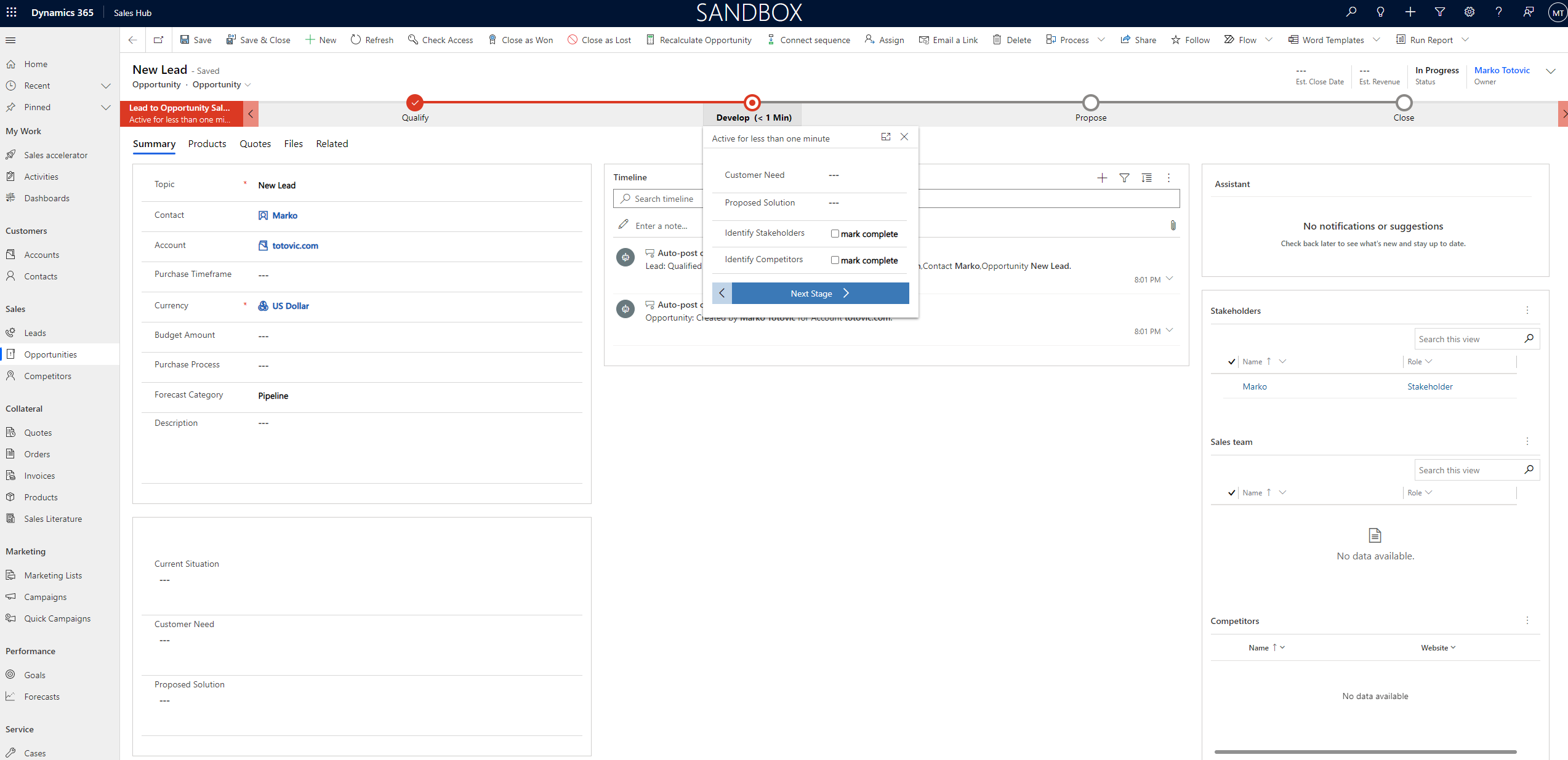
Dynamics 365 Sales Lead to Opportunity Business Proces Flow
Today I wanted just to make a high-level overview, but in future texts, I’ll try to be more accurate about when CRM in Business Central is enough for you and when you should think about integration with Dynamics 365 Sales.
New platform BizApps.Wiki has just started. On the first sight it looks like as well know Wikipedia, but there is ‘but’…
In comparison with Wikipedia there is highly focused content only with business applications (solutions/software) and other related topics. By the business application topics you can find information about almost all possible business application solutions as well as vendors (global and local). Also you can find information about partners or about the most impactful experts (MVPs or similar).
OK it is obviously that topics are not related only with Dynamics solutions as this is Wiki about all business solutions, but there are for sure a few dozens of articles (maybe even more) related only with Microsoft solutions.
And on the end, there is one really good idea about building the digital business applications museum. Even if its history is not so big, it is very interesting how these applications looked like 20-30 years ago. And this is not finished project… as you can see on the first page, this is an ongoing project (always work-in-progress) where it is expected that community will take a part in building or editing this library of articles.
I’ll not write about the project in more details as you can easily go there and check. Definitely good for developers, consultants, project managers, but also for future experts such as students…
First I need to admit that I’m not big fan of this kind of certification. Based on my previous experience 10+ year ago, it was more about getting certificate and less about proving a real knowledge. I had an opportunity to meet a lot highly certified persons, but they couldn’t implement even the easiest projects. But still, partners wanted to invest in certification as some kind of knowledge proof.
But with new exams in the last few years things are slightly changed and I had opportunity to check them. But with these two new exams I’m talking about, things improved drastically. And I can say I’m really positive surprised.
First what I want to say is that I didn’t prepare myself for these two exams. And when I say ‘I didn’t prepare’, I mean it for real. I wanted to see if it is possible to pass these exams with real experience and practical knowledge. And I succeed! From my perspective this is the most important fact – if you are waring with these technologies and have a real practical knowledge, you can pass them without any problem. It still means you should be focused on questions as they can sometimes be complicated, especially when it comes to the case studies. I didn’t want to say these exams are easy as they are not, but you don’t need to prepare yourself if you know topics. But to be honest, you can still find a couple of useless questions, you really don’t need in practice, but even if you fail on some of them you will still have big chance to pass exams.
What I want to mention about BC exam is to be prepared with SaaS topics as this is very important. It is not enough to know only features in system, as you need to understand cloud concept as well. On the other side, when we talk about Power Platform, you should know both Canvas and Model-driven Power Apps, Power Automate as well as other Power Platform features (AI, Chat Bots…) and CDS. But this is what we imply with the Power Platform knowledge.
If you are newbie, in this case you need to learn for these exams. But good thing is that if you want to start, you can find everything you will need on the Learning Path site. But one small note, when you start to learn from Learning Paths, I often hear that there are not enough information and some of people often fail on exams. This is because, you need to open every link you have in your learning path as often you can find basic information in this part of text, but when you click on some links, you will be redirected to Microsoft docs site with all necessary information with related topic.
On the end I want to say THANKS to all people involved in preparation these two new exams as they made a good result. And for all of you who didn’t register for these exams, do it… you will not make mistake.
We are at the end of this year. I could hardly say – good year as we have global pandemic and people dye. But new year is coming and there are some lights at the end of tunnel; vaccine appears and probably we will have better year as I think it is not possible to have worse one.
Let’s see what events await us in 2021. I (and probably nobody) don’t know if these events will go virtually as this year or on site if this is possible, but let’s see what we will have.
In the first half of year, we will start with Directions events:
NAV TechDays, Antwerp, Belgium – November 18-19, 2021
Of course we have more, but still not scheduled. What you can do now is to sign up and join mailing lists to be updated when they announce dates. Currently, I can suggest to do it for the following events:
On the end, I really hope we will win Corona virus and we will have minimum few events in live as conference is not only about content and it is about networking and building friendships. We as human beans still need live communications. Maybe we proved that a lot of things can be done in virtual environment, but some thing can be done only in real world.
I hope we will have healthier and more successful new year and I’ll meet some of you in person.
Recently I published a blog post about Dynamics 365 Ecosystem for April 2020 release. As I see many of you downloaded these images, but I also got a comments that this was outdated as a few days ago Microsoft announced October 2020 release (2020 Wave 2 release). Because of that I started with updating these graphics and I’ve just finished with all news.
Again, I want to mention and to say ‘thanks’ to Vadim Korepin who made this initial graphics. I used his initial slides and added all news from the last release. But even more, I found that one important part of Dynamics 365 ecosystem was not there – Industry Accelerators. They are very important parts of ecosystem and it can be very useful for some specific industries. This time I added them, and I hope we will have more and more partners using them.
If you want to collect images in the best resolution, download them (right click on the image) and you will get 3840×2180 images.
And let’s start with the first image where we have completely list of all Dynamics 365 solutions and other related solutions:
Then we can continue wit ERP ecosystem where we have some added features in each of them:
The same situation is with CRM ecosystem where we got some new features:
With modular solutions we have some differences as now we have Dynamics 365 Customer Voice as new solution:
Dynamics 365 AI solutions have some new features as well as Mixed Reality solutions:
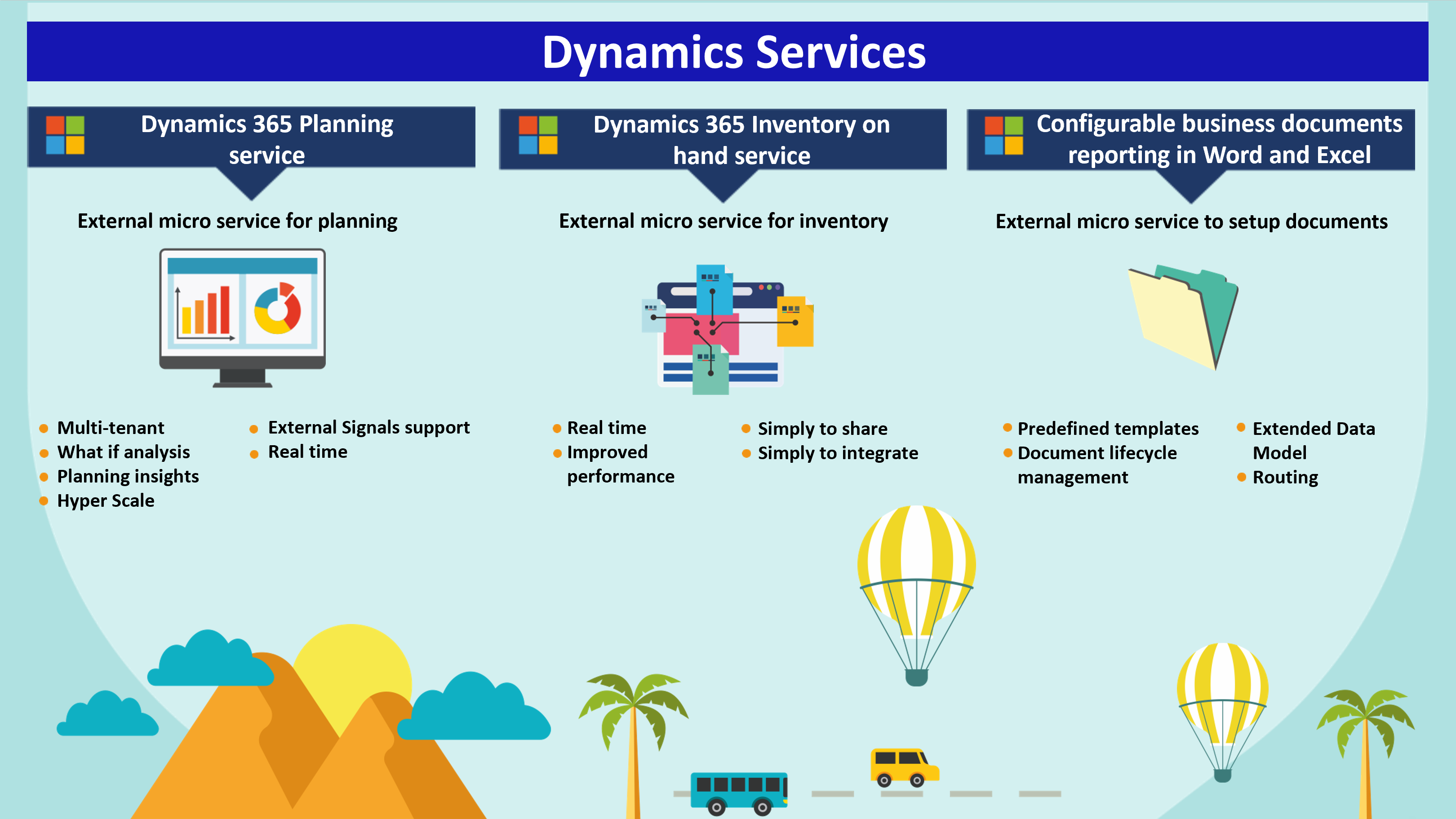
List of Dynamics 365 services is extended for new service – Electronic invoicing Add-on:
And now new part – Industry Accelerators for specific vertical solutions. This is completely new page with accelerators details. Based on official documents, industry accelerators are foundational components within Microsoft Power Platform and Dynamics 365 that enable ISVs and other solution providers to quickly build industry vertical solutions. The accelerators extend Common Data Model to include new entities to support a data schema for concepts within specific industries.
And finally, platform again with some updates:
I hope you will use these images in daily business and especially when you need to explain connections between our ecosystem.
Last months I see a lot of interests for completely Dynamics 365 ecosystem map. Even if we now what is part of Dynamics 365 ecosystem, visualization is much better. Because of that I want to share with you one global ecosystem map and more detailed maps per each solution. This is the last one made for April 2020 release and thanks to Vadim Korepin who made it. Keep in mind that resolution in my blog is not the best, but if you want to get in the best resolution, download image (right click on the image) and you will get 3242×1843 picture.
First start with completely Dynamics 365 ecosystem with all solutions.
Now let’s continue with more details. First let’s make a look in ERP ecosystem (Finance, SCM, project Operations and Business Central):
Logically we will continue with CRM portfolio:
Now to add ecosystem of our modular solutions to complete ERP and CRM solutions:
AI Solutions in D365 ecosystem looks like that (keep in mind that we have some additional embedded AI features in other solutions):
Mixed Reality is also part of Dynamics 365 ecosystem:
This is the list of Dynamics 365 services:
And the last but not the least, Microsoft platform ecosystem (Power Platform and other Microsoft platforms):
When you look at all these maps, it is obviously that we have a great ecosystem in Dynamics 365 family. I hope you will use these charts in daily business.
As I’m from area where official Business Central localizations (made by Microsoft) don’t exist (CEE), it is not so strange that this topic is very important for me personally as well as for all partners I cooperate with and their existing and potential clients. Of course we have some partner based localizations as we had for NAV earlier, but this topic is important… no localization – no clients :). And yes, I wanted to make it today as we just got new release where we announced a few new localizations.
Based on available sources from official Microsoft site and information from AppSource, I created the following map (keep in mind I’m not geographer and maybe map is not 100% accurate :)) and table with details.
This map is good as an overview where Business Central is available. If you asking me if I’m satisfy, answer is yes and no. I’m happy we got so many partner based localizations developed as extensions, even the most of people suspected it will be possible. But when we talk about numbers, it is enough to remind that we had 196 Dynamics NAV localizations (info from one of previous Directions). Compared with that, we need more localizations. One of the reasons NAV was so popular was that we had localization in almost all countries and if we want to have Business Central SaaS with the same popularity, we need to have more localizations. In a meantime, if you are from country where we don’t have localization and you want to move BC to the cloud, I can recommend to read this article.
OK, now in more details. There is a table with all available localizations and who made them as well as together with available languages. You will see, this table is interesting (download table to get full resolution picture). You can find the most of these details on the official Microsoft site, but I tried to make it easier for understanding making combination of localizations and languages from different sources.
Just to avoid some misunderstanding, these information are based on official data from October 3rd 2020 and of course, it is subject of changing.








 Totovic Dynamics 365 Blog