New App – Microsoft Invoicing

I’ll start this post with two phrases “Amazing” idea and App and “Unfortunately”.

First “amazing”, because it is really new cool App in Office 365. With this new online mobile App you can easy create and send very good looking invoices to your customers in PDF format. It is awesome application for very small business. And except creating and sending invoices, you can accept your payments, mark your invoices as paid or unpaid; add and edit your customers, view yearly and monthly sales and overdue payments… It is really cool and smart thing in your hands.

But why “unfortunately”? This “unfortunately” is for now, because you can currently try this app only if you are invited and of course if you are using Office 365… and not all Office 365 packages. Currently, it is possible only with Office 365 Business Premium Subscription.

If you are lucky, when you open your Office 365 dashboard, you will find Business Center and you will find Invoicing.
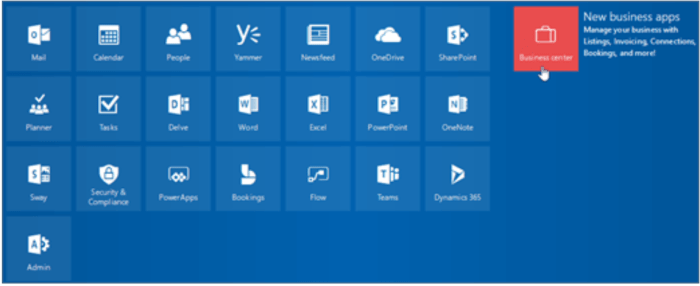
Invoicing01

And now, I’ll show you in few steps how to download and run this App. You can download it from AppStore for your iPhone or from Google Play for your Android devices. Just to know, I’ve tried only on iPhone.

When you find it on your store and download it, you will run App and find ‘Sign In’ button.
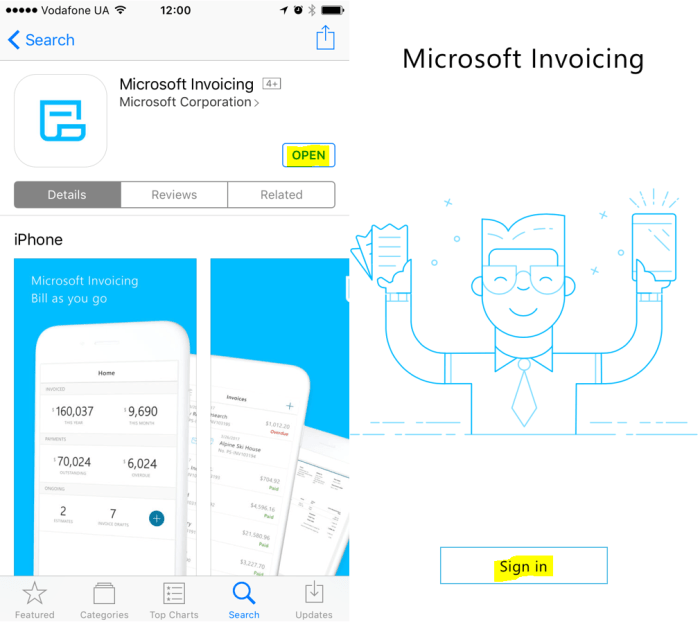
Invoicing11.PNG

O course, you just need to click on this button and to continue with logging. Of course, for logging, you must use your Office 365 credentials. System will the first ask for you Office 365 account and then open standard Office 365 login page to enter you password.
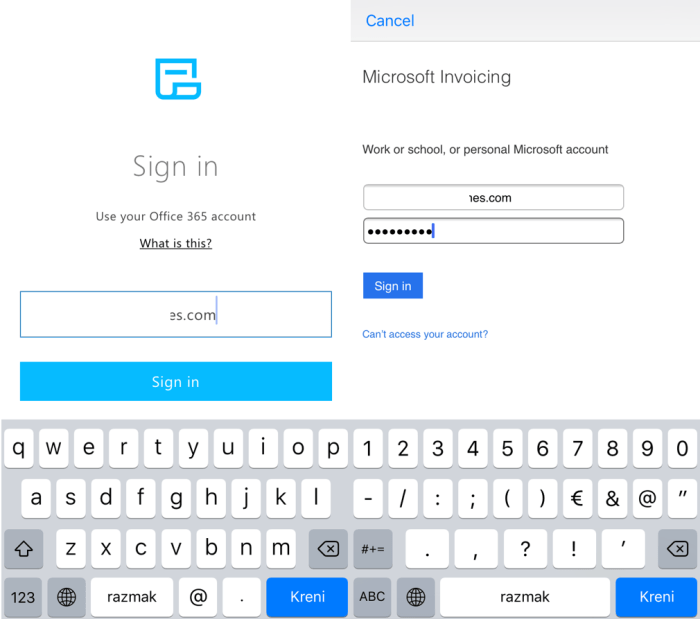
Invoicing12

And as I already said, if you are lucky one, you can try this App now. if you are not so lucky :(, you will get a message that App not accessible…

This is all for this post. In the next post, I’ll write more about features.

My sessions on this fall conference season

This fall Dynamics NAV conference season will start soon, in two months and it is the last moment to register on conference you planned to go. This season we expect thick events schedule and officially season will start in Orlando on Directions NA at September 17th. If you need the full list of Dynamics conferences, you can find here.

I’ll have my session on three of these conferences. First I’ll start with Directions NA, then continue with Directions EMEA and finish my season on NAVUG Summit.

orlandomadridnashville

I’ll have the same session on Directions NA and Directions EMEA – ‘Project Management Methodology in Dynamics 365 BE Implementation‘ and I already wrote about this topic.

My first session will be third day of Directions NA – September 19th at 3:15pm. As I said, I’ll have the same session on Directions EMEA, and it will be at the first day of conference, after Keynote – October 4th at 11:15am. After these two conferences where I’ll have soft skills topic (project management), I’ll have more technical topics on NAVUG Summit, starting from October 11.

My topics will be how to use Flows with NAV, where I’ll show not only technical topic, but also practical example how and where to use it. And then, I’ll have topic about variations in Manufacturing in NAV, where I’ll try to transfer my experiences in a lot of Mfg implementations. Schedule is published, but it will be changed for sure. I know this, because I need to provide two sessions in the same moment 🙂 … and I know myself, I cannot do it 🙂

See you there…

New Dynamics NAV API’s

As I promised a few days ago in my post about news in Dynamics NAV, now I’ll add some additional news. In this post I’ll show new API’s.

Currently we have these 42 completed API’s:

APIs01

And we will have these API’s soon:

APIs02

Sorry because of quality of pictures (photos taken on Microsoft Inspire). I’ll make them better in the few following days. Today, I just wanted to share these info.

NAV news from Microsoft Inspire

I didn’t write for a while, but now we can speak about some news in Dynamics NAV. We got some information on Microsoft Inspire conference and not only about NAV. There are a great news, as announcement of new products, e.g. Microsoft 365 enterprise and business edition… But in this text I just want to mention few things about NAV.

The first, we will continue with both of models, ‘on premises’ and ‘on Azure’. We can expect for all Dynamics products we currently have, ongoing development.

Insp1.PNG

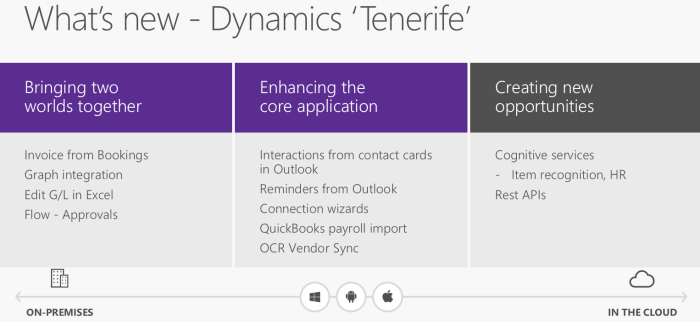
Except this important information about future releases of all Dynamics group of products, we got the main information about the most important technical and functional news in NAV ‘Tenerife’. You can find them on the following picture:

Insp2.PNG

And of course, these are not all news we will see in the next release. For example there is a new and better out of the box PowerBI integration, not only on the role centers. Now we will use more contextual PowerBI integration on different places in NAV.

Insp4jpg.jpg

And not only this. But we will have more information soon… I’ll keep you in a touch.

In-Client Designer in Dynamics NAV – June Update

To continue yesterday’s article about In-client Designer in Dynamics NAV as I promised. If you want to check these features from this year June update, you need to deploy Azure virtual machine from the following link: http://aka.ms/navdeveloperpreview.

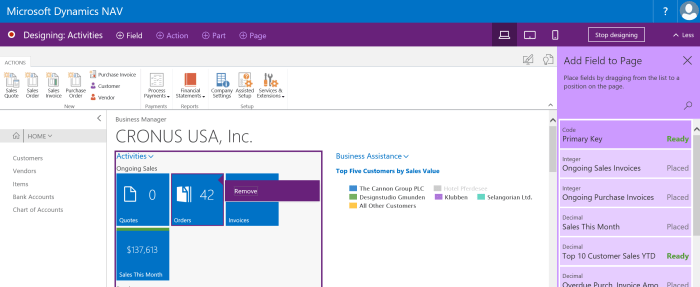
One of the biggest feature is possibility to customize Role Center. Now, we can reposition or hide Cue  or Cue group on Role Center. And not only on Role Center, we can also do it on any page where we have cues.

InDesign4

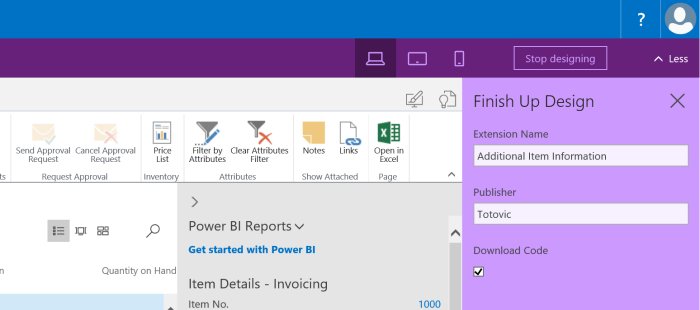
What is more new in In-client designer? When we want to finish our customization, system will ask us for our Extension Name and Publisher as well.

InDesign5

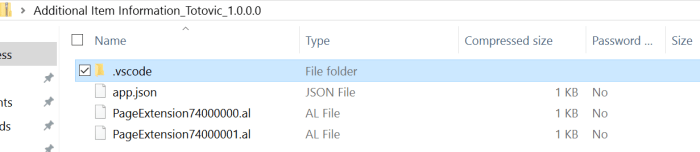
When we save it, system will download it as a zipped VS Code:

InDesign6

Of course, we have a lot more features and improvements, but they are mostly related to VS Code. In some new articles, I’ll show more about it.

In-Client Designer in Dynamics NAV

Recently, Microsoft published new Developer Preview for the next NAV version. If you try to find it on Azure portal as one of the NAV virtual machines, you will find “Dynamics NAV ‘Tenerife’ Development Preview”.

When you install run NAV after deployment, in the first moment you will not see ‘Design Mode’ icon. To get it, you need to run ‘Install New Developer Experience’ PowerShell script. After that you can try In-client designer. Now let’s see some of the features. This tool can be used for page design.

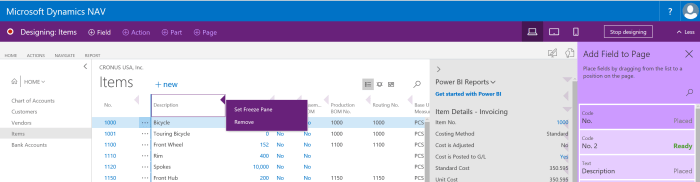
Currently, we can work only with Fields and not with Actions, Parts and Pages. If we run design for the list page, we can change an order on columns, remove some of fields, add them and set freeze pane.

InClient1

The same situation is if we want to make some customization on card page; we can do everything the same as on list, except adding freeze pane 😊. But this is with standard fields on pages. On the other side, we can add fields on card part pages. We can notice that we have context oriented fields for part pages. And also, we have some controls, as we can only drop media fields onto card part pages and we cannot drop a field under a repeater control, because this is not the design that list pages were intended for.

InClient2.PNG

And finally, we can add or remove some parts on role center. When we decide to finish with customizations, we just need to click on ‘Stop’ and system will ask us what to do with ours work. System will offer to save the changes to the tenant for all users, or to save the changes to a VS Code package file that we can work on later in VS Code.

InClient3

On the first sight, that is all, but if you create Azure VM using http://aka.ms/navdeveloperpreview URL, you can get some newer features. More about this in the next post.

Dynamics 365 for Talent – Integrations

Few days ago, I’ve started with a story about new product (still Technical Preview) – Dynamics 365 for Talent. I want to spend a few words about possible integrations.

When you look at the official announcement, you can find that key integrations will support the overall business and the following integrations will be created, but they will be available at or shortly after general availability:

  • LinkedIn
  • Microsoft Dynamics AX 2012 R3
  • Microsoft Dynamics 365 for Finance and Operations, Enterprise Edition
  • Background screening
  • Global payroll providers
  • ATS providers

As you can see, there are not planed integration with Dynamics 365 for Financials or with Dynamics NAV. But  think it will be necessary because these products don’t have a real HRM solution. But I’ve also found that it will be possible to use Common Data Services platform with built-in extension points for Power Apps, Flow and Power BI.

TalentSys.PNG

But, when I tried to make connection via Flow and Power App, I’ve found that it is still not available as a connection. Of course, it is probably because it is only technical preview and I’m sure it will be available with a general availability. I’m waiting this moment and I want to make some kind of integration. I’ll write about it, I hope soon.

Directions 2017 NA

The third year in a row, I’ll have session in Directions NA. I’ve got confirmation a few days ago and I can say that I’m so happy, because it is one of the my favorite conferences and I really love the American audience.

DirectionsNA

Conference will be held at the beautiful hotel JW Marriott Orlando, Grande Lakes, Florida in period September 17-21. It is still not too late to make registration here. I would like to see all of you there.

DirectionsHotel

This time, my topic will not be technical, but related with Dynamics 365. I’ll speak about Project Management Methodology in D365 BE Implementation. I think this is important topic although we are usually thinking only on very fast selling and very fast implementing solution, when speak about D365 Business Edition. But it is still a project and we still need to take care about a lot of things and to manage it.

Now, I don’t want to speak about all details here, because I’ll try to help you in this kind of project management with this session.

Dynamics 365 for Talent

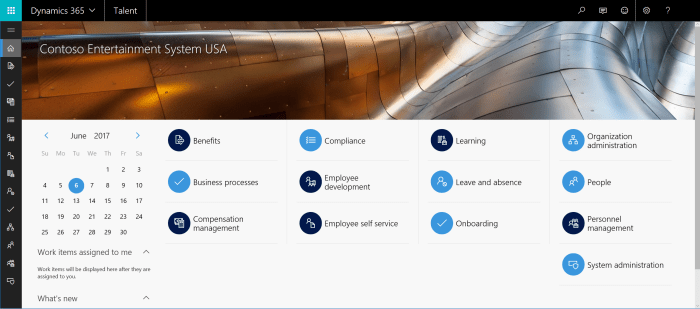
Effective July 1st, Microsoft will announce new Dynamics 365 family member. This is new HRM app – Dynamics 365 for Talent. Of course, this will not be only one news, but I want to say a few words about this product. First, we can run and test technical preview and I want to share some first experiences. We still cannot find all features here, but we can make the first sight. For example, we will still wait integration with LinkedIn. It will be very important integration, especially in recruitment process. But we still don’t know all areas where integration will be done. But again, lets see what we have here.

talent1.PNG

This will be standard SaaS solution with web client, very similar with D365 for Operations. And of course, it will be integrated with this solution. And I would like if we can get integration not only with this enterprise solution, but also with D365 for Financials. Minimum, I’m expecting some App for this.

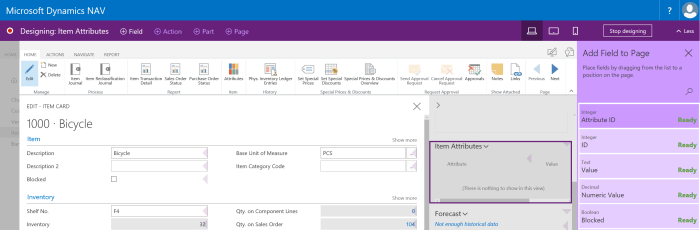
If you try to run a few basic features in demo database, you can notice that it works fast enough and very smoothly. When we open app for the first time, we can see a menu as default dashboard and in the left side in the same moment. If icons are not clear enough on the left side, we just need to click on three-lines, and it will be expanded so you can see the names of these commands. Also, when you run system for the first time, you will find very good “Get Started” with very good prepared videos and with a lot of step-by-step manuals. And if this manuals are not enough, you have a awesome tool where you can create task saving; you just need to choose this tool, run it and do everything what you want to do; when you click on stop, system will create nice manual step-by-step and you can choose how and where you want to deploy it.

In this first text, I didn’t plan to speak about features, just to make some basic overview. In my next texts, I will write more about features.
talent2.PNG

More details about this technical preview, you can find here:

https://community.dynamics.com/enterprise/b/dynamics365fortalent/archive/2017/06/05/dynamics-365-for-talent-technical-preview-is-here

Summit EMEA 2017 (NAVUG, AXUG, CRMUG)

For the first time in the last 10+ years, I was on the conference with NAV topic, but I didn’t spend whole time on NAV sessions. This time, on Summit EMEA, I wanted to hear as more as possible about all news in Dynamics world. Because of that, I was on AX, CRM and PowerBI sessions as well. Of course, I was on a few NAV lectures.

Summit

In NAV world, there were a lot of interesting topics about the best practices in functional and technical areas. From my perspective, the most interesting sessions been about integration with PowerBI and Extensions, but this is my subjective opinion. Generally, in NAV world, we didn’t have some news and probably we need to wait this fall to get something new.

On the other side, I attended on a few AX and CRM sessions and it was interesting for me. The first because I’m not so experienced in these areas and the second, because they have some news. In the AX world, Microsoft announced AX on-prem (actually AX with “local data”); we use this “local data” expression because we have company data on a local, but LCS is still in the Azure. Presentations about this topic were really interested. An on the end, Amsterdam was awesome – a true host.

Amsterdam

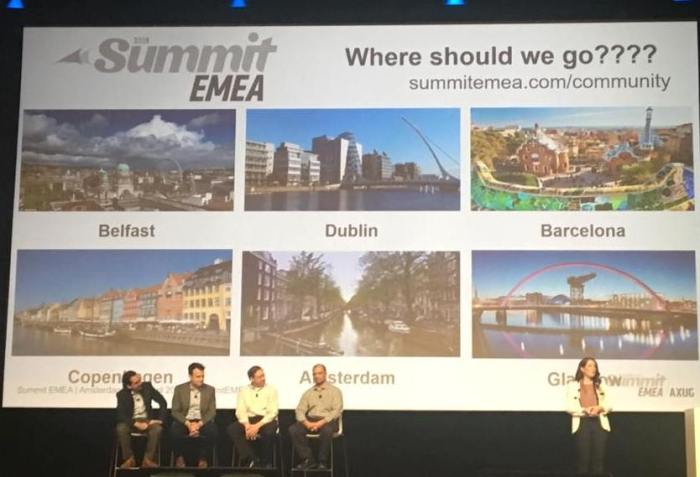
As the conclusion; the amazing conference with a more than 1000 participants, mostly from user’s side and the great content. The great opportunity for networking… again I met a lot of interesting people. The next one will be in one of the next cities and I will be there for sure:

NexdtYear

What would you like for the next year? Where should you go: Belfast, Dublin, Barcelona, Copenhagen, Glasgow or Amsterdam again?

And of course, in the next few days, I’ll publish more details about content if you are interested.