Dynamics 365 Business Central Roadmap

In my previous text, I’ve mentioned I’ll continue with first impressions about Dynamics 365 Business Central. But I’ll continue this text the next week, when I finish my presentation with this topic at eXtreme 365 in Dubrovnik.

This time, I’ve just wanted to show more details about Dynamics 365 Business Central roadmap. When we compare this roadmap, there is just a small difference in comparison with the last one shown on Directions NA and EMEA the last year (OK, except new name).

D365BC roadmap.PNGIn the previous roadmap, we had Dynamics NAV 2018R2 planed for this spring, but now we can see it will not be published with its name. We can see that we will get Dynamics NAV 2018 updates (personally, I think it is much better).

And as we could hear, in the future we will get small updates every month and bigger package two times per year. If you want to find more about each planned feature, you can go here.


Run D365 Business Central for the first time

When you run your Dynamics 365 Business Central for the first time, you will see new refreshed Web Client. Well, I think we will get some more small features soon (but just small polishing). Anyway, everything is easy for navigate and everything is exactly where you expect to be. And everything works very smoothly. I think the first what we can see are the messages in the left part of screen, with the most important information (the first will be “Good afternoon…”, but after that information).

d365bc1.PNG

Now we have a main menu on the top of the screen. Depends what we choose, we will get submenu just below the first row. Again, depends of the number of commands, we will get just one or more rows.

d365bc2

But we also have a lot of the most important actions on the right side of the page. Then we can see information and tiles in the activities and there are ordered noticeable. If you click on ‘See more’ or on some tile, you will open additional information (the same thing s with the large message on the left top part of screen).

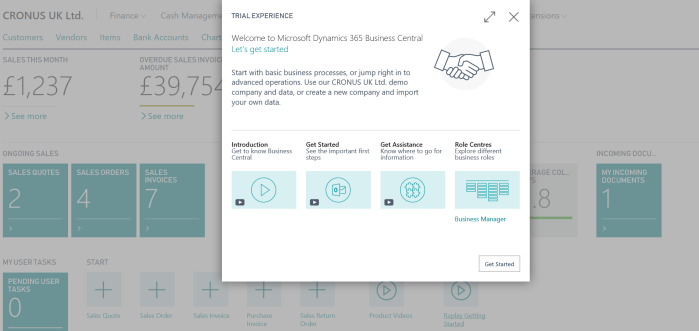
We can also find “Product videos” and “Get started” links. On “Product videos”, you can find a few interesting videos about product, but more interesting is “Get started”. OK, we can find some educated videos again, but we have something more interesting – Role Centers link. With this, we can Explore different business roles features.

d365bc3.PNG

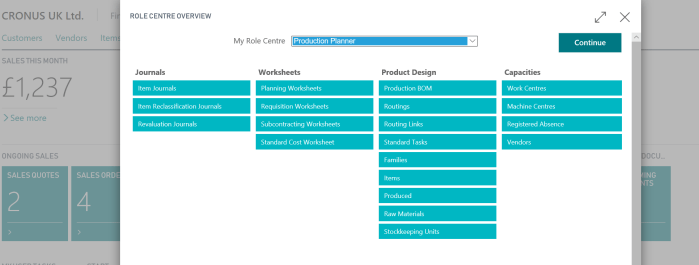
If you run it, you will get new window where you can choose all available role centers as an option and see what features are covered with each of them as the main menu structure (for each of them, you will see small tooltips with the basic information). And even more, if you click on Continue, you can change your role center; and again you don’t need to make logout/login, because system will change your role center automatically.

d365bc4.PNG

Of course, you can change your role center using ‘My Settings’, but guess… you will run the same page as I already showed. Really good user experience.

Then, when you run some page, from menu… for example customer, you can choose if you want to unpin the top menu… just to get little more space. Of course, you can chose the view type and so. But everything is so modern and provides really good experience.

d365bc5

OK, this is just beginning. This is still not even the first impression. But I don’t like to write so big texts. I’ll continue soon with more details.

D365 Tenerife is Dynamics 365 Business Central

I didn’t plan to write this article before keynote on Directions ASIA, but two days before it, it is announced – new SaaS solution, previously known as code name Dynamics 365 ‘Tenerife’ is named as Dynamics 365 Business Central. This news is published today by Alysa Taylor (General Manager, Business Apps & Strategy) here in blog.

BC1.PNG

Dynamics 365 Business Central (it is interesting that only this solution hasn’t ‘for’ in its name) will be available in first 14 countries from April 2nd and it will continue one of the most successful customer base with more than 160.000 customers. This solution also has new refreshed Web Client and many other interesting features.

If you want to find more information, you can run official D365BC page, where you can find new licensing model and new prices as well.

We will have two different packages of features with different price range:

BC2

I will try not to copy already published blog and wait on another news in next two days. And just not to forget, Dynamics 365 Business Central has new logo:

BC0

Dynamics NAV and GDPR

A few days ago, Microsoft published Whitepaper about GDPR regulations and NAV as well as package of new Cumulative Updates where the first part (DataClassification property) on these changes were implemented.

Day after this was published, we could find a new article with more details how to work with classified data and new DataClassification property in tables and fields.

I don’t want to retype all these details, because you can find all these information on NAV Team blog as well as complete documentation about data classification. I’ve just wanted to spread a word. Again, all details about new CU’s and how to implement GDPR requirements can be found on a NAV Team blog.

Waiting Directions ASIA

Today is Sunday and I’m seating on the airport waiting my flight to Bangkok. I just few days Directions ASIA 2018 will start. This time, it will be one of the most important conferences in Dynamics NAV world.

DirectionsASIA.PNG

Why it will be so important? On this conference we will see the new product with still code name – Dynamics 365 ‘Tenerife’. As we already know, this solution will be full Dynamics NAV on a cloud as full SaaS solution. But we will get the same on-prem product, with the same code base – Dynamics NAV 2018R2. From my point of view, I’m primarily waiting SaaS solution and I expect it will be much more significantly for Dynamics world. In this moment I don’t want to write anything about news in this solution, because we will get officially information in only few days. I’ll be there and I’ll publish the most important news announced on Directions.

Also, we will see some news from CRM world (Sales and Marketing), especially from SMB area. It will be very important in the future of business applications, because we can offer common solutions to cover all requirements in specific companies.

Dynamics 365 for Marketing Public Preview

Few days ago, Dynamics 365 for Marketing Public Preview finally has been announced. For those of you who already attended on some of Dynamics events, this was expected moment.

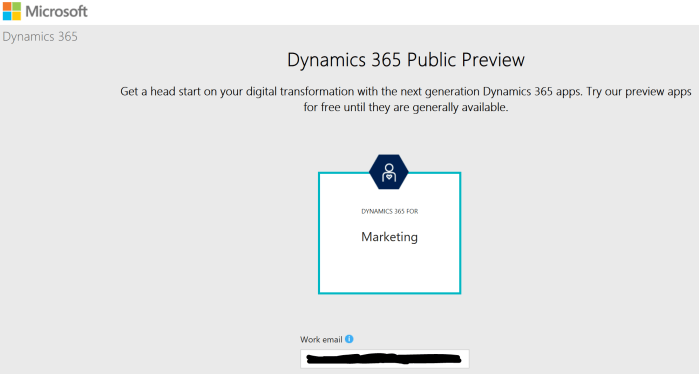
If you want to try it, go to this URL: https://trials.dynamics.com/Dynamics365/Preview/Marketing and you just need to use work email and phone number for verification:

D365M1

The second step will be accepting trust to the Microsoft CRM Services as publisher…

D365M2.PNG

When you finish registration, you will get the main Dynamics 365 for marketing landing page:

D365M3

Now, you have possibility to run ‘First time setup’ and finish this configuration and continue to work with this app after that. In the following texts, we will write more about them.

The main features covered with this App are:

  • Multi-channel campaigns
  • Lead management
  • Sales and marketing alignment
  • Marketing analytics
  • Event Management

Counting Named Subscription Users in Dynamics NAV

Waiting Dynamics NAV as full SaaS solution (Dynamics 365 ‘Tenerife’), a lot of partners are deploying NAV on Azure with subscription licenses. Subscription license has much better price in comparison with perpetual model, even from only BREP.

But we have a small difference here. In perpetual licensing model, users are concurrent, but n subscription model, users are named. Because of that I’ve got a lot questions how system count these users and prevent bigger number of users from licensed.

Generally, this is very easy. NAV counts number of created users and compare it with your subscription license. That moment, when you try to create new user, more than you have licensed, system will stop you.

##1

As you can see on the previous picture, I’ve got a message that creating this new user will not meet the terms of the current license. OK, it works. That means if you want to change user, you need to delete old one and than create new one.

But in subscription model, you can change number of users monthly. What if you had in one moment, because of business needs, more licensed users and now you scaled down number of users? In this case, when you try to log in, system will show the following message:

##2.PNG

That means with current license and number of users, you are not legal. But if you press OK, system will allow you to log in. But every time when you try run NAV, you will get this violation message that shows you are not legal.

Dynamics 365 for Talent availability per countries

In my previous blog post, I hope I make a licensing process closer to you, but now when you know how to calculate price for licenses and you can start with selling process, question is where you can do it. In what countries?

Regarding this question, I can prepare two different answers. One is answer about officially availability per countries where it is possible to sell product and second answer is a new question; can we sell if we don’t have localization (in this case translation).

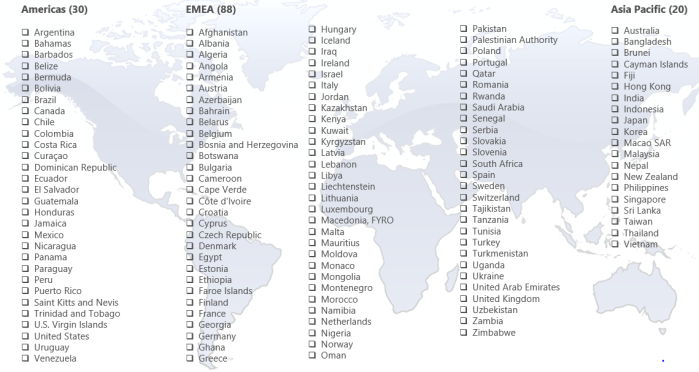
Product is available in 138 countries in this moment: Americas 30, EMEA 88 and Asia Pacific 20. This is the mast full list I have (but this list will be updated):

Talent1.PNG

If you have a demo environment, you can go there: System administration > System settings and check all available languages in System language field. In this moment, we have available the following 42 languages: Arabic, Czech, Danish, German (DE, AT, CH), English (AU, CA, GB, IE, IN, MY, NZ, SG, US, ZA), Spanish (ES, MX), Estonian, Finnish, French (FR, BE, CA, CH), Hungarian, Icelandic, Italian (IT, CH), Japanese, Lithuanian, Latvian, Norwegian, Dutch (NL, BE), Polish, Portuguese (BR), Russian, Swedish, Thai, Turkish and Chinese (Simplified). This is not small number of languages, but we still need more, and I hope we will get them soon. On the other side, if you are going to Attract or Onboard apps, you can find, these apps have much more languages; if I count well, there are 61 languages. It would me nice if we have minimum all these languages in HR core.

Talent2.png

I hope this amazing product will be available in more and more languages.

Licensing in Dynamics 365 for Talent

In a last period, I’ve got a lot of questions about how to make a proper licensing for Dynamics 365 for Talent. As it is a new solution, it is understandable. As I’ve already wrote a few articles about this product, I think I can help with some answers.

The first and very important, all users in this solution are named users. And if we speak about HR core part, we have two different user types and you can buy them on two separate ways. We have Full Users with total access to all HR core application and we have Team Members with very limited access (mostly, but not only for read tasks).

As I mentioned Full Users (Talent Users) can be bought on the following ways:

  • as a regular Talent User (you must take minimum 5 users) for 40 USD
  • buying Dynamics 365 for Finance and Operations, i.e. you will get full Talent Users buying Unified Operation (for 190 USD) or full Dynamics 365 Plan (for 210 USD); in both cases you will get much much more than just Talent, but Talent will be part of your completely system.

TalentLicense.PNG

If we are speaking about Team Members, you can buy them for 8 USD, but again you will not get only access to Talent with them, but also to all other Apps in Dynamics 365 package. As I mentioned, Team Member are not limited only with read rights, because you can use them for example as employee for Employee Self Service.

OK, but this is not the end. Recently, Microsoft announce two additional AI Apps for Talent (Attract and Onboard) and that means if you want to use them, you first must be a regular Talent User. Then, you can subscribe them. Price is 8 USD for each of them separately or if you want both, price will be 12 USD in total.

And again, this is not the end. Actually, it doesn’t mean it must be the end. Why? Because if you want to customize something. As you already know (I hope), this App is full SaaS and you cannot just open a code and change it. If you want to change something on forms and similar, you can do it using PowerApps. In this case person who will make these customizations must have PowerApps Plan 2 (40 USD) license, but other users who will use these forms, have to have minimum PowerApps Plan 1 (7 USD) license. That means, not all users, only these who will use these new features. And just to know, if you are buying some Dynamics Plan, you will get PowerApps for free.

PowerAppsLicense.PNG

And again, it is similar situation if you want to use PowerBI for additional reports or Flow for additional workflows.

I hope I covered all models of licensing here. But just keep in mind, it is possible to be some changed, because it is a new App in Dynamics 365 family and with new releases, it is possible to be some changes. And I didn’t mentioned, but just to be sure: all pries are on monthly basis.